AfterShip Page Builder vs Kit (formerly ConvertKit)
AfterShip Page Builder and Kit (formerly ConvertKit) solve different problems. One builds high-converting online store pages. The other runs your entire creator email business. Here's how to pick the right one.
Strong Page Builder, Troubled Support History
We note the Page Builder offers excellent, conversion-focused tools, including a permanent free tier and advanced features like lazy loading and sticky add-to-cart widgets. However, external user feedback on the wider AfterShip services points to severe issues with customer support and billing practices. Overall, retailers should weigh the strong product functionality against potential risks associated with the company’s operational execution.
Pros
- Permanent free plan allows users to build and publish one page immediately.
- Conversion-focused features like sticky Add to Cart and countdown timers are included.
- Drag-and-drop editor lets users build professional pages with zero coding.
- Optimized for speed through built-in lazy loading functionality.
Cons
- Company's broader service receives highly negative user reviews regarding support response times.
- Reports of unauthorized charges and difficult cancellation processes are frequent in public feedback.
- External reviews do not specifically address the Page Builder product quality.
- The tracking reliability of the core AfterShip application is widely criticized by users.
Creator-friendly, but check support.
We find Kit a capable and intuitive email marketing platform tailored specifically for creators, offering strong automation and a clean interface. Overall, it's a great starting point for growing an audience, though users should weigh the mixed customer support reviews and potential pricing scale against their needs.
Pros
- Intuitive, clean interface designed for creators and non-technical users.
- Powerful visual automations and sequences to nurture audiences.
- Generous free plan for up to 10,000 subscribers.
- Strong focus on deliverability and building owned audiences.
Cons
- Customer support responsiveness and quality receive frequent criticism.
- Pricing can become steep as subscriber counts increase significantly.
- Some users report unexpected account suspensions or deliverability issues.
- Advanced analytics and collaboration features are limited.
AboutAfterShip Page Builder
AfterShip Page Builder is an intuitive page builder software made specifically for online stores. It allows you to create high-performing pages, like product pages, collection pages, and landing pages, entirely with drag-and-drop tools. You'll find a vast collection of ready-to-use elements and templates designed for various business needs and scenarios. The primary goal is ensuring customers have a smooth, optimized browsing experience that consistently drives sales. 💡
AboutKit (formerly ConvertKit)
Kit is an email marketing platform specifically for creators like authors, podcasters, YouTubers, and entrepreneurs. It's the hub for growing your email list, sending beautiful newsletters, and selling digital products—all while keeping the experience intuitive and straightforward. 💡
Highlights
Feature Comparison
Features Overview
We highlight the main differences and pick a winner for each feature.
Core Purpose & Focus
AfterShip Page Builder builds store pages. Kit (formerly ConvertKit) runs email marketing.
AfterShip Page Builder is laser-focused on eCommerce. It helps Shopify merchants create high-converting product, collection, and landing pages. Its tools, like sticky add-to-cart, are designed to boost sales. Kit (formerly ConvertKit) is an email marketing hub for creators. It's built to grow your subscriber list, send newsletters, and sell digital products. Its automation features work in the background to nurture your audience. The key difference is their core job. AfterShip Page Builder optimizes the shopping experience on your website. Kit (formerly ConvertKit) manages the relationship with your audience via email.
Ease of Use
Both are designed for non-technical users, but for different tasks.
AfterShip Page Builder uses a simple drag-and-drop editor for page design. You can launch professional pages with zero coding. The interface is intuitive for marketers focused on visual layouts. Kit (formerly ConvertKit) is praised for its clean, intuitive interface. Creators find it easy to set up automations and send emails without tech headaches. The learning curve is gentle for email marketing. Both tools prioritize ease of use in their domains. AfterShip Page Builder simplifies web page creation. Kit (formerly ConvertKit) simplifies email workflow automation.
Automation & Workflows
Kit (formerly ConvertKit) dominates in email automation. AfterShip Page Builder has simpler workflow tools.
AfterShip Page Builder offers automated Version History for page edits. You can save and reuse page sections with Saved Sections. These are helpful workflow aids for page management. Kit (formerly ConvertKit) provides powerful visual automations. You can build complex email sequences that welcome subscribers and nurture them 24/7. Creators report sales growth from targeted automations. For email marketing automation, Kit (formerly ConvertKit) is clearly more advanced. AfterShip Page Builder's automation is limited to internal page management tasks.
Reporting & Analytics
Kit (formerly ConvertKit) offers deeper audience insights. AfterShip Page Builder provides focused page metrics.
AfterShip Page Builder includes a Page Analytics dashboard. It tracks key metrics like visitor numbers, add-to-cart rates, and subscribers. This data is specific to your page performance. Kit (formerly ConvertKit) offers an Insights dashboard on the Pro plan. It provides deliverability reporting and deeper engagement metrics. You can track email opens, clicks, and audience growth over time. Kit (formerly ConvertKit)'s analytics are more comprehensive for marketing strategy. AfterShip Page Builder's analytics are narrower, focused on conversion events on a specific page.
Integration Ecosystem
Kit (formerly ConvertKit) connects to more apps. AfterShip Page Builder is tightly integrated with Shopify.
AfterShip Page Builder guarantees seamless integration with Shopify and Shopify Plus themes. It also supports adding third-party scripts like Google Analytics. Its ecosystem is focused on the eCommerce stack. Kit (formerly ConvertKit) connects with over 100 apps through its App Store. This includes Shopify, Canva, Circle, and Thinkific. You can also use its API for custom integrations. Kit (formerly ConvertKit) offers a broader, more diverse integration ecosystem. AfterShip Page Builder provides a deep, specialized integration for Shopify users.
Pricing & Value
AfterShip Page Builder is cheaper for page volume. Kit (formerly ConvertKit)'s free plan is generous for email.
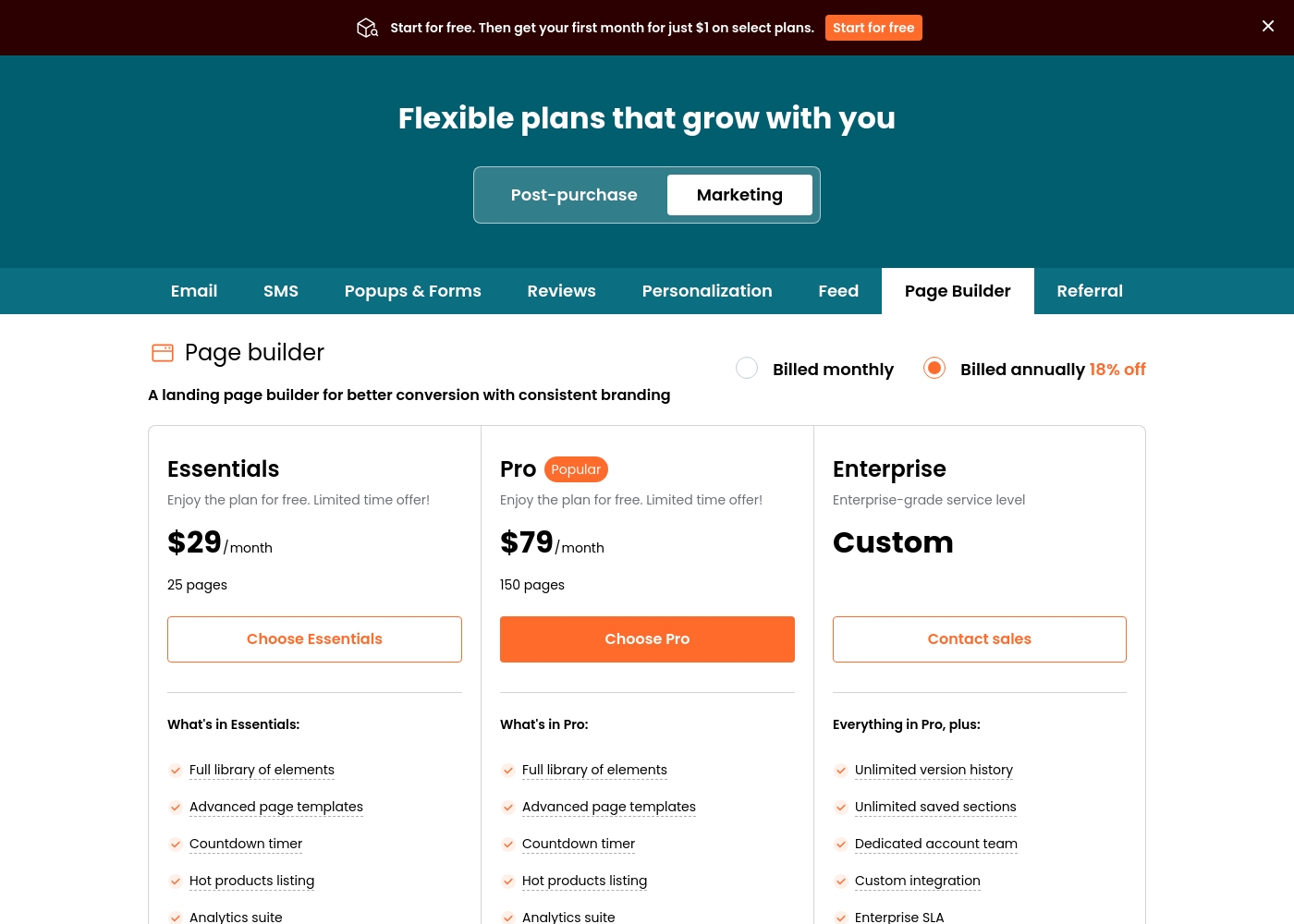
AfterShip Page Builder starts at $0 for 1 page. Paid plans run $29-$79/month based on page count. Annual billing saves 18%. This is straightforward value for page needs. Kit (formerly ConvertKit) offers a free Newsletter plan for up to 10,000 subscribers. Paid plans start at $39/month, scaling with subscriber count. Annual billing offers significant savings. Value depends on your goal. AfterShip Page Builder delivers excellent value for eCommerce page building. Kit (formerly ConvertKit)'s free plan is an unbeatable value for starting an email list.
Customer Support
Both have mixed reviews, with common complaints about response times.
AfterShip Page Builder offers live chat on paid plans. Gold support guarantees a 2-minute response time. However, external reviews heavily criticize AfterShip's support as slow and unhelpful. Kit (formerly ConvertKit) provides 24/7 email and chat support. Priority support is available on the Pro plan. Yet, many user reviews cite poor support quality and long delays. Customer support appears to be a pain point for both companies. Neither has a clear advantage based on user feedback.
Scalability
They scale differently: by page count vs. by audience size.
AfterShip Page Builder scales by the number of published pages. Plans range from 1 page to 150+ pages. This is ideal for merchants running multiple campaigns. Kit (formerly ConvertKit) scales by your active subscriber count. Prices increase as your email list grows. This is perfect for creators focused on audience expansion. The scalability model matches the tool's purpose. AfterShip Page Builder scales with your marketing page volume. Kit (formerly ConvertKit) scales with your audience growth.
AfterShip Page Builder costs between $0 and $79 per month (plus a custom Enterprise option) with 4 plans: Free at $0/month, Essentials at $29/month, Pro at $79/month, and Enterprise at Custom pricing.
Let’s look closer at what each flexible plan includes so you can choose the right fit for your business needs. You can switch between monthly and annual billing, with annual plans saving you 18% off the regular rate.
Free
Price: $0/month Websites Supported: 1 page Best For: Users just starting out who need basic features Refund Policy: Not explicitly stated Other Features: Includes all basic features
- All basic features
- Full library of elements
- Advanced page templates
- Countdown timer
- Hot products listing
- Analytics suite
- Full library of elements
- Advanced page templates
- Countdown timer
- Hot products listing
- Analytics suite
- Unlimited version history
- Unlimited saved sections
- Dedicated account team
- Custom integration
- Enterprise SLA
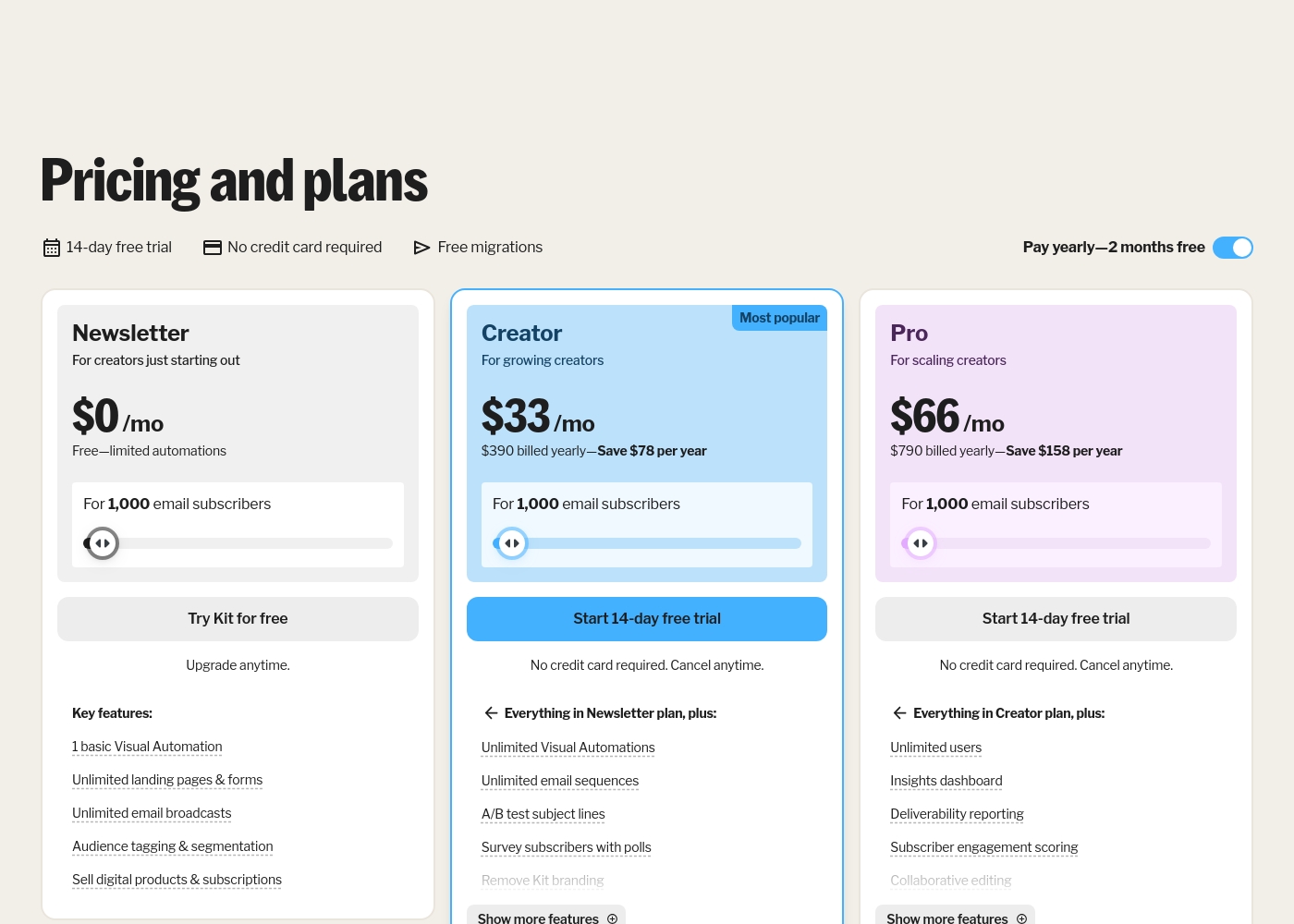
Kit (formerly ConvertKit) costs between $0 and $790 per year for 1,000 subscribers with 3 plans: Newsletter at $0, Creator at $390 billed yearly, and Pro at $790 billed yearly.
Take a look at the breakdown below to see which features fit your current creative goals.
Newsletter
Price: $0 per month Websites Supported: Not explicitly stated Best For: New creators starting out Refund Policy: Not explicitly stated Other Features: Unlimited landing pages, Audience tagging, Digital product sales, 1 basic Visual Automation
- 1 basic Visual Automation
- Unlimited landing pages & forms
- Unlimited email broadcasts
- Audience tagging & segmentation
- Sell digital products & subscriptions
- Everything in Newsletter plan
- Unlimited Visual Automations
- Unlimited email sequences
- A/B test subject lines
- Remove Kit branding
- Everything in Creator plan
- Unlimited users
- Insights dashboard
- Deliverability reporting
- Newsletter referral system
Pricing Notes
- AfterShip Page Builder's pricing is based on published pages, not traffic or visitors.
- Kit (formerly ConvertKit)'s pricing is per-usage based on your active subscriber count.
- Both offer permanent free plans, but AfterShip's is limited to 1 page while Kit's supports up to 10,000 subscribers.
- AfterShip Page Builder offers an introductory first month for $1 on select paid plans.
- Kit (formerly ConvertKit) charges a 3.5% + $0.30 transaction fee for digital product sales.
Pricing Head-to-Head
User Reviews
The overwhelming majority of feedback captured on Trustpilot relates specifically to AfterShip’s tracking and logistics services, not the Page Builder tool. The overall sentiment is challenging, resulting in a 2.8-star rating across 651 reviews.
A primary pain point is the reliability and accuracy of shipment tracking; many users report significant delays in updates, leading to confusion about package status or location discrepancies between AfterShip and carrier systems. Customer support is consistently criticized, deemed unhelpful, slow, and often relying on generic or copy-pasted responses.
The support here is atrocious. Agents do not read the context in the thread and simply copy-paste answers, failing to address the core problem. A simple ticket can take a month or longer for a short reply.
On Trustpilot, Kit (formerly ConvertKit) receives mixed feedback. Users frequently praise its ease of use, highlighting a simple, intuitive interface perfect for creators and beginners.
Many appreciate the automation features and clean design for emails and landing pages. However, a significant number of reviews cite poor customer support, with long response times and unhelpful agents.
ConvertKit is super easy to use. I love how simple it is to set up automations and sequences without any tech headaches. It's perfect for my newsletter.
Our Verdict
There's no universal winner here. AfterShip Page Builder and Kit (formerly ConvertKit) are built for completely different jobs. Your choice depends entirely on what you're trying to do. AfterShip Page Builder's superpower is building high-converting eCommerce pages. It's packed with tools like sticky add-to-cart and countdown timers. It's a focused solution for Shopify merchants who need to launch pages fast. Kit (formerly ConvertKit)'s superpower is running a creator's email business. It automates newsletters, nurtures audiences, and sells digital products. It's the command center for building a loyal community you own. The deciding factor is your core need. If you're optimizing a Shopify store, choose AfterShip Page Builder. If you're growing an audience and selling digital products, choose Kit (formerly ConvertKit). For most online store owners, AfterShip Page Builder is the right tool. For most content creators and newsletter writers, Kit (formerly ConvertKit) is essential. They're specialists, not generalists.
Frequently Asked Questions
Which is better for small teams: AfterShip Page Builder or Kit (formerly ConvertKit)?
It depends on your goal. AfterShip Page Builder is better if your team needs to build Shopify landing pages. Kit (formerly ConvertKit) is better if your team needs to manage an email list and send automations. AfterShip charges per team member; Kit's Pro plan includes unlimited users.
Can I use AfterShip Page Builder for email marketing like Kit (formerly ConvertKit)?
No. AfterShip Page Builder is a page builder for websites, not an email marketing platform. It creates landing pages where you can capture emails, but it doesn't send newsletters or automations. Kit (formerly ConvertKit) is built specifically for email marketing.
Is Kit (formerly ConvertKit) worth the extra cost over AfterShip Page Builder?
They aren't directly comparable in price. AfterShip costs $29-$79/month for pages. Kit costs $0-$79/month for email marketing based on subscribers. The 'extra cost' is for a completely different, more complex service (email automation vs. page building).
Do both tools offer free plans?
Yes. AfterShip Page Builder has a permanent free plan for 1 page. Kit (formerly ConvertKit) has a free Newsletter plan supporting up to 10,000 subscribers. Kit's free plan is much more generous for its intended use.
How do they handle scaling? AfterShip Page Builder vs Kit (formerly ConvertKit)
They scale differently. AfterShip Page Builder scales by adding more published pages to your plan (up to 150+). Kit (formerly ConvertKit) scales by your subscriber count, and prices increase as your list grows.
Which tool has better customer support?
Both have significant issues reported in external reviews. AfterShip Page Builder's broader service receives very negative feedback for slow, unhelpful support. Kit (formerly ConvertKit) also gets mixed reviews for support quality and response times. Neither has a clear advantage.
Ready to Choose?
Both tools have their strengths. Choose based on your specific needs.