Asana vs Notion
Picking Asana or Notion is tough because both manage work beautifully. Asana is built for structured project management and massive scale. Notion is the flexible, AI-powered workspace for docs and knowledge.
Great features, poor customer support.
We find that Asana offers powerful project management features, excellent organizational scalability, and a generous free plan suitable for small teams. However, recurring external reports indicate severe problems with customer service responsiveness and billing transparency, heavily detracting from the product’s core strengths. Overall, we recommend caution for small businesses or any organization prioritizing reliable, direct customer support.
Pros
- Powerful free tier available for individuals and small teams (up to 10 users).
- Flexible design for managing tasks, projects, and team workflows efficiently.
- Supports excellent scalability, trusted by many Fortune 100 companies.
- Advanced features like Gantt charts and Timeline views are available starting on the Starter plan.
Cons
- Customer service is widely reported as non-existent, slow, or dependent on ineffective chatbots.
- Numerous complaints regarding deceptive auto-renewal practices and unauthorized charges.
- Refund requests are frequently denied, increasing costs for unintended subscriptions.
- Users often lose access or tasks when attempting to downgrade from a paid trial to the free plan.
Powerful software, risky provider.
We found Notion is an exceptionally flexible and powerful productivity tool, praised globally for its block-based editor and ability to consolidate diverse workflows. However, external evidence highlights significant failures in subscription management and support responsiveness. Overall, we advise extreme caution regarding billing procedures due to recurring reports of unauthorized charges and cancellation difficulties.
Pros
- Exceptionally powerful and versatile block-based editor.
- Effective for personal knowledge management and team use.
- Consolidates multiple specialized tools (wikis, CRMs, project management).
- Strong native AI assistance integrated throughout the workspace.
Cons
- Widespread reports of deceptive or confusing billing practices.
- Extremely poor and unresponsive customer support experiences.
- Users report app is often slow and unreliable.
- Difficulty canceling subscriptions and obtaining timely refunds.
AboutAsana
Asana is an online platform built specifically to manage your team’s work, projects, and tasks. It supports powerful Human + AI collaboration.
This AI component understands your specific business context, helping to move your most important work forward efficiently. Because it's a centralized ecosystem, it easily brings all doers and stakeholders together in one place. 💡
AboutNotion
Notion is your dedicated AI workspace and everything app. It is built to replace multiple specialized tools with one powerful platform. This centralized space lets teams consolidate project management, internal wikis, and basic CRM functions. Notion is trusted broadly; over 100 million users worldwide use it, and 62% of the Fortune 100 are customers. You can use it right in your browser or download specialized tools like Notion Mail and Notion Calendar to keep time and work together. ✅
Highlights
Feature Comparison
Features Overview
We highlight the main differences and pick a winner for each feature.
Project Structure vs. Flexibility
Asana focuses on clear pathways; Notion provides boundless flexibility.
Asana is a built-for-purpose project management engine, offering powerful structures. It uses Gantt charts and Timelines to track dependencies smoothly. Asana defines how work moves from task to objective, emphasizing clear accountability. Notion is the ultimate flexible workspace using a block-based editor. It can act as your team's wiki, basic CRM, or project tracker seamlessly. Notion's setup requires more effort since you must define every process from scratch. Asana provides the structure right out of the box. If you hate rigid structures, Notion offers customization freedom that Asana cannot match.
Integrated AI Assistance
Notion integrates AI deeply for content; Asana uses AI for workflow assistance.
Notion provides a built-in AI assistant to every team member. It is recognized as the top-rated AI writing tool available today. Notion uses AI heavily for summarization and content generation. Asana offers the Asana AI Studio to manage routine work. This component focuses on amplifying impact and standardizing workflow context. While both use AI, Notion’s strengths lie in content intelligence. Asana’s AI strength is automating project tasks. Notion users leverage AI daily to create documentation and drafts instantly.
Tracking Views
Asana provides professional visual tracking; Notion relies more on database views.
Asana excels here, offering List, Board, and Calendar views standard. More importantly, Asana Starter plans unlock robust Timeline and Gantt Views. These views are crucial for tracking complex project dependencies. Notion primarily uses board, list, and database views for task management. Users might need complex setups to replicate true Gantt functionality. Teams needing professional, dependency-focused project reporting should strongly consider Asana first. Asana is optimized for managers overseeing crucial deadlines.
Centralized Wiki / Docs
Notion is an award-winning knowledge base tool; Asana is primarily a task tracker.
Notion is rated the #1 knowledge base for three years running. It is designed to consolidate documentation and replace internal wikis efficiently. Notion provides a single source of truth for all crucial company documentation. Asana's structure is optimized for tracking action items and tasks, not for creating deep, interconnected documentation. You can store files in Asana, but pages are not its core strength. Teams focused on seamless new hire onboarding prefer the unified knowledge structure of Notion. You can build comprehensive internal documentation much easier within Notion.
Resource Planning
Real-time staffing visualization is a key strength of paid Asana plans.
Asana Advanced tier includes dedicated resource management tools. This feature lets leaders visualize current team staffing and available bandwidth instantly. It helps analyze current workload across the entire business. Notion lacks this native dedicated resource visualization layer for staffing capacity. Notion focuses on task assignment within projects but not organizational capacity. If organizational bandwidth and staffing visualization are critical, Asana is the clear superior choice. This ensures efficient alignment of resources with crucial objectives.
Integration Ecosystem
Asana connects to more enterprise systems; Notion focuses on core developer tools.
Asana connects easily with over 300+ enterprise tools out of the box. High-level integrations include Salesforce, Tableau, and Power BI. This allows extensive business intelligence reporting. Notion integrates smoothly with developer and communication platforms like Slack, GitHub, Jira, and Google Drive. Notion tends to integrate to pull data into its "everything app." Notion focuses on consolidation, whereas Asana focuses on connecting outward to existing tech stacks. Asana is better suited for integrating with existing BI platforms.
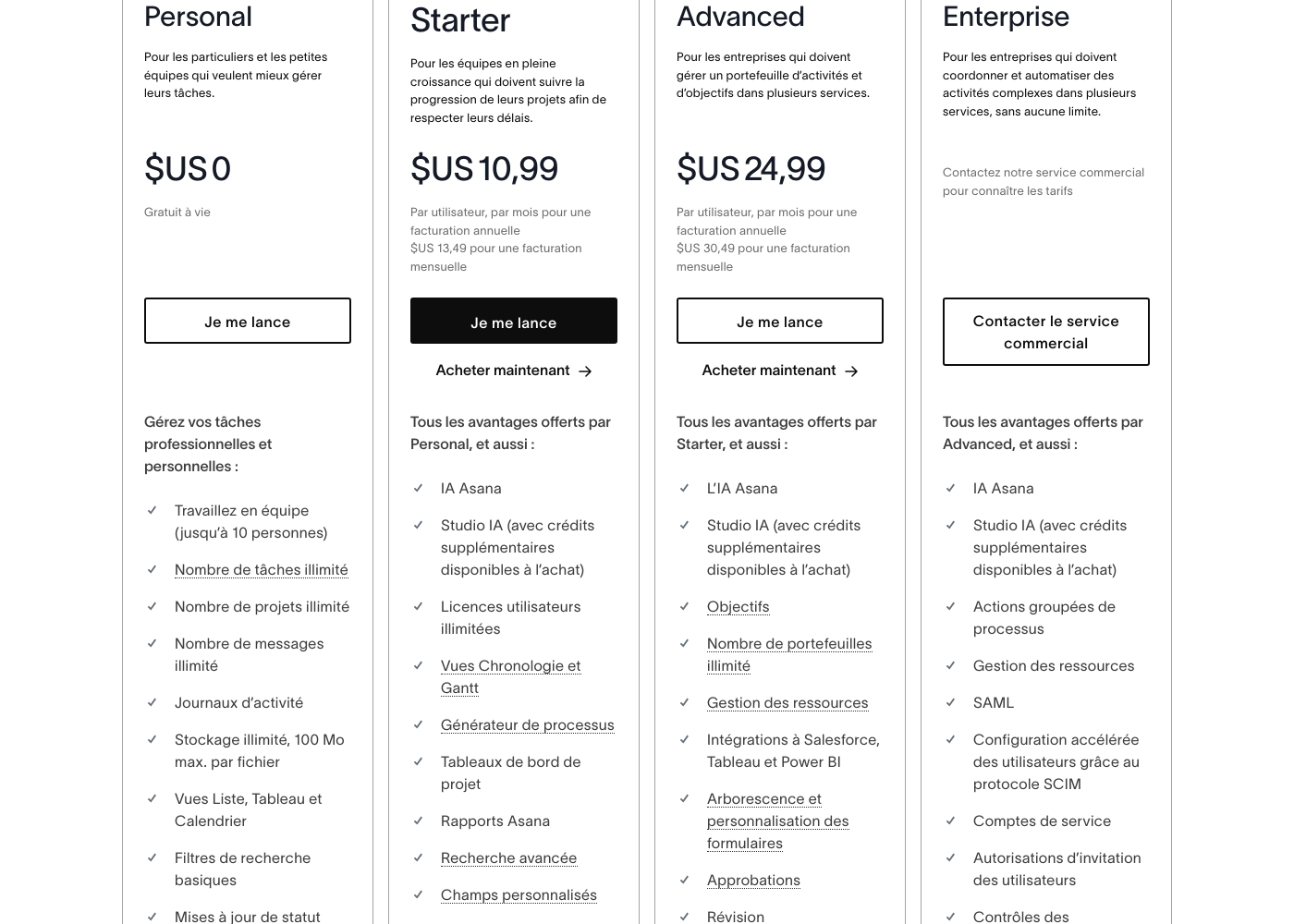
Asana costs between $US 0 and $24.99 per user per month (annual billing) with 5 plans: Personal at $US 0, Starter at $US 10.99, Advanced at $US 24.99, Enterprise at Contact Sales, and Enterprise+ at Contact Sales.
Here is a breakdown of what each plan offers your team.
Personal
Price: $US 0 (Free for life) Websites Supported: Not explicitly stated Best For: Individuals and small teams wanting better task management Refund Policy: Not explicitly stated Other Features:
- Work in teams (up to 10 people)
- Unlimited tasks, projects, and messages
- Unlimited storage (100 MB max. per file)
- List, Board, and Calendar views
- Basic search filters
- Work in teams (up to 10 people)
- Unlimited tasks, projects, and messages
- Unlimited storage (100 MB max. per file)
- List, Board, and Calendar views
- Basic search filters
- Unlimited user licenses
- Asana AI Studio access
- Timeline and Gantt Views
- Process Generator
- Advanced Search and Custom Fields
- Objectives and unlimited portfolios
- Resource Management
- Integrations to Salesforce, Tableau, and Power BI
- Form customization and approvals
- Native time tracking
- Bulk process actions
- SAML and SCIM for accelerated user configuration
- Service accounts
- 24/7 support
- Custom branding
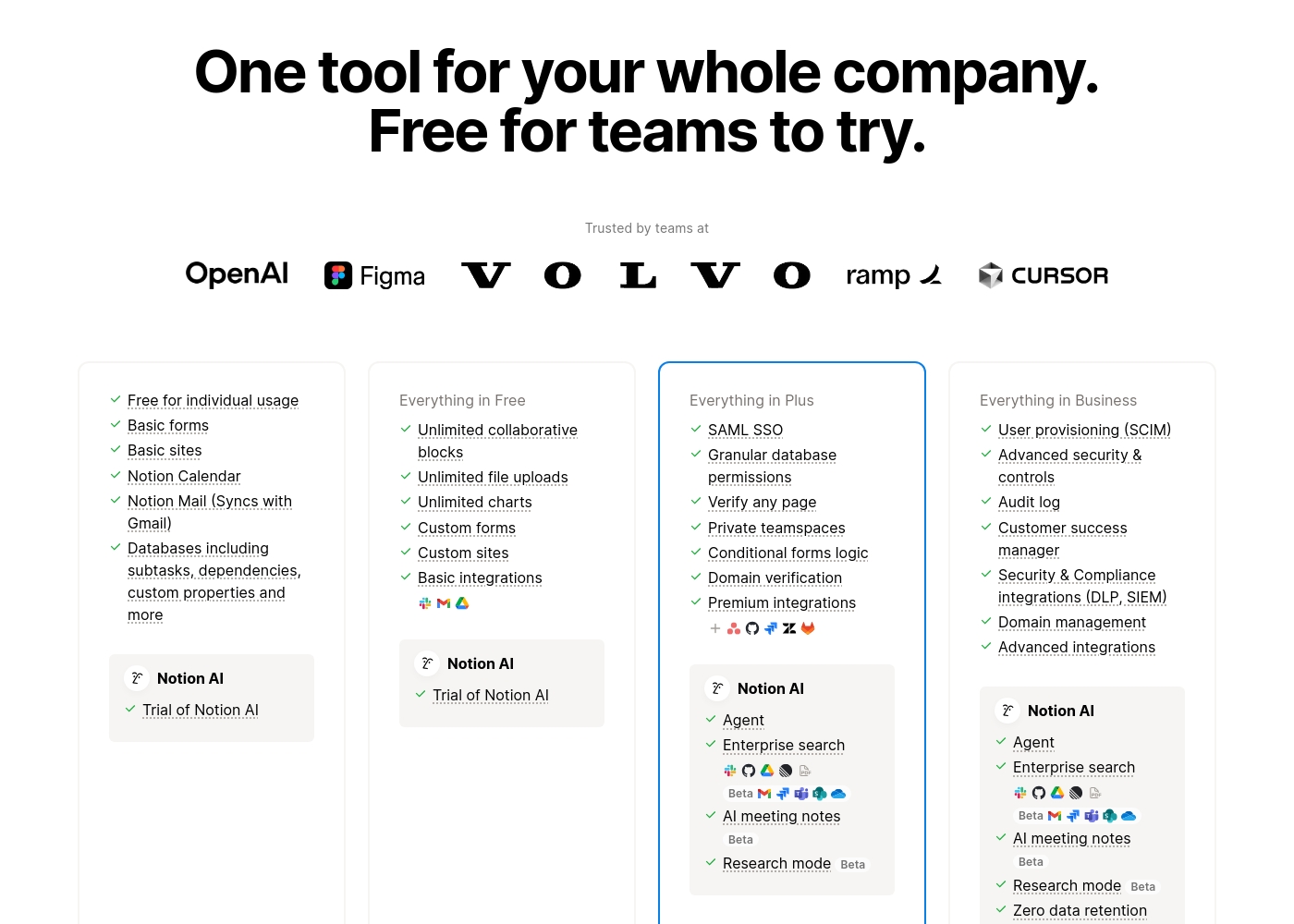
Notion costs between $0 and $20 per seat/month with four plans: Free at $0/seat/month, Plus at $10/seat/month, Business at $20/seat/month, and Enterprise (custom pricing).
Here’s a detailed look at the core features included in each subscription level.
- Unlimited pages and blocks for individuals
- Web publishing with 1 custom subdomain
- Basic forms and sites
- Notion Calendar and Mail synchronization
- Databases with subtasks and dependencies
- Unlimited blocks and file uploads
- 30 days of page history
- Basic SAML SSO
- Granular database permissions
- Access to unlimited charts
- 90 days of page history
- Advanced security controls and Audit log
- Conditional forms logic
- Domain verification
- Advanced page analytics (includes editor list)
- Unlimited page history and workspace analytics
- SCIM user provisioning
- Zero data retention with LLM providers for Notion AI
- Customer Success Manager support
- Security & Compliance integrations (DLP, SIEM)
Pricing Notes
- Asana explicitly states they do not offer refunds once a paid subscription has started.
- Asana's free Personal plan supports up to 10 users, an excellent offer for small teams.
- Notion offers a 30-day refund window for annual subscribers but only three days for monthly.
- Both companies face massive user complaints regarding unexpected auto-renewals and deceptive billing practices.
- Notion provides a special free Plus plan for students and educators.
Pricing Head-to-Head
User Reviews
External feedback, predominantly showcased through Trustpilot, reveals widespread dissatisfaction among users, giving the service a significantly low overall rating. Customers frequently criticize the subscription and billing practices, often citing unexpected auto-renewals or unauthorized charges occurring months after cancellation or trial expiration. The inability to secure refunds, even in cases of clear error, is a major pain point.
🚨 The most significant complaint centers on support responsiveness. Reviewers report slow service, sometimes waiting a week for an email reply, reliance on frustrating chatbots, and difficulties contacting a human representative. While some users acknowledge the base product is flexible and has good design features, the company's operational infrastructure and seeming focus on larger enterprises leaves smaller businesses feeling neglected, leading many to label the experience customer-hostile or deceptive.
The app itself is great, offering good design, projects, and flexible team spaces. However, the customer service experience is awful. The only way to talk to CS is often through slow, ineffective emails.
Trustpilot feedback paints a sharply divided picture of Notion. While many users praise the platform as a terrific tool—highlighting its power, versatility, and unique block-based editor for personal and professional organization—these compliments are often eclipsed by grave concerns regarding management and billing practices.
A recurring major theme across many reviews details frustrating experiences with unexpected charges, deceptive auto-upgrades (especially relating to annual plans and new members), and significant challenges when trying to cancel subscriptions or obtain timely refunds. Furthermore, support responsiveness is frequently described as unsatisfactory, unhelpful, or even condescending, often failing to resolve billing errors or login issues.
Enjoy using Notion a lot for my daily work interface. It helps me set up my employees and assign tasks with no issue at all. We upgraded from the free plan and will absolutely continue using the platform.
Our Verdict
Deciding between Asana and Notion is a classic run-and-gun choice versus structured planning. Most people must figure out if tasks or documents are their priority. Both Asana and Notion are exceptionally powerful team tools. Neither Asana nor Notion wins on user happiness or responsive basic support, however. Asana is the supreme manager of structured work and process. If you need dedicated resource planning, choose Asana today. Its powerful Timeline views and native Gantt charting track dependencies flawlessly. Asana is engineered for maximum operational scale and high-level enterprise compliance. The generous Asana free tier supports up to 10 users, which is hard for Notion to beat. Notion is your modern, flexible “everything app” and knowledge base champion. Notion easily replaces your dedicated wiki, project manager, and basic CRM, saving subscription costs. The integrated AI assistant in Notion is excellent for content creation and search. Users love Notion's boundless customization. The critical decision hinges on structure versus flexibility. Do you require strict, top-down project management with high-level reporting? Stick with Asana. Are you building a massive, searchable knowledge repository? Notion is the better option. Asana provides the defined rails that growing enterprises require. Choose Asana if you are running complex projects needing resource planning and compliance. Pick Notion if you need one highly flexible tool to consolidate documentation and task management. Both Asana and Notion are leaders, but they solve entirely different organizational problems.
Frequently Asked Questions
Which is better for knowledge management: Asana or Notion?
Notion is specifically designed to be an internal wiki and single source of truth. G2 rates Notion the number one knowledge base for three years running. Asana is focused on task management and project flow, not deep documentation.
Does Asana offer dedicated resource management like Notion?
Yes, Asana offers dedicated resource management in its Advanced tier. This feature allows management to visualize team staffing and bandwidth. Notion does not feature this native high-level resource planning capability.
Which software has a more generous free plan, Asana or Notion?
Asana's free Personal plan is usually more generous for teams. It supports up to 10 collaborators with unlimited tasks and projects. Notion's free plan is robust but primarily optimized for individual use.
Which tool has better project tracking features like native Gantt charts, Asana or Notion?
Asana is superior here, offering native Timeline and Gantt Views in its Starter plan. This is essential for tracking complex dependencies. Notion can simulate these views but lacks true native Gantt charts.
Can Notion replace multiple specialized SaaS tools, whereas Asana cannot?
Yes, Notion explicitly functions as an “everything app,” replacing wikis and basic CRMs. Asana's core function is dedicated project management, relying on integrating with 300+ external tools.
Do Asana and Notion have similar problems with customer support and billing?
Yes, user reviews show severe, widespread complaints for both Asana and Notion. Customers report poor customer service, slow responsiveness, and deceptive auto-renewal charges for both companies.
Ready to Choose?
Both tools have their strengths. Choose based on your specific needs.