Assembly vs Blueink
Assembly and Blueink solve very different problems. Assembly builds modern client portals for service firms. Blueink delivers fast, affordable eSignatures. Your choice depends on whether you need a client hub or a signature tool.
Solid all-in-one client portal
Overall, we find Assembly to be a strong, user-friendly platform for professional firms aiming to centralize client management and present a polished brand. It delivers on its core promise of a modern portal but may require consideration for specific integration needs or advanced customization.
Pros
- Intuitive, modern interface that is easy for clients and staff to navigate.
- Comprehensive all-in-one platform replacing scattered emails, files, and invoices.
- Strong branding and white-labeling options, especially on higher-tier plans.
- Includes key features like invoicing, messaging, and eSignatures without add-ons.
Cons
- Pricing escalates significantly for team seats and advanced features like HIPAA.
- Some users report navigation friction or layout issues when accessing specific features under time pressure.
- Integration options may require setup work if your specific software isn't listed.
- Not ideal for very simple or infrequent client interactions due to pricing structure.
Top Value and Service Leader
We find Blueink offers an extremely compelling e-signature platform, driven by significant cost savings and a strong focus on compliance and robust API features. Overall, its commitment to included premium customer support makes it a top value choice, particularly for highly-regulated businesses.
Pros
- Highly competitive pricing, often 50% cheaper than major alternatives.
- Regulatory compliance for regulated industries (HIPAA, GDPR, 21 CFR Part 11).
- Premium US-based customer support is included across plans.
- Unlimited envelope tier available for high-volume users.
Cons
- Limited public feedback makes external validation challenging.
- Features like Teams and Signing Brands are restricted to annual plans.
- Trustpilot review base is currently too small to be reliable.
AboutAssembly
💡 Assembly is a client portal and back-office platform for professional service firms. It's built for businesses in accounting, law, marketing, real estate, and tech. The goal is to replace clutter with a single, client-friendly hub.
AboutBlueink
Blueink provides advanced, value-packed eSignature software for businesses that need both robust security and streamlined efficiency. This solution is flexible, catering to enterprises and companies across multiple sectors, including government, healthcare, and financial services.
It offers comprehensive compliance protocols, adhering to stringent standards like HIPAA, GDPR, and 21 CFR Part 11. Blueink ensures your documents and processes meet complex industry requirements without compromising ease of use. The platform is truly adaptive and aims to serve highly regulated industries and growing businesses equally. ✅
Highlights
Feature Comparison
Features Overview
We highlight the main differences and pick a winner for each feature.
Core Purpose
Assembly is a client portal. Blueink is an eSignature tool. They serve fundamentally different needs.
Assembly is an all-in-one platform for professional service firms. It centralizes client communication, files, invoicing, and contracts. Think of it as a branded hub for your entire client relationship. Blueink is specialized eSignature software. It focuses on getting documents signed quickly and securely. Its core features are templates, delivery methods, and compliance. The key difference is scope. Assembly manages the whole client lifecycle. Blueink manages the signing step of that lifecycle.
Document Signing
Assembly includes basic eSignatures. Blueink is built for high-volume, fast turnaround signing.
Assembly offers eSignatures as part of its platform. You can send contracts for signature within the client portal. It's a convenient add-on for firms needing occasional signing. Blueink's entire platform is optimized for signing. Its SMS delivery boasts a 45% higher response rate than email. Features like SmartLink Forms and Bulk Send are designed for speed. For firms where signing is a primary daily task, Blueink's specialized tool is more powerful.
Client Experience
Assembly creates a branded portal for ongoing client interaction. Blueink provides a streamlined signing experience.
Assembly's goal is to delight clients with a modern portal. It offers a single place for messaging, file sharing, and payments. You can customize it with your brand for a professional impression. Blueink's client experience is focused on the signing event. It's designed to be fast and intuitive for signers. The SMS feature gets documents opened and signed in minutes. Assembly builds long-term client relationships. Blueink excels at rapid, single-task completion.
Security & Compliance
Both offer strong compliance. Blueink has broader standards out-of-the-box. Assembly has HIPAA on advanced plans.
Assembly offers enterprise-grade security. HIPAA compliance with a BAA is available on the Advanced plan ($399/mo). This is crucial for healthcare and financial firms. Blueink meets a wider range of standards. It supports HIPAA, GDPR, and 21 CFR Part 11 on all plans. This makes it versatile for global, regulated industries. Blueink's compliance is more accessible from lower tiers. Assembly's compliance is more comprehensive for client management.
Integrations & API
Assembly connects to business tools. Blueink offers a best-in-class API for embedded signing.
Assembly integrates with Zapier and Make. It also offers API access on Professional plans. This connects your portal to accounting, CRM, and project tools. Blueink's API is G2-recognized as best-in-class. It's designed for deep, embedded signing experiences within your app. The API is half the cost of alternatives. Assembly integrates your existing workflow. Blueink lets you build the signature workflow into your product.
Pricing & Value
Assembly's price scales with clients and users. Blueink offers predictable per-user pricing.
Assembly starts at $39/mo for solos. The Professional plan is $149/mo for 3 users. Costs increase significantly for more users or advanced features. Blueink starts at $15/user/month annually. The Unlimited plan is $40/user/month. There are no overage penalties if you exceed limits. Blueink offers clearer value per user. Assembly's value is in its all-in-one platform.
Target Audience
Assembly suits service firms needing a client hub. Blueink suits any business needing fast, compliant signatures.
Assembly is built for accounting, law, marketing, and consulting firms. It replaces email chaos with a modern portal. It's ideal for businesses wanting to centralize client management. Blueink serves government, healthcare, financial services, and high-volume teams. It's for anyone tired of expensive, slow eSignature providers. Its compliance makes it a strong choice for regulated sectors. The choice is clear: need a client portal? Assembly. Need a signature engine? Blueink.
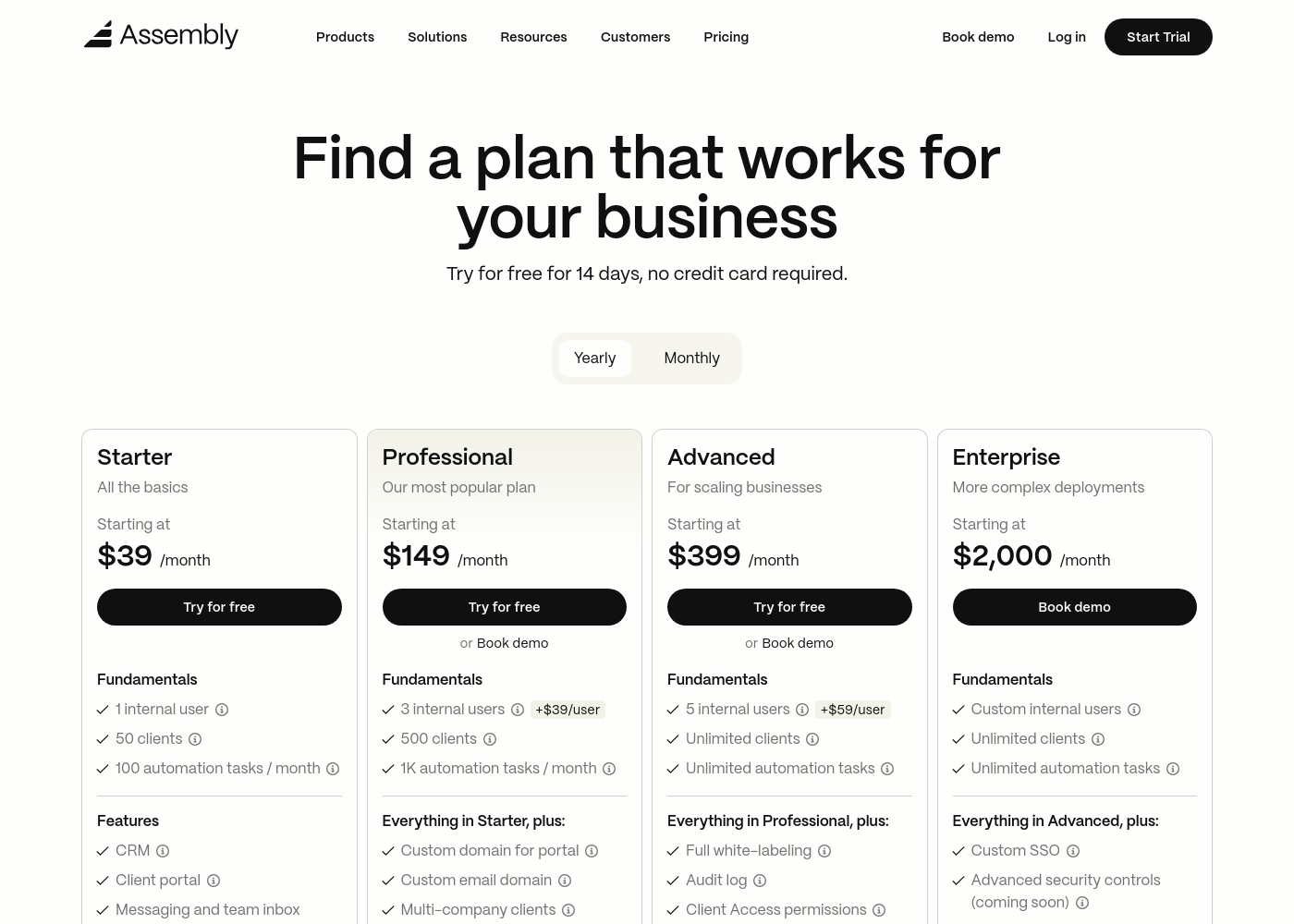
Assembly costs between $39 and $2,000 per month with 4 plans: Starter at $39, Professional at $149, Advanced at $399, and Enterprise at $2,000.
Take a look at the feature breakdown for each tier below.
Starter
Price: $39 / month Websites Supported: Not explicitly stated Best For: Solo entrepreneurs and small service providers Refund Policy: 30-day satisfaction guarantee Other Features: CRM, white-labeled client portal, messaging, invoicing, and task management.
- CRM
- Client portal
- Messaging & inbox
- Invoices & pay links
- Proposals & contracts
- Custom domain
- API & Zapier/Make
- Multi-company clients
- Low payment fees
- Full white-labeling
- Audit log
- HIPAA compliance
- Client access permissions
- Custom SSO
- Sandbox workspace
- Dedicated success manager
- Technical advisor
Blueink costs between $15 and $40 per user per month (billed annually) with four main plans: Standard at $15/month, Business Pro at $30/month, Blueink Unlimited at $40/month, and Enterprise (Contact Sales).
The platform pricing is clear and designed to be cost-effective compared to competitors.
Standard
Price: $15/user/month ($180 billed annually) Websites Supported: Not explicitly stated Best For: Small teams or individuals needing reliable e-signatures. Refund Policy: Not explicitly stated Other Features:
- 120 Envelopes / User / Year (10 per month)
- 5 Reusable Templates / User
- Blueink Payments and Auto Detect Fields
- SMS Pin / Selfie / ID Authentication
- Email and Chat Support
- 120 Envelopes/User/Year
- 5 Templates/User
- Blueink Payments
- Auto Detect Fields
- Real-time audit trail
- All Standard features
- 1800 Envelopes/User/Year
- 12 Templates/User
- SMS Delivery Reminder Emails
- Custom Messaging
- All Business Pro features
- Unlimited Envelopes/User/Year
- Unlimited Templates
- Teams (annual plans only)
- Signing Brands (annual plans only)
- Unlimited Users and Templates
- Bulk Send
- Smart Link Forms
- Custom Reporting
- Customer Success Team

Pricing Notes
- Assembly's pricing is tiered by plan, with user limits and overage fees on lower tiers.
- Blueink's main plans are priced per user per month with annual billing, offering significant savings.
- Assembly includes a 30-day satisfaction guarantee. Blueink's refund policy is not explicitly stated.
- Blueink confirms no overage penalties. Assembly charges extra for users and automation tasks beyond plan limits.
- Assembly offers a 20% discount for nonprofits and education. Blueink does not mention specific discounts.
Pricing Head-to-Head
User Reviews
From our research on Trustpilot and Capterra, users consistently praise Assembly for its modern, intuitive interface and the ease with which it centralizes client communication. The platform is frequently described as a clean, all-in-one hub that simplifies operations.
However, some users on Capterra note occasional friction in navigation under time pressure and desire more robust customization. Support responsiveness and the value of included features like invoicing and portals are highlighted as major positives, while pricing for higher tiers is seen as a consideration for scaling firms.
Assembly's interface is quick to navigate and simple to operate. It has been great for keeping our client recognition tasks organized in one place without a steep learning curve.
We can only draw limited conclusions from the publicly available feedback as external user reviews are scarce, making it difficult to fully assess recurring themes like ease of use or overall reliability. The current Trustpilot account shows a 3.7-star rating based on very few submissions.
One specific point of praise highlighted by users is related to support responsiveness, noting that the US-based team is 'great.' This aligns well with Blueink's internal claims of providing premium customer service as a standard feature, differentiating them from competitors. Without more input regarding integrations, onboarding complexity, or long-term value, we rely heavily on the company's detailed pricing structure, which appears significantly cheaper than alternatives.
The US-based customer support team is extremely helpful and effective. Whenever we run into questions, they respond quickly and resolve issues on the first attempt.
Our Verdict
Assembly and Blueink aren't really competitors. They solve different problems. The real question is: do you need a client portal or an eSignature engine? Assembly's superpower is building a modern client hub. It replaces scattered emails and files with a single, branded portal. You get invoicing, messaging, and contracts all in one place. It's perfect for service firms wanting to impress clients from day one. Blueink's superpower is speed and value. It gets documents signed 45% faster with SMS delivery. It's 50% cheaper than major alternatives. Compliance with HIPAA, GDPR, and more is built into every plan. The deciding factor is your primary pain point. If client management feels chaotic and you need a central system, pick Assembly. If your signing process is slow, expensive, or non-compliant, pick Blueink. Choose Assembly if you're a law firm or agency needing a professional client portal. Choose Blueink if you're in healthcare or finance and need fast, compliant signatures at a fair price.
Frequently Asked Questions
Can Assembly and Blueink be used together?
Yes, but for different tasks. Assembly manages the client relationship. Blueink handles the signing of specific documents. You might use Assembly's portal to communicate, then use Blueink for a complex, high-volume contract signing.
Which is better for a healthcare practice?
For a HIPAA-compliant client portal, Assembly's Advanced plan is a strong choice. For HIPAA-compliant eSignature-only workflows, Blueink offers it on all plans. It depends on whether you need a full portal or just the signing.
Is Blueink really 50% cheaper than Assembly?
Not directly, as they are different tools. Blueink's pricing ($15-40/user/month) is for eSignature-only. Assembly's pricing ($39-2000+/month) is for a full portal platform. Comparing cost depends on your specific need.
Does Blueink have a client portal like Assembly?
No. Blueink is specialized for eSignature workflows and document tracking. It does not offer ongoing client communication, file sharing, or invoicing features like Assembly's portal.
Can I get a free trial for both?
Yes. Both Assembly and Blueink offer a 14-day free trial. Neither requires a credit card to start. This lets you test each platform's core features before buying.
Which one offers better customer support?
Blueink heavily emphasizes its included premium support with a 3-minute response time. Assembly offers tiered support, with dedicated success managers on higher plans. Both have positive feedback.
Ready to Choose?
Both tools have their strengths. Choose based on your specific needs.