Backlog by Nulab Inc vs Hive
Backlog by Nulab Inc and Hive both simplify project management, but they shine in different areas. Backlog by Nulab Inc is built for dev teams needing code and issue tracking. Hive is a connected hub for agencies and cross-tool collaboration.
Solid all-in-one for dev teams.
Overall, we find Backlog to be a capable and cost-effective platform that effectively merges project management, issue tracking, and code collaboration into a single tool. It's a strong choice for small to mid-sized teams looking to simplify their workflow without per-user costs.
Pros
- All-in-one platform combining project management, issue tracking, and Git/SVN repositories.
- Transparent, flat-fee pricing with no per-user charges, making it affordable for growing teams.
- Built-in AI assistant to help with summaries, file retrieval, and task drafting.
- Integrates with popular tools like Slack, Microsoft Teams, and Google Drive.
Cons
- External review sources were inaccessible, limiting our ability to gauge user sentiment on support or reliability.
- The platform's breadth might be overwhelming for very simple project tracking needs.
- Advanced features are only available on higher-priced plans.
- Specific details on performance with very large teams or complex codebases are unclear from provided materials.

Powerful hub for connected teams.
We found Hive excels at centralizing work across multiple tools into a single, AI-assisted workspace. Its flexible views and automation are strong assets, though the pricing structure and some user experiences around support warrant careful consideration. Overall, it's a robust choice for teams prioritizing integration and workflow efficiency.
Pros
- Centralizes work from tools like Slack, Salesforce, and email into one unified workspace.
- Offers flexible project views including Kanban, Gantt, Calendar, and Table.
- Integrates Buzz AI for smart search, summaries, and turning conversations into tasks.
- Provides a free forever tier and a free trial with no credit card required.
Cons
- Some users report confusion or dissatisfaction with billing and subscription management.
- Advanced features and support are often reserved for higher-tier, more expensive plans.
- Requires upfront integration setup to realize its full value, which may not suit all teams.
- Pricing details for some modules or support levels are not fully transparent upfront.
AboutBacklog by Nulab Inc
Backlog is an all-in-one work management platform built for teams that build, plan, or create. 🚀 It combines project management, issue tracking, and team collaboration into a single, powerful tool. This makes it ideal for development teams managing code and bugs, design teams planning sprints, marketing teams running campaigns, and small businesses seeking a straightforward solution without user limits.
AboutHive
Hive is a project management platform built for teams of all kinds. From agencies and marketing teams to non-profits and education groups, it’s designed to organize collaboration and automate workflows. It’s not just a task list; it’s a connected system where your work happens. 💡
Highlights
Feature Comparison
Features Overview
We highlight the main differences and pick a winner for each feature.
Pricing Model
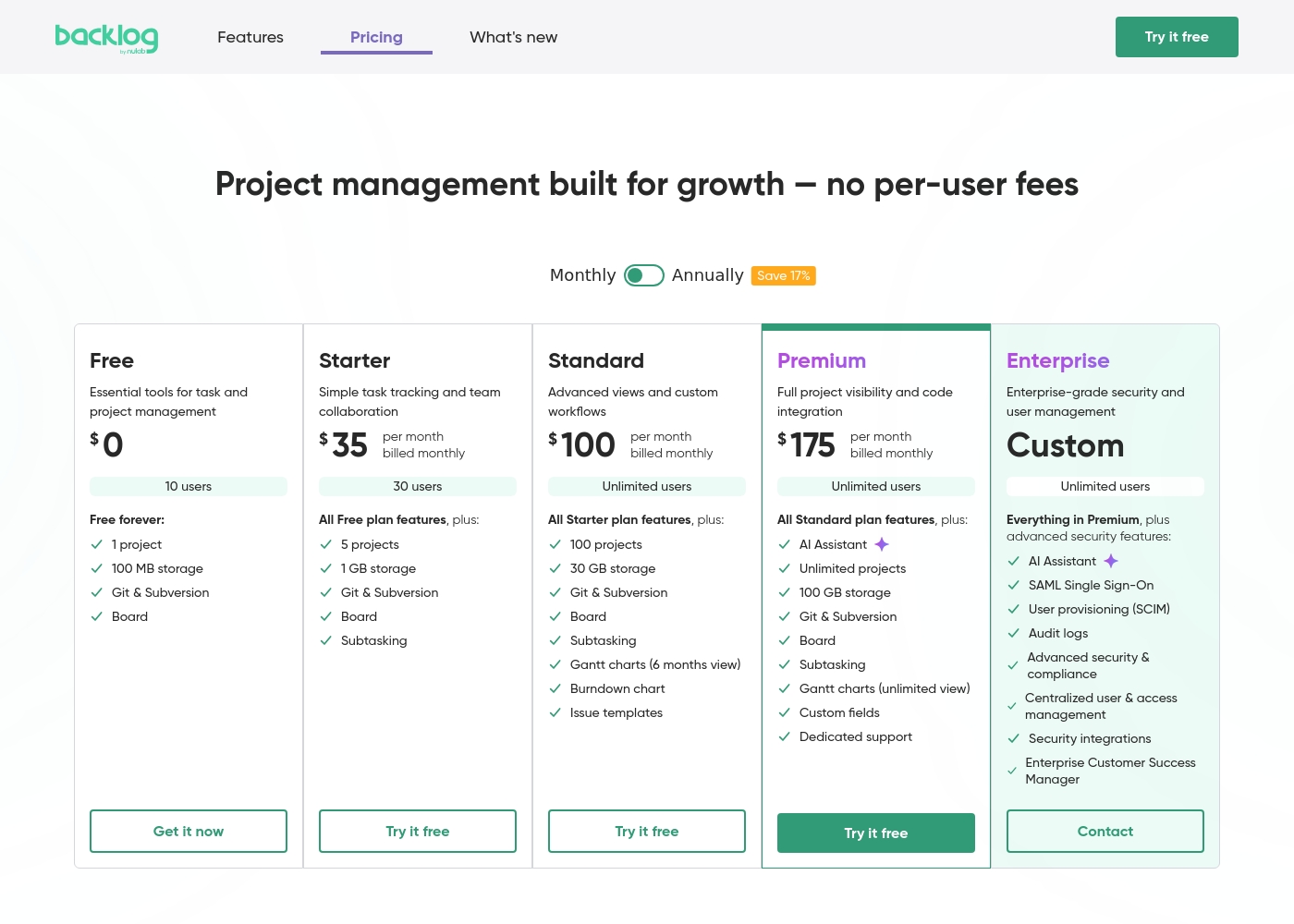
Backlog by Nulab Inc charges a flat fee per plan. Hive charges per user, per month.
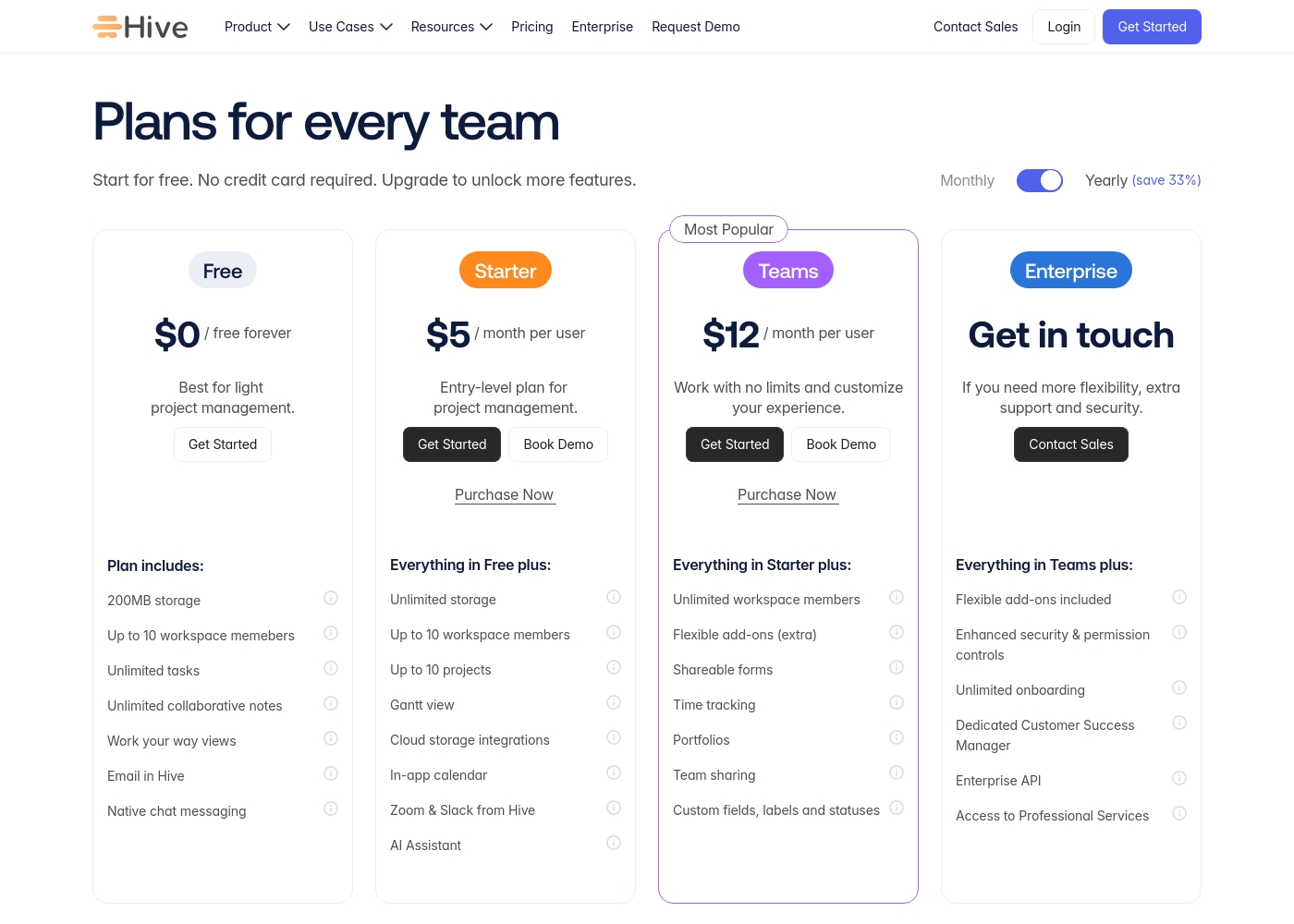
Backlog by Nulab Inc uses a flat-fee model. Your cost stays the same whether you have 5 or 50 users on a plan. This removes budget surprises as your team grows. Hive's pricing is per user, per month. The free plan covers 10 members. Paid plans start at $5/user and go to $12/user for the Teams plan. The key difference is predictability. Backlog by Nulab Inc offers cost certainty for growing teams. Hive's cost scales directly with your headcount. For a team of 20, Backlog by Nulab Inc's Standard plan might be a fixed cost. With Hive, you'd pay $240/month on the Teams plan.
Core Purpose
Backlog by Nulab Inc unifies code and projects. Hive unifies all your connected tools.
Backlog by Nulab Inc is an all-in-one hub for project management, issue tracking, and code. It's built to keep development work centralized and streamlined. Hive is a workspace that connects your existing tools. It pulls data from Salesforce, Slack, and email into one place for a single source of truth. Backlog by Nulab Inc is deeper for technical work. Hive is broader for connecting disparate business applications. Choose Backlog by Nulab Inc if code and issues are your main focus. Choose Hive if you need to unify communication and CRM tools.
AI Assistance
Both have AI, but Hive's Buzz AI is more integrated with external tools.
Backlog by Nulab Inc's AI helps with internal tasks. It summarizes project data, retrieves files, and drafts to-do lists based on deadlines. Hive's Buzz AI searches across connected apps. It summarizes info from Slack, email, and more, and turns conversations into action items. Backlog by Nulab Inc's AI focuses on your project data. Hive's AI works across your entire connected workflow. Hive's AI offers a wider scope for teams using many different software tools daily.
Project Visualization
Hive offers many more flexible views. Backlog by Nulab Inc is more basic.
Backlog by Nulab Inc provides standard project views for task tracking and progress. It's straightforward but limited in visualization options. Hive offers Kanban, Gantt, Calendar, Table, and List views. You can even mix views within the same project for different tasks. Hive's flexibility lets each team visualize work their way. Backlog by Nulab Inc offers a more singular, functional approach. This makes Hive better for complex projects with diverse stakeholder needs.
Trial & Onboarding
Backlog by Nulab Inc offers a longer trial. Hive offers a risk-free start.
Backlog by Nulab Inc provides a 30-day free trial on any paid plan. No credit card is required upfront. Hive offers a 14-day free trial. They also have a free forever plan and an 'adoption guarantee' to reduce risk. Backlog by Nulab Inc gives you more time to test deeply. Hive gives you a permanent free option to start with. The choice depends on if you want a long test drive or a no-cost entry point.
Automation
Hive has stronger automation with templates. Backlog by Nulab Inc is more manual.
Backlog by Nulab Inc handles task assignment and progress tracking well. Its automation is more about linking code commits to issues. Hive features automated action and project templates. You can set up new projects or recurring tasks with pre-built structures. Hive saves more time on repetitive setup work. Backlog by Nulab Inc keeps things simpler but more hands-on. For teams running the same processes repeatedly, Hive's automation is a major advantage.
Customer Support
Backlog by Nulab Inc offers email support. Hive's support varies by plan.
Backlog by Nulab Inc provides email support on paid plans. The Premium plan adds a dedicated support session. Hive offers support via contact form. Enterprise plans include a dedicated Customer Success Manager. Backlog by Nulab Inc's support is consistent. Hive's support depth increases significantly with higher-tier plans. For enterprise teams, Hive's dedicated CSM could be a key differentiator.
Integration Ecosystem
Hive focuses on pulling data from external tools. Backlog by Nulab Inc focuses on dev tools.
Backlog by Nulab Inc integrates with Slack, Teams, Google Drive, and has a robust API. It also imports from Jira and Redmine. Hive connects with Slack, Salesforce, email, and Gong. It aims to centralize communication and CRM data. Backlog by Nulab Inc's integrations support development workflows. Hive's integrations support sales, marketing, and cross-team communication. Your existing tool stack will determine which integration ecosystem is more valuable.
Backlog by Nulab Inc pricing: Backlog by Nulab Inc offers a range of flat-fee plans starting from a free tier up to $175 per month, with no per-user fees. You can save 17% by choosing annual billing for any paid plan level reached by your team's needs. Plans range: $0–$210/month Billing options: Free plan, Free trial, Monthly subscription, Yearly subscription, Per seat pricing, Usage-based pricing
Hive pricing: Hive offers a range of options from a $0 free forever tier to a $12/month per user Teams plan. Subscriptions range from free tools for individuals to robust, feature-rich environments for growing organizations and enterprises alike.
Yearly billing is available to help you save on total costs over time. Monthly plans provide maximum flexibility if you prefer less commitment.
Pricing scales with features, allowing you to pay for only the power you need as your projects grow more complex. Add-ons like Buzz AI and time tracking are extra costs on mid-tier plans, which makes the pricing structure modular and customizable.
Pricing Notes
- Backlog by Nulab Inc's flat-fee pricing means no per-user costs, making it cheaper for larger teams.
- Hive's per-user model costs $5-$12 per user monthly on paid plans, with add-ons like Buzz AI costing extra.
- Backlog by Nulab Inc offers a 30-day trial; Hive offers a 14-day trial plus a free forever plan.
- Hive's 'adoption guarantee' provides extra confidence for new users.
Pricing Head-to-Head
User Reviews
We found that external review platforms like Trustpilot were not accessible due to verification errors, preventing us from gathering specific user sentiment from those sources. Capterra was not provided.
Therefore, our review is based solely on the official product information and pricing details from Nulab. ✅ We can confirm Backlog offers a unified platform for project management, issue tracking, and collaboration with built-in Git/SVN support and no per-user fees.
Backlog is great for keeping all our code and tasks in one place. The Git integration is seamless, and my team stopped switching between five different apps. It just works for our sprint planning.
Reviewing Hive's external reputation, we found Trustpilot reviews to be mixed but often positive regarding the product's functionality and customer service responsiveness. Users frequently praise the platform's ease of use and comprehensive features for project management, noting its helpful support team. 📊 On the other hand, some reviews highlight concerns with pricing transparency and occasional billing issues, which can affect overall value perception. ⭐ Capterra's detailed review page was inaccessible due to security restrictions, preventing a full cross-platform synthesis. Based on the available Trustpilot snippets, the sentiment leans towards appreciation for Hive's core toolset and collaborative environment, though experiences with account management and subscription handling are less consistent.
Hive has been a game-changer for our marketing team. The ability to see all our projects in different views, like Gantt charts, helps us stay on top of deadlines. Customer support has also been very responsive whenever we had questions.
Our Verdict
This is a close call, but it comes down to what you're managing. For pure development workflows, Backlog by Nulab Inc has a clear edge. For connecting all your business tools, Hive is the stronger hub. Backlog by Nulab Inc's superpower is its integrated code and issue tracking. It keeps your Git repositories, bugs, and project plans in one connected place. This saves dev teams from constant context-switching. Hive's superpower is its central workspace that pulls in data from Slack, Salesforce, and email. Its Buzz AI can then summarize these conversations and turn them into tasks. This unifies communication and action. The deciding factor is your team's primary pain point. If you need to manage code alongside tasks, Backlog by Nulab Inc is the simpler, more affordable choice. If you need to automate workflows across many disconnected tools, Hive is worth the per-user investment. For most software teams, **Backlog by Nulab Inc** is the better fit. It's cost-effective and purpose-built for dev work. For agencies, marketing teams, or any group juggling multiple business apps, **Hive** provides a more powerful, albeit pricier, command center.
Frequently Asked Questions
Which is cheaper for a team of 20 people?
Backlog by Nulab Inc will likely be cheaper. Its flat-fee plans don't charge per user. Hive's Teams plan would cost $240/month for 20 users.
Does Hive have built-in code repositories like Backlog?
No. Backlog by Nulab Inc includes native Git and SVN repositories. Hive focuses on connecting external tools, not hosting code.
Which tool is better for automating project setup?
Hive is stronger here. It offers automated action and project templates. Backlog by Nulab Inc has more basic task automation.
Can I connect Salesforce to Backlog by Nulab Inc?
Not natively. Backlog by Nulab Inc integrates with Slack, Teams, and Google Drive. For Salesforce, you'd likely need a custom API integration.
Which has a longer free trial?
Backlog by Nulab Inc offers a 30-day trial. Hive offers a 14-day trial, plus a separate free forever plan.
Is Hive's 'adoption guarantee' a money-back guarantee?
The data doesn't specify. It's called an 'adoption guarantee' and is likely about ensuring successful onboarding, not necessarily a refund policy.
Ready to Choose?
Both tools have their strengths. Choose based on your specific needs.