Buzzsprout vs Descript
This is a classic battle between a dedicated host and a powerful creation suite. Buzzsprout prioritizes reliable distribution and superior ease of hosting. Descript focuses on revolutionary AI editing workflows and video production capabilities.
Simple, reliable hosting with excellent support.
Buzzsprout is designed for maximum simplicity, making it the easiest way to launch and reliably distribute your podcast to listeners worldwide. Overall, we find this platform offers exceptional ease of use and value, though we note that monetization features currently require refinement based on extensive user feedback.
Pros
- Extremely user-friendly interface suitable for beginners and professionals.
- Reliable hosting and smooth distribution process.
- Clear, useful advanced statistics and tracking results.
- Pricing structure is affordable and scales well with upload volume.
Cons
- Recent monetization/advertising options have caused usability and revenue concern for some creators.
- Advertising matching lacks accuracy and sufficient performance analytics.
- Does not currently support video podcast hosting.
- Invoicing system is complex for creators managing multiple podcasts on the platform.
AI Editing That Redefines Workflow
We found Descript provides unparalleled speed and efficiency by innovating the editing process into a simple, text-based workflow, making advanced tools accessible to everyone. Overall, this is a powerful, modern solution ideal for creators and businesses looking to drastically increase content output quality and volume efficiently.
Pros
- Text-based editing is highly innovative and drastically reduces editing time.
- Powerful integrated AI toolset (Studio Sound, Eye Contact, filler removal) achieving professional polish.
- Transcription is fast, highly accurate, and a key 'game-changer' feature.
- Easy onboarding allows technical novices to start creating quickly.
Cons
- Constant, major application updates cause workflow disruption and user frustration.
- Users report that the AI co-editor (Underlord) can sometimes be slow to respond.
- Some subscription users wish they could purchase additional AI processing hours (like dubbing) separately.
- Quality-of-life issues exist, such as difficulties with voiceover recording workflow.
AboutBuzzsprout
Buzzsprout is an excellent podcast host, emphasizing ease of use above all else. This service is specifically designed to be the simplest way to get your podcast online. It takes the hassle out of distribution, ensuring your content reaches your listeners easily. ✅
AboutDescript
Descript is a complete video and podcast editor that uniquely combines a full set of professional editing tools with powerful artificial intelligence. This setup makes sophisticated video creation accessible to everyone.
The platform allows you to use your own intuitive tools or direct your AI co-editor, named Underlord, to handle complex tasks for you. It’s ideal for creators making everything from YouTube videos to podcasts, and for businesses needing high-quality internal training or customer support videos.
Highlights
Feature Comparison
Features Overview
We highlight the main differences and pick a winner for each feature.
Editing Workflow
Descript uses revolutionary text-based editing; Buzzsprout assumes pre-edited files.
Buzzsprout ensures reliable delivery of your final production and distribution. It assumes you arrive with a fully edited file ready for upload and delivery. You edit in Descript simply by manipulating a transcript of your audio or video file. Deleting text instantly cuts the corresponding media section flawlessly. Descript's editing is revolutionary, simplifying complex tasks quickly. Buzzsprout is only a platform for hosting the finished result. If you dread timeline editing, Descript provides immediate, time-saving efficiency for content creation.
Distribution & Hosting
Buzzsprout is a dedicated host; Descript is purely an export tool.
Buzzsprout is the gold standard host, managing your RSS feed and guaranteeing wide distribution. It's trusted by over 120,000 active podcasters for reliability. Descript focuses only on creating the master media file, which you then upload to a separate service. Descript is not designed to function as your podcast host. Buzzsprout is essential for making sure your audience *hears* your show and finds it easily. Descript is designed to help you *make* the show perfectly. If you switch systems, Buzzsprout offers an Easy Podcast Migration tool for hassle-free transfer from other hosts.
Pricing Structure
Buzzsprout scales on content volume; Descript scales by editor seats.
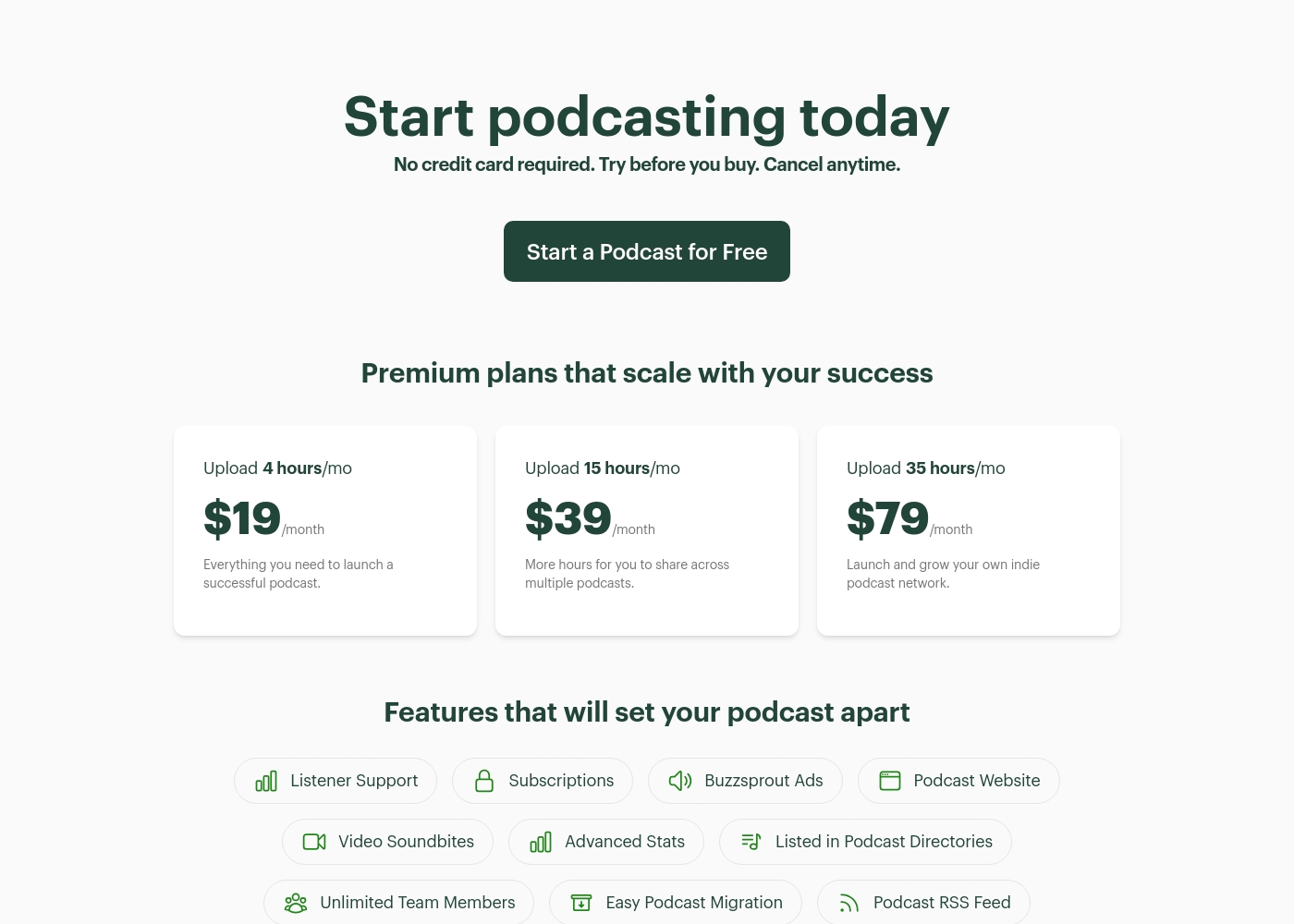
Buzzsprout charges based on monthly upload volume, from $19 for 4 hours up to $79 for 35 hours. All plans include Unlimited Team Members. Descript charges per separate editor seat, costing up to $50/person/month when billed annually. Pricing also limits processing based on monthly media hours. If you have a very lean editing team but high content volume, Buzzsprout may offer better value. Descript is better if you have many editors and low volume. Buzzsprout offers true month-to-month flexibility; Descript's best prices require an annual commitment.
AI Production Tools
Descript's AI is integral for editing; Buzzsprout offers AI for mastering only.
Buzzsprout offers specialized AI features like Magic Mastering and Cohost AI as optional add-ons. These primarily focus on maximizing final audio quality. Descript includes core AI tools like Studio Sound and Regenerate built directly into the editor. It removes background noise and fixes audio errors instantly. Descript's AI is built into the creation workflow to speed up editing dramatically. Buzzsprout uses AI to polish the final media file. Descript's one-click Remove Filler Words tool can save you hours of manual editing time on every single episode.
Video Capability
Descript is a full video suite, Buzzsprout is restricted to audio podcast delivery.
Buzzsprout does not currently support full video podcast hosting directly on its platform. It creates short Video Soundbites for social media promotion. Descript handles video natively, allowing exports up to 4K resolution on the Creator plan. It includes visual AI like Eye Contact and Green Screen. If you plan to produce video versions of your podcast, Descript is an indispensable tool right now. Descript allows you to use AI avatars or automatically generates B-roll, making serious video accessible to non-professionals.
Monetization & Ads
Buzzsprout provides native ad insertion; Descript has no built-in ad tools.
Buzzsprout enables Dynamic Content insertion on its highest tier for automated ad placement. You also get tools for Listener Support and Subscriptions. Descript's monetization is indirect, focusing on high-speed production so you can secure your own ad revenue elsewhere. It outputs clean files. Buzzsprout offers native advertising technology within its platform for simplified revenue generation. Descript does not. Choosing Buzzsprout consolidates hosting and ad management into one easy-to-use platform.
Collaboration Tools
Buzzsprout allows unlimited admin access; Descript charges per active editor.
Every premium plan from Buzzsprout includes unlimited team members for free. This simplifies administrative management and collaboration effortlessly. Descript uses a per-seat model, charging separately for each active editor. The Business plan supports only up to five users before custom Enterprise pricing. Buzzsprout offers superior scalability for large administrative teams managing the distribution feed. Descript is better for small teams needing simultaneous editing access. For team-wide brand consistency, Descript’s Business plan offers a full Team-wide Brand Studio.
Buzzsprout costs between $19 and $79 per month with three premium plans: 4 hours/mo at $19, 15 hours/mo at $39, and 35 hours/mo at $79.
Before diving into the features, you can explore these premium plans, which scale with your podcasting success.
4 hours/mo
Price: $19/month Websites Supported: Not explicitly stated Best For: Launching a successful podcast Refund Policy: Not explicitly stated Other Features:
- Podcast Website
- Easy Podcast Migration
- Advanced Stats
- Unlimited Team Members
- Listed in Podcast Directories
- Try before you buy
- No credit card required
- Cancel anytime
- Everything you need to launch a successful podcast
- Podcast Website
- Advanced Stats
- Easy Podcast Migration
- Unlimited Team Members
- More hours for you to share across multiple podcasts
- Listener Support
- Subscriptions
- Buzzsprout Ads
- Video Soundbites
- Launch and grow your own indie podcast network
- Podcast RSS Feed
- Custom Embed Players
- Advanced Statistics
- In-depth Podcasting Guides
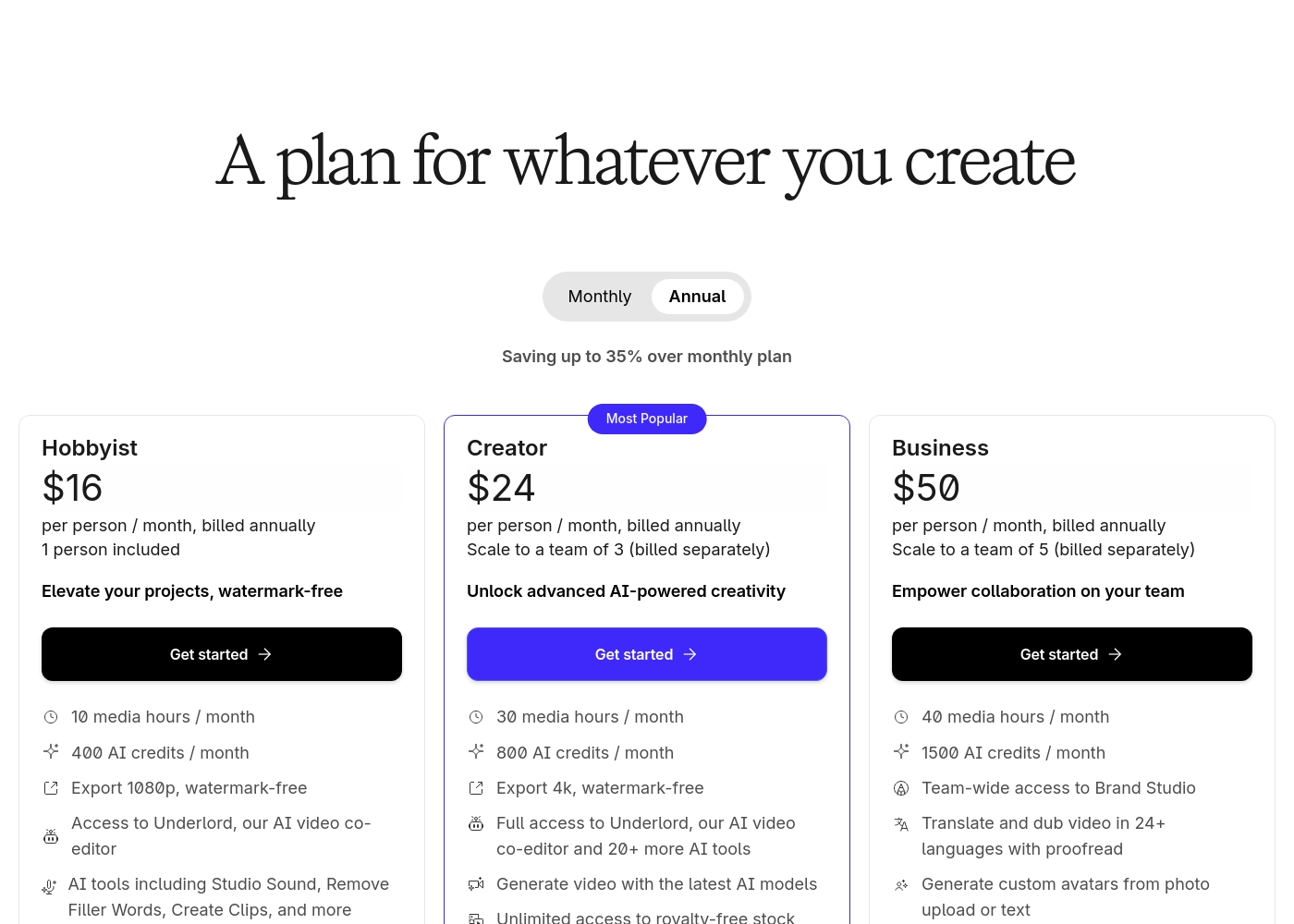
Descript offers five plans starting free and scaling up to $50 per person per month when billed annually. The paid plans are Hobbyist ($16), Creator ($24), Business ($50), and Enterprise (contact sales).
Let's explore the features and capabilities of each plan in detail, starting with the free option.
Free
Price: $0 per person / month, billed annually Websites Supported: Not explicitly stated Best For: Starting your journey, or trying text-based editing Refund Policy: Not explicitly stated Other Features:
- 1 media hour / month
- 100 AI credits at signup
- Limited use of Underlord AI co-editor
- Start your journey with text-based editing
- Limited use of Underlord AI co-editor
- Limited trial of AI Speech
- Elevate your projects, watermark-free
- Access to Underlord AI video co-editor
- AI tools including Studio Sound, Remove Filler Words, Create Clips, and more
- AI Speech with custom voice clones and video regenerate
- Unlock advanced AI-powered creativity
- Full access to Underlord and 20+ more AI tools
- Generate video with the latest AI models
- Unlimited access to royalty-free stock media library
- Advanced export options (timeline, batch files)
- Empower collaboration on your team
- Team-wide access to Brand Studio
- Translate and dub video in 24+ languages with proofread
- Generate custom avatars from photo upload or text
Pricing Notes
- Buzzsprout offers true month-to-month commitments on all paid plans without penalty.
- Descript's listed prices require yearly billing; monthly commitment costs are higher.
- Buzzsprout pricing scales strictly based on the monthly volume of content uploaded (4 to 35 hours).
- Descript pricing scales based on the number of editors (seats) and included media hours per seat.
- All paid Buzzsprout plans include unlimited team members, unlike Descript’s per-seat model.
Pricing Head-to-Head
User Reviews
Buzzsprout enjoys overwhelmingly positive external reviews, earning high marks for its superior ease of use and straightforward onboarding process. Users consistently report the platform is reliable, simple, and "worry-free," making it ideal for absolute beginners finding success in podcasting.
The system is also widely praised for providing excellent advanced statistics and dependability in global distribution. Support teams are frequently recognized for offering good guidance and helpful customer service.
Buzzsprout made it incredibly easy to set things up properly, even as a complete newbie. I absolutely love the user-friendly interface and the continuous updates I receive regarding my podcast downloads.
Users consistently praise Descript for revolutionizing audio and video editing, primarily through its game-changing text-based workflow. The software is seen as highly intuitive, simplifying complex edits like trims and filler word removal, saving substantial time for creators and educators.
The speed and accuracy of the transcription feature are frequently highlighted, making sophisticated video creation vastly more accessible, even for technical novices. AI features like Studio Sound and eye contact correction are celebrated for adding professional polish effortlessly.
Descript is a game changer for video editing. I love editing my videos directly from the transcript, which lets me fix small glitches and even correct speech quality quickly.
Our Verdict
Buzzsprout and Descript are both essential tools, but they fill very different roles in podcasting. You may actually need both, but the decision is about which part of the process you need to optimize first. Buzzsprout is the gold standard for easy hosting and wide distribution. It lets you upload a finished file effortlessly and handles the crucial RSS feed management. Buzzsprout offers flexible, volume-based pricing and unlimited team seats for administrative growth. Descript is the editing powerhouse, using AI to turn your media into a script you can easily modify. Built-in features like Studio Sound and filler word removal save hours of production time instantly. Descript is crucial if you produce video content or demand extremely high transcription accuracy. If you are currently struggling with complex editing and video output, choose Descript first to fix your production bottleneck. If your editing is outsourced or already simple, Buzzsprout is the better choice for stable, professional hosting and delivery. The final verdict: Use Buzzsprout if dependable hosting for 4+ hours of monthly audio is your top need. Choose Descript if you are a creator who needs to edit video quickly or a team tired of traditional timeline editing.
Frequently Asked Questions
Which is better for beginners launching their first podcast: Buzzsprout or Descript?
Buzzsprout is widely cited as the easiest hosting platform for absolute beginners to get online quickly. Descript is great for novices who dread the editing process. Both offer robust free tiers to test the workflow before committing to a paid plan.
Can Descript replace Buzzsprout for podcast hosting and distribution?
No, Descript is an editor; it does not host your podcast or manage your RSS feed. Buzzsprout is a dedicated host and distributor designed for this purpose. You must use a host like Buzzsprout after creating your file in Descript.
Which tool offers better specialized support for video podcasts?
Descript supports native video editing up to 4K resolution with specialized visual AI tools. Buzzsprout only provides promotional Video Soundbites. If video is a priority, Descript is the required tool for creation and editing.
How do the pricing models differ between Buzzsprout and Descript?
Buzzsprout charges based on the quantity of content uploaded monthly (upload hours). Descript charges per editor (seat) and includes media hours for editing in that plan. Descript’s best pricing uses annual billing.
Does Buzzsprout offer the same powerful AI editing tools as Descript?
Not natively. Descript includes core, time-saving AI like Studio Sound and filler word removal in its standard plans. Buzzsprout offers similar features like Magic Mastering only as extra paid add-ons separate from the hosting fee.
Which is better for large administrative teams needing collaboration?
Buzzsprout simplifies collaboration by offering unlimited team members on all premium tiers. Descript charges per editor seat. For administrative access to manage distribution, Buzzsprout is the cost-effective winner.
Ready to Choose?
Both tools have their strengths. Choose based on your specific needs.