ClickUp vs Nifty
ClickUp and Nifty both strive to be your ultimate all-in-one workspace solution. ClickUp is a powerful, feature-rich platform built for extreme flexibility and depth. Nifty triumphs in superior ease-of-use and clear client management capabilities. We will help you understand the crucial trade-offs between the two contenders.
Feature-rich, but expect complex setup.
We recognize ClickUp’s ambitious goal to be an all-in-one workspace, offering impressive versatility and an extensive feature set that streamlines project management. While this comprehensive nature is powerful, we found numerous external reports regarding recurring system bugs, slow performance, and extremely poor customer service experiences. Overall, we see that ClickUp is highly flexible for complex business workflows, but teams must be ready for a steep learning curve and potential challenges with reliability and support responsiveness.
Pros
- Extremely flexible platform offering over 15 customizable views (Gantt, List, Board).
- Consolidates over 50 applications into a single, centralized workspace.
- Effective replacement for specialized tools like Jira and Notion.
- Strong Free Forever plan is generous for individual users and small projects.
Cons
- Frequent reports of bugs, unreliable performance, and a slow user interface.
- Customer support is widely criticized for being inaccessible and ineffective.
- The massive feature set makes the learning curve surprisingly steep.
- Billing practices lack clarity regarding user seats and unexpected automatic charges.
Excellent All-in-One Project Management OS.
We find Nifty is remarkably successful at centralizing all required project elements into one single, easy-to-use platform, leveraging superior UI design. The pricing scales effectively from a generous Free plan to comprehensive Enterprise features, making it viable for any size team. Overall, we confidently recommend Nifty for organizations seeking true project consolidation and a superior user experience.
Pros
- Superior ease-of-use and clean user interface compared to competitors.
- Excellent for client-facing work via its built-in client portal functionality.
- Consolidates documentation, tasks, and team chat, effectively replacing other tools.
- Offers a fully featured Free plan ($0) and affordable, scalable pricing options.
Cons
- Public user feedback volume and verified third-party reviews are currently very limited.
- Advanced features like Custom SAML and IP Restriction are gated behind the high-tier Enterprise plan.
AboutClickUp
ClickUp is reliably described as the essential all-in-one workspace for modern teams. It’s designed to align, collaborate, and boost productivity across your entire organization. This platform helps eliminate app sprawl by converging over 50+ different applications into one centralized hub. Teams managing operations, campaigns, or product development use ClickUp to get more done faster, together. ✅
AboutNifty
Nifty serves as an all-in-one hub designed to supercharge productivity and streamline your workflows. It’s a powerful Operating System for managing projects at scale, used by over 20,000 highly productive teams. Instead of separating your roadmaps, tasks, docs, and discussions, Nifty puts everything into a central workspace. This makes team alignment and smarter decisions happen naturally. This centralized system is perfect for cross-functional collaboration, supporting roles from developers and designers to sales managers. 💡
Highlights
Feature Comparison
Features Overview
We highlight the main differences and pick a winner for each feature.
Ease of Adoption
Nifty has a clean, intuitive UI; ClickUp is known for complexity and bug reports.
ClickUp offers massive features, but users consistently report a steep learning curve. The interface is often criticized as slow, buggy, and overly dense. Customization quickly adds to complexity, slowing down new teams. Nifty highly emphasizes its superior ease-of-use and an extremely clean user interface. Staff and clients reportedly adopt Nifty immediately with minimal friction. This drives faster organizational utility and consistency. ClickUp requires more extensive initial training and adjustment period for teams. Nifty prioritizes immediate usability, ensuring smooth onboarding for everyone. If low-friction adoption is key, Nifty is the clear choice. For distributed teams struggling with tool adoption, Nifty provides a much smoother experience. The vastness of ClickUp can quickly overwhelm new users.
Client Collaboration
Nifty provides unlimited client access; ClickUp limits guest seats on paid plans.
ClickUp's paid plans, like Unlimited, include limited external guest seats starting at five. Users can use Proofing features to accelerate visual feedback cycles immediately. External access is functional but restrictive. Nifty’s Business plan offers unlimited guests and clients, which is transformative for agencies. Tools like File Proofing expedite creative approvals and external handoffs efficiently. Nifty works perfectly as a client portal. Nifty is clearly designed for client-facing organizations requiring extensive external collaboration often. ClickUp is better suited for internally managed projects with fewer external stakeholders. If you manage many client projects, Nifty’s unlimited guest access offers superior value. ClickUp makes frequent, high-volume client collaboration expensive quickly.
AI & Intelligence
ClickUp features deep search AI; Nifty uses AI for superior planning and prioritization.
ClickUp features ClickUp Brain, offering various AI writing and notetaking tools. Connected Brain provides robust enterprise search across apps like Salesforce and GitHub. This focuses on quick information retrieval. Nifty utilizes Orbit AI to help teams strategically plan and prioritize required work effort. Orbit AI aims for ultimate productivity by streamlining your overall complex workflow processes. Nifty focuses heavily on execution. ClickUp’s AI suite is broader and deeper, especially for centralized knowledge intelligence. Nifty focuses its AI capability on strategic, high-level planning and project execution alignment. If rapid content generation and cross-app intelligence are vital, ClickUp has the technical advantage. If better execution planning is needed, Nifty's Orbit AI is highly effective.
Data Flexibility
ClickUp provides 15+ views; Nifty offers five clean, robust task visualization formats.
ClickUp is known for its massive flexibility, sporting over 15 ways to visualize data. Users switch instantly between views like Gantt charts, Boards, and specialized Calendars. This supports highly customized workflow configurations. Nifty provides five powerful standard views: Kanban, List, Timeline, Calendar, and Swimlane. These fewer, focused views handle most modern project management needs efficiently. Nifty includes strong Swimlane support. ClickUp is the depth winner, capable of supporting the most niche viewing requirements easily. Nifty provides sufficient views while ensuring the UI remains clean and fast. If your required viewing modes are numerous and highly complex, ClickUp's vast inventory maximizes utility. Nifty is ideal for teams who value consistency over quantity.
Comparative Pricing
ClickUp is cheaper at the Business tier; Nifty offers strong client value.
ClickUp’s mid-tier Business plan costs $12 per user per month when billed annually. ClickUp also backs its paid plans with a 30-day satisfaction money-back guarantee. Pricing can become complicated with added seats. Nifty’s comparable Business plan costs $16 per member per month, a higher per-seat cost. Nifty does not publicly advertise a satisfaction refund policy. Nifty does offer up to 45% annual savings. The crucial difference is features included for the price. ClickUp is cheaper per seat but Nifty includes unlimited guests at the Business level. Nifty provides vastly superior value for client-heavy teams. If your team is purely internal, ClickUp saves $4 per person monthly. If you manage 20 clients, Nifty saves substantial costs on guest licenses.
Reliability & Support
Nifty users report reliability; ClickUp support is widely criticized as ineffective.
ClickUp users repeatedly complain that customer support is inaccessible and unhelpful. Many reviews mention recurring bugs and system slowness undermining the feature set. This reduces overall platform reliability. Nifty offers Priority Support starting on the Business plan for faster help. User feedback suggests a highly reliable platform with successful team implementation and adoption rates. Sentiment is positive. Feature depth in ClickUp is undermined by its widely reported support and stability issues. Nifty delivers a consistently stable user experience with responsive support options. If you cannot afford system downtime or frustrating support waits, Nifty is the much safer option. ClickUp's features are high-risk.
Data Migration
Nifty simplifies migration instantly; ClickUp offers no specific migration tools.
ClickUp focuses on building an all-in-one replacement tool for many separate systems. There are no built-in, easy migration paths from rival platforms specified in their feature set. Implementing ClickUp requires manual setup. Nifty sells its seamless adoption by offering instant import capability. You can migrate data easily from Jira, Asana, Trello, Wrike, and even ClickUp itself. This greatly reduces setup time. Nifty is designed to transition users easily from existing tools, lowering the barrier to entry. ClickUp expects customers to adopt its system fully and build from scratch. For organizations moving away from old platforms, Nifty removes the common headaches of long and complex data import processes.
Scalability Control
ClickUp offers global residency; Nifty offers security and specialized enterprise tools.
ClickUp is robust for large-scale enterprise, offering specialized features like Enterprise API access. It uniquely offers critical global data residency options (US, EU, APAC) for massive organizations. This is vital for compliance. Nifty supports necessary security features like Custom SAML and IP Restrictions for control. Nifty also includes a Dedicated Success Manager for Enterprise clients and Open API access for developers. Scalability is strong. ClickUp is superior if your organization has global regulatory requirements demanding data localization. Nifty provides the tools required for advanced IT security and support. If you are a regulated public company, ClickUp’s data residency features may be mandatory. Nifty is highly scalable but doesn't offer the same localization control.
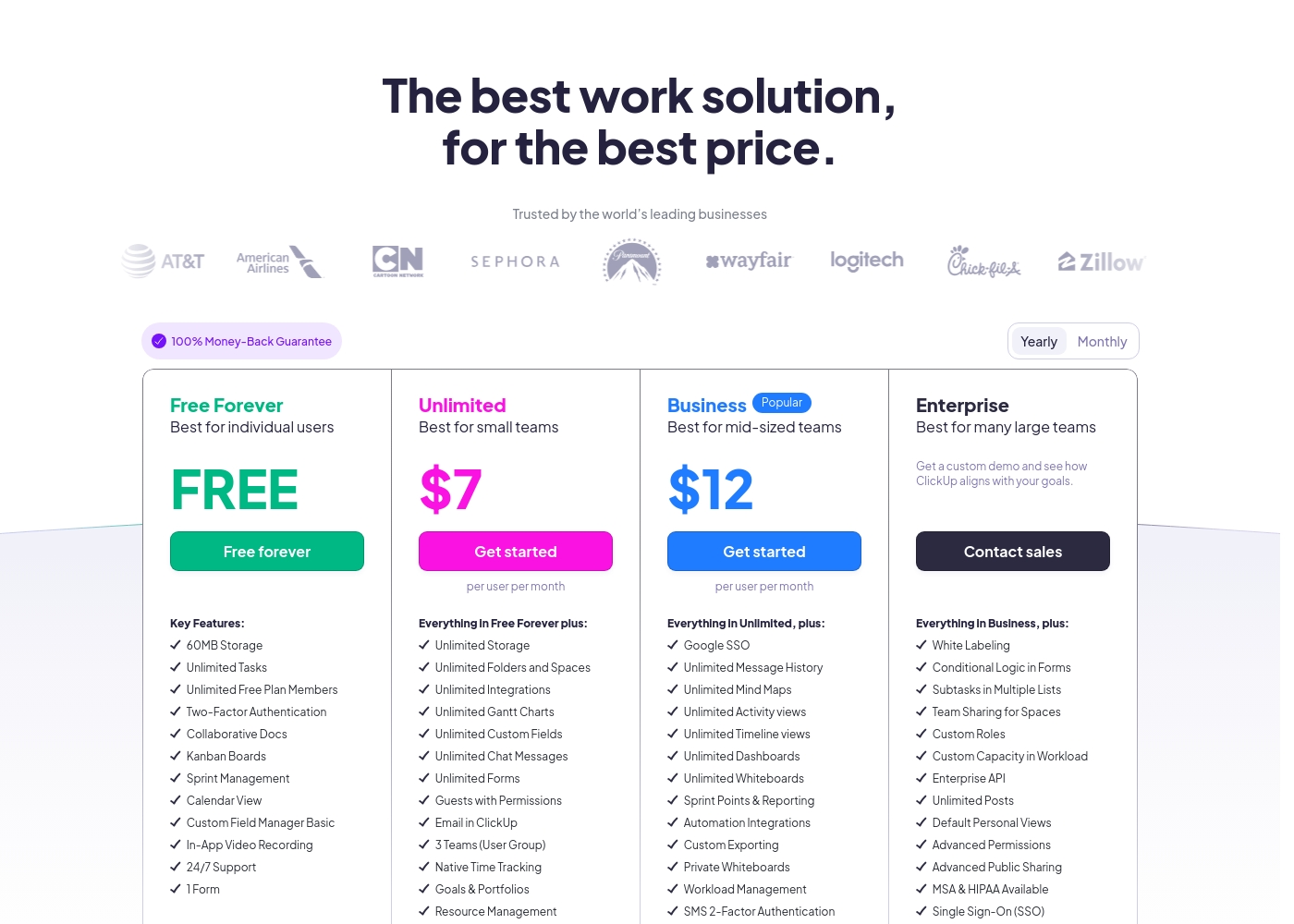
ClickUp costs between Free and $12 per user per month (billed annually) with four plans: Free Forever (Free), Unlimited ($7), Business ($12), and Enterprise (Custom).
Below, you'll find the specific details regarding what each plan includes.
Free Forever
Price: Free forever Websites Supported: Not explicitly stated Best For: Individual users Refund Policy: Not applicable Other Features: 60MB Storage, Unlimited Tasks, Two-Factor Authentication, Collaborative Docs, Kanban Boards, 24/7 Support
- 60MB Storage
- Unlimited Tasks
- Unlimited Free Plan Members
- Two-Factor Authentication
- Collaborative Docs
- Unlimited Storage, Folders and Spaces
- Unlimited Integrations
- Unlimited Gantt Charts, Custom Fields, Chat Messages, and Forms
- Guests with Permissions
- Email in ClickUp
- Google SSO
- Unlimited Message History, Mind Maps, Activity views, Timeline views, Dashboards, and Whiteboards
- Sprint Points & Reporting
- Automation Integrations
- Custom Exporting
- White Labeling
- Conditional Logic in Forms
- Subtasks in Multiple Lists
- Custom Roles
- Enterprise API
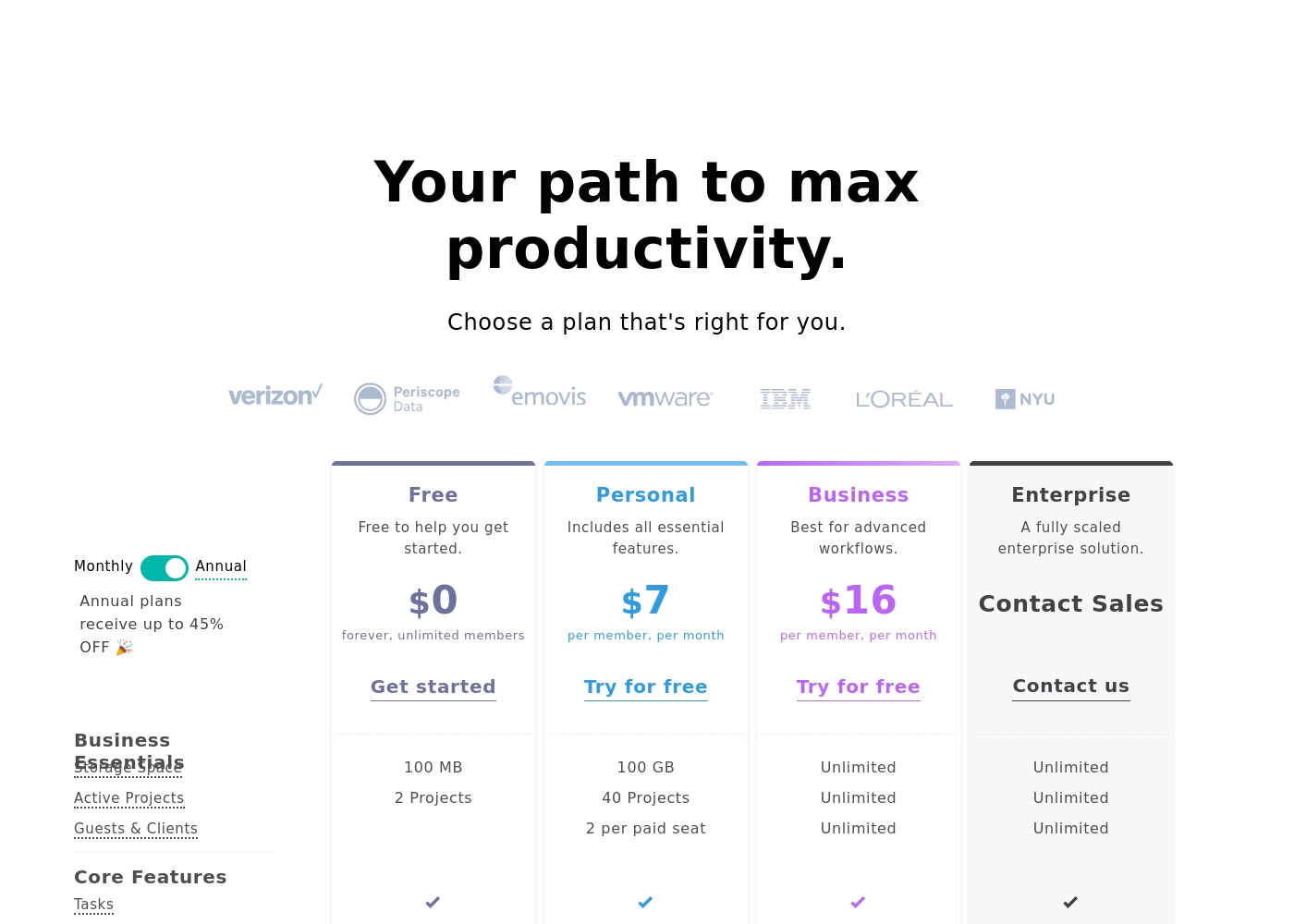
Nifty costs between $0 and $16 per month, featuring four plans: Free at $0, Personal at $7 per member, Business at $16 per member, and Enterprise requiring a quote.
We designed Nifty pricing to scale effortlessly with your team's needs. Here is a closer look at what each plan includes.
Free
Price: $0 per month Websites Supported: Not explicitly stated Best For: Free to help you get started Refund Policy: Not explicitly stated Other Features:
- 100 MB Storage Space
- 2 Active Projects
- Core features like Tasks, Docs, and Team Chat
- Task Dependencies and Portfolio overview
- 100 MB Storage Space
- 2 Active Projects
- Tasks, Milestones, Discussions, Docs, Files, Team Chat
- Portfolios and Recurring Tasks
- Two-Factor Authentication and Google SSO
- 100 GB Storage Space
- 40 Active Projects
- Custom Fields
- Budget Tracking
- Time Tracking & Reporting
- Unlimited Storage, Active Projects, and Guests & Clients
- Workflow Automations and File Proofing
- Cross-Project Overviews and Goals Tracking
- Team Workloads and Custom Roles & Permissions
- Priority Support and Microsoft SSO
- Native Forms
- Custom SAML
- IP Restriction
- Dedicated Success Manager
Pricing Notes
- ClickUp’s Business plan ($12) is cheaper per seat than Nifty’s Business plan ($16) when billed annually.
- Nifty's Business plan includes unlimited guests/clients, offering huge value for agencies.
- ClickUp provides a 30-day money-back guarantee, which Nifty does not publicly advertise.
- ClickUp users have reported opaque pricing and unexpected charges for additional user seats.
- Both offer permanently free plans, but ClickUp offers unlimited free projects while Nifty is limited to two.
Pricing Head-to-Head
User Reviews
ClickUp receives highly polarized feedback, reflected in its low 2.3 Trustpilot score. Users frequently praise the platform’s versatility and comprehensive nature, noting it successfully replaces disconnected tools like Jira, Slack, and spreadsheets.
Teams find it effective for centralized task management, project planning, and acting as a central knowledge base. However, reliability and customer service are major concerns across the user base.
Truly a game changer. I never went back to email, Slack, and spreadsheets after switching. ClickUp is a singular app for everything and helps us move fast daily.
While the overall Trustpilot rating sits at 3.7, this score is based on sparse user feedback within the input provided (specifically, only one review snippet). Users who submit feedback, however, are highly satisfied.
The primary theme emphasized is unmatched ease of use and a clean, intuitive user interface (UI) that dramatically surpasses competitors. One reviewer specifically noted that Nifty serves effectively as a client portal, which adds significant value for client-facing organizations.
This is a great, simple project management system. The ease-of-use and UI are genuinely superior to other competitors we’ve tested. Our staff and clients adopted the system immediately.
Our Verdict
Choosing between ClickUp and Nifty boils down to a core trade-off: Power versus Stability. Both tools promise an all-in-one workspace, but their execution differs significantly. For most teams seeking reliable project management and excellent collaboration, Nifty is the safer and more consistent bet. ClickUp's superpower is its sheer depth and unparalleled flexibility. It offers 15+ ways to view data and uses Connected Brain AI to search across 50 applications. If you need global data residency or extreme customization, ClickUp has the features to support any complex operation. However, be prepared for a steeper learning curve and potential bugs. Nifty triumphs with a superior user experience and focus on client collaboration. Teams can transition easily using Nifty’s instant data migration from tools like ClickUp and Jira. Nifty's Business plan includes unlimited guests and excellent File Proofing, perfect for client-facing agencies. The deciding factor is reliability and support. ClickUp's comprehensive nature is often undermined by reports of poor service and system slowness. Nifty users report high overall satisfaction and smooth staff adoption. Nifty delivers consistency where ClickUp delivers complexity. Choose ClickUp if your team demands extensive flexibility and deep resource management features. If you are an agency or a small team wanting a clean, reliable, and easily adopted client portal, Nifty is the clear winner for superior execution.
Frequently Asked Questions
Which is better for small teams focused on quick adoption: ClickUp or Nifty?
Nifty is significantly better for teams prioritizing quick adoption and ease of use. Nifty’s consistent UI leads to high staff and client satisfaction. ClickUp is powerful but often suffers from complexity and a steeper learning curve.
How do ClickUp’s resource limitations compare to Nifty’s guest access?
ClickUp severely restricts external collaboration on paid plans, allowing limited guest seats. Nifty's Business plan offers unlimited guests and clients for seamless external handoffs. Nifty provides much better value for agencies or client-facing organizations.
Which software is more reliable and offers better customer service?
Nifty shows higher reliability and positive sentiment in user reviews. ClickUp's core features are strong, but its support quality is frequently criticized as being slow and inaccessible. Nifty is the safer choice for consistent performance.
Does ClickUp offer features that Nifty cannot match?
Yes, ClickUp is superior in deep organizational depth and specialized features. ClickUp uniquely offers global data residency options (EU/APAC) for Enterprise clients. Its Connected Brain AI also provides enterprise search across external applications.
How much cheaper is ClickUp for a mid-sized team of 20 internal users?
For 20 internal users on the mid-tier plans, ClickUp saves $80 per month. ClickUp's Business plan is $12/user, while Nifty's Business plan is $16/member. That difference quickly adds up annually.
Can I easily migrate my data from ClickUp to Nifty if I switch?
Yes, Nifty specifically supports instant data migration from ClickUp, Jira, and other tools. This makes the transition process extremely simple and reduces setup friction. ClickUp does not offer equivalent migration support.
Ready to Choose?
Both tools have their strengths. Choose based on your specific needs.