Emergent vs Webydo
Emergent and Webydo both promise no-code creation, but they're built for totally different jobs. Emergent focuses on generating full-stack apps from plain English descriptions. Webydo is a pixel-perfect website builder for professional designers. Your choice depends on whether you're building an app or a website.
Fast app building, clear pricing.
We find Emergent delivers on its promise of rapid, no-code app development with a straightforward tiered pricing model. It's a strong tool for creators and small teams who need to move from idea to prototype quickly. Overall, we see it as a solid, accessible platform for its target audience.
Pros
- Truly no-code platform for building full-stack web and mobile apps.
- Extremely fast from concept to deployment.
- Clear, tiered pricing with a free entry-level option.
- Pro plans include advanced features like large context windows and custom AI agents.
Cons
- External user review data is currently unavailable to validate support quality or reliability.
- Advanced features like 'Ultra Thinking' and high credit limits are only on the expensive Pro plan.
- Detailed cancellation terms and refund policies are not explicitly stated.
- The Free plan is limited to 10 credits per month, which may be restrictive for testing.
Professional features, questionable stability.
We observe that Webydo provides unique features such as white labeling and advanced CMS tools specifically built for professional agencies and designers. However, we cannot recommend a product where frequent platform glitches, extremely unreliable support, and aggressive billing practices are consistently reported by users. Overall, designers should exercise extreme caution before committing to this platform, especially for critical client projects.
Pros
- No-code, pixel-perfect design capabilities available.
- Includes client-facing CMS functionality for easy content updates.
- Professional features like White Labeling and custom branding for agencies.
- Centralized dashboard simplifies management of multiple client projects.
Cons
- Users report frequent platform glitches and operational unreliability.
- Customer support is consistently described as poor, slow, or non-existent.
- Reports of unexpected billing, charges, and sudden price hikes.
- Fees to export sites create a feeling of being 'captive' designers.
AboutEmergent
💡 Emergent is an AI-powered development platform for creators, entrepreneurs, and teams. It's designed for anyone with an idea, regardless of technical skill. You describe what you want in natural language, and the platform generates the code, design, and infrastructure. It's a complete tool for building websites, mobile apps, and custom AI agents.
AboutWebydo
Webydo is a powerful professional platform built specifically for designers and agencies. It empowers you to design and publish complex websites without dealing with underlying code. The platform's editor allows drag and drop functionality directly onto the design canvas. ✅
This platform automatically handles code generation. This gives you the professional features you need to create custom websites down to the last pixel. Over 246,000 designers and agencies are already using Webydo to grow their businesses.
Highlights
Feature Comparison
Features Overview
We highlight the main differences and pick a winner for each feature.
Core Workflow
Emergent builds via AI description; Webydo builds via visual drag-and-drop design.
With Emergent, you describe your app idea in plain English. The AI then generates the full-stack code, design, and deploys it live. You refine through natural language feedback. Webydo provides a pixel-perfect design canvas. You visually drag and drop elements to craft your layout. The platform auto-generates the underlying code. The key difference is abstraction level. Emergent hides code completely behind language. Webydo hides code behind a visual design interface. Emergent is faster for starting from zero. Webydo gives you more direct control over the final look.
Target Use Case
Emergent builds functional apps; Webydo builds professional marketing websites.
Emergent excels at building MVPs, internal tools, and custom mobile/web apps. It's ideal for launching a startup idea or creating a unique SaaS tool. Webydo is built for creating client websites. It's perfect for portfolios, business sites, and e-commerce storefronts. The platforms serve different goals. Emergent answers 'how do I build a new product?' Webydo answers 'how do I design a beautiful website for my client?'
Collaboration & Management
Webydo offers agency-focused team tools; Emergent focuses on project collaboration.
Webydo provides a Central Dashboard for managing multiple client projects. Higher-tier plans add team seats and White Label branding for agencies. Emergent's collaboration is project-based. You can build with a team, and GitHub integration allows for code collaboration on paid plans. Webydo's features are more polished for agency workflows. Emergent's are more functional for shared app development.
Client Handoff & CMS
Webydo includes a client-ready CMS; Emergent requires building or integrating your own.
Webydo automatically generates a Content Management System as you design. You can hand this off to clients so they can update content themselves. Emergent builds functional apps, not content sites. There's no built-in CMS for client content updates. You would need to build that feature into your app. For agencies billing clients for website updates, Webydo's CMS is a major advantage. For builders making standalone software, it's not a concern.
Advanced Customization
Webydo allows custom code; Emergent builds custom AI agents.
Webydo's Team and Agency plans include an 'Add Code to Site' feature. You can inject custom HTML, CSS, and JavaScript for advanced functionality. Emergent's high-tier Pro plan lets you build custom AI agents. You can create intelligent tools for automation. The customization paths are totally different. Webydo customizes the website's behavior. Emergent customizes the application's intelligence and logic.
Learning Curve
Emergent requires prompt crafting; Webydo requires design skill.
Emergent's learning curve is in writing effective prompts. You need to describe your app clearly and iteratively. Webydo's learning curve is in mastering its design editor. User reviews mention it can be slow and complex. Both have a learning curve, but for different skills. Emergent tests your ability to articulate a vision. Webydo tests your visual design proficiency.
Platform Reliability
Webydo reports stability issues; Emergent's reliability is unverified.
Webydo's user reviews frequently mention glitches and platform instability. Users report it crashing and making unwanted changes. Emergent lacks sufficient external review data to assess reliability. Its Trustpilot page shows a verification error. Based on available evidence, Webydo has documented reliability problems. Emergent's stability is an unknown factor for now.
Pricing Transparency
Emergent's pricing is clear and tiered; Webydo's is complex and partially hidden.
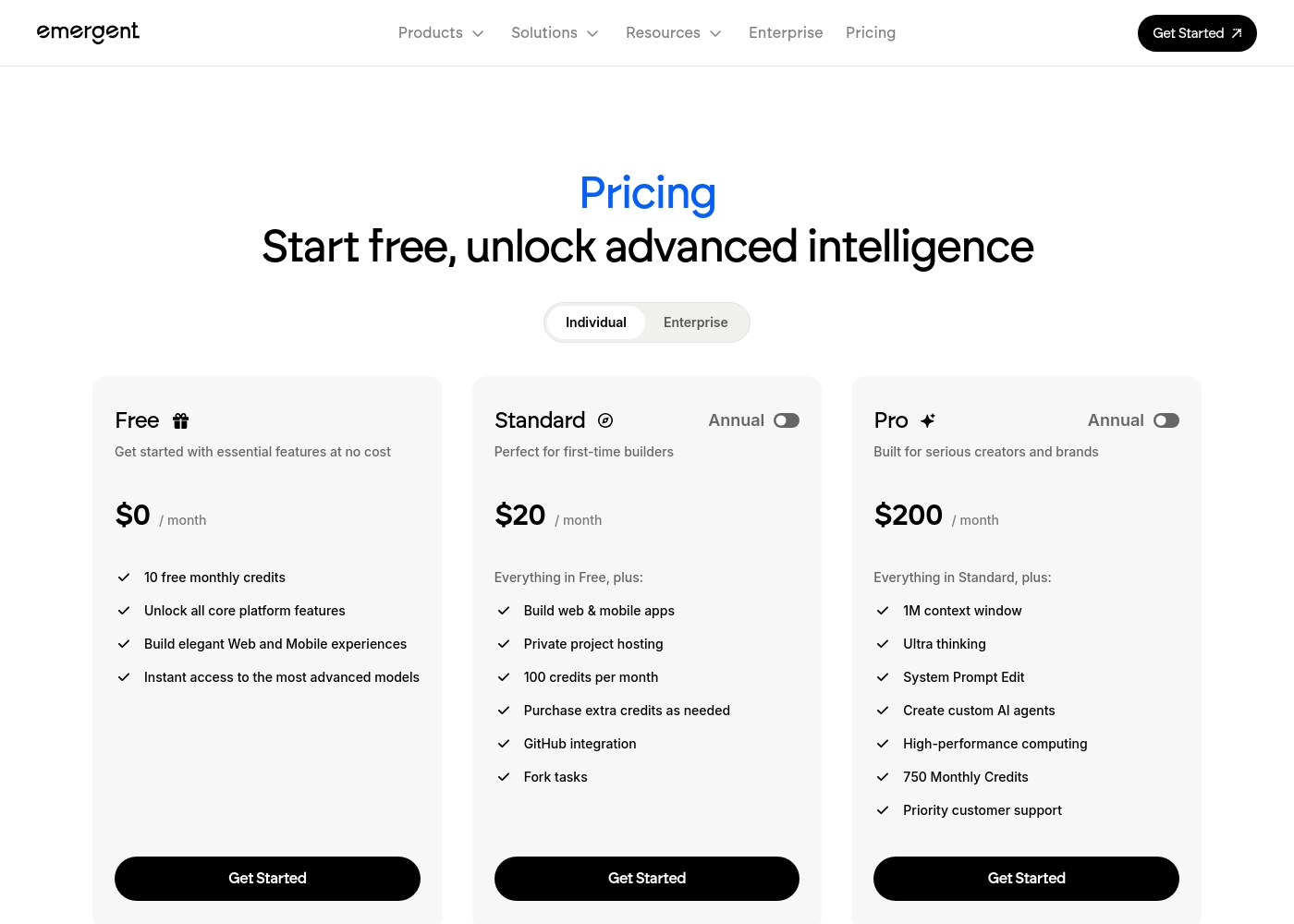
Emergent lists exact prices for all three tiers: Free ($0), Standard ($20), and Pro ($200). Webydo only lists the General Site Price ($15/mo). Prices for Starter, Pro, Team, and Agency plans are 'Not explicitly stated.' This lack of transparency makes cost comparison difficult. Emergent offers a straightforward path from free to premium.
Emergent pricing: Emergent offers a range of options from a free entry-level tier to professional plans starting at $20 per month. Pricing is primarily based on monthly credit allocations and advanced AI capabilities like larger context windows and private hosting.
Individual annual and monthly billing options are available for scaling your software development needs efficiently. These plans provide flexible choices for every stage of your building process, whether you're starting fresh or managing an established brand with high performance requirements.
Note that annual prices listed reflect a discount compared to monthly billing rates, offering substantial savings for long-term users. For teams, there's also an Enterprise option for high-volume needs.
Webydo offers subscription packages focusing on Designer Accounts, starting with a general site plan at $12 per month (billed annually).
Selecting the right Webydo plan depends on the number of sites you manage and the scope of features required for your agency or freelance business. All plans fully include hosting and the Content Management System (CMS) for your use and for your clients.
General Site Pricing
Price: $15/month or $12/month (billed annually) Websites Supported: 1 Best For: Individuals building and hosting one site effortlessly Refund Policy: Not explicitly stated Other Features: Included hosting and CMS
- Ideal for individuals
- Build and host one site effortlessly
- Included hosting and CMS
- 1 Designer Account
- Free hosting & CMS included
- Email Support
- 1 Designer Account
- Chat & Email Support
- Client Billing
- Free hosting & CMS included
- 3 Designer Accounts
- Full Onboarding & Setup
- Client Billing
- White Label CMS & Branding
- Add Code to Site

Pricing Notes
- Emergent's pricing is fully transparent with three clear tiers and credit limits.
- Webydo's pricing is opaque; only the basic plan price is shown. Higher-tier costs are hidden.
- Emergent uses a credit-based system on paid plans; additional credits can be purchased.
- Webydo's plans are structured around 'Designer Accounts' (seats) and number of sites.
- Webydo requires a credit card for its 14-day free trial and auto-renews.
- Emergent's free plan is permanent, not a time-limited trial.
Pricing Head-to-Head
User Reviews
External review data for Emergent is currently limited, as the provided Trustpilot link resulted in a verification error and Capterra information is unavailable. 🔍 This means we can't yet synthesize specific user sentiment on recurring themes like accuracy, ease of use, or support responsiveness from external review platforms. Our assessment is therefore based primarily on the provided feature and pricing information. We encourage you to check these review sites directly for the latest user feedback as it becomes available.
No specific user testimonials could be synthesized from the provided snippets, as the Trustpilot page returned a verification error and Capterra data was not available. Real user feedback was not accessible for this review.
The public feedback available for Webydo is overwhelmingly negative, pointing to significant reliability and customer support issues. Users consistently describe the platform as glitchy and unstable; long-term users noted that it "makes changes on its own" and frequently "crashes a lot." The most consistent complaint concerns the extremely poor quality of customer service, described by multiple reviewers as "awful," "slow at best," and frequently non-existent.
Support response times often exceeded 24 hours without resolving the core problem. Furthermore, several reviews highlight major concerns regarding billing and platform lock-in.
Been using it for almost a decade, and it’s the worst web builder available. It glitches constantly and Webydo support is truly awful. I do not recommend this service at all; find an alternative.
Our Verdict
The bottom line? Emergent and Webydo aren't really competitors—they're for completely different jobs. Emergent is your fast-track to building a new app from scratch. Webydo is a professional toolkit for designing beautiful client websites. Emergent's superpower is speed. You can go from a plain English idea to a deployed, functional web or mobile app in minutes. It's the ultimate tool for turning concepts into prototypes without touching code. Webydo's superpower is control. It gives professional designers a pixel-perfect editor and automatic code generation. You can craft exactly what you envision and hand off a CMS to your clients. The deciding factor is your goal. Are you building a new product or service? Choose Emergent. Are you building websites for clients? Choose Webydo. If you're an entrepreneur with a software idea, Emergent is your clear winner. If you're a design agency managing client sites, Webydo's features align with your workflow. Just be aware of its reported reliability issues before committing.
Frequently Asked Questions
Which is better for small teams: Emergent or Webydo?
Emergent is better for small teams building new products or internal tools together. Webydo is better for small design agencies or freelance teams managing client websites. The choice depends on whether you're building apps or designing sites.
Does Emergent have a visual editor like Webydo?
No, Emergent does not have a visual drag-and-drop editor. You build and modify your app entirely through natural language prompts. Webydo's core interface is its visual design editor.
Is Webydo worth the extra cost over Emergent?
Webydo isn't necessarily more expensive; its pricing is just hidden. Value isn't about cost here—it's about fit. Webydo is worth it only if you need its specific website design and agency features.
Can I export my website code from Emergent?
Emergent does not explicitly mention site code export features. Webydo offers site export on its Agency plan (100 exports). If code portability is critical, Webydo is the clearer option.
Which tool is more reliable and less glitchy?
Based on user reviews, Webydo has significant reliability issues, with users reporting frequent glitches. Emergent's reliability is unverified due to a lack of public reviews. Webydo's track record here is a concern.
Do I need coding skills to use Emergent or Webydo?
Neither requires traditional coding skills. Emergent requires skill in writing clear prompts. Webydo requires skill in visual web design. Both are no-code platforms for different creative processes.
Ready to Choose?
Both tools have their strengths. Choose based on your specific needs.