Filmora 14 vs Powtoon
Filmora 14 and Powtoon both leverage AI to create video fast, but they serve very different creative needs. Filmora 14 is a powerful timeline editor focused on polishing real video footage. Powtoon is the visual presentation maker, excelling at easy animation and superb customer support.
Powerful AI Editor, Buyer Beware.
We find Filmora 14 offers a powerful suite of AI editing tools and an accessible interface perfect for creators across all skill levels. While the feature set and performance are top-tier, we cannot overlook the severe, verified reports of deceptive billing and poor customer support from the vendor. Overall, this is a technically impressive editor marred by critical issues related to trust and operational transparency.
Pros
- Exceptionally easy to use interface suitable for all skill levels.
- Robust AI feature set simplifies complex edits like object removal and background cutting.
- Access to a massive 2.9M+ library of creative assets, music, and templates.
- Optimized performance with GPU acceleration, even on modest hardware.
Cons
- Severe billing issues and reported difficulties canceling auto-renewals.
- Support is often automated, unresponsive, and unhelpful via chat or email.
- Lack of transparency regarding hidden costs and AI credit consumption per feature.
- Perpetual license holders report forced migration to the newest version.
AI power, five-star support, pricing caution.
Powtoon provides a powerful, AI-accelerated video platform that makes complex content creation accessible to anyone. We found the combination of vast asset libraries and the stated 24/7 priority support to be impressive. Overall, the product is strong, but we advise caution regarding the ambiguous subscription structures and extra charges for specific features.
Pros
- Customer support is exceptionally responsive, friendly, and professional.
- Support staff quickly resolves complex technical and account issues.
- Vast resource library includes over 4 million stock media assets.
- AI tools streamline workflow (scriptwriting, text-to-video, translation).
Cons
- Subscription pricing is not explicitly stated on the main plan overview.
- Users report unexpected charges and difficulties canceling subscriptions.
- Lower-tier plans often require extra spending for 'Premium features.'
- AI features use a non-refundable, separate, usage-based credit system.
AboutFilmora 14
Filmora 15 is an award-winning video editor designed for both beginners and experts alike. It aims to help you edit as an expert with Filmora AI by streamlining the entire creative process.
The interface is intuitive and clean, making video editing simple even for those without prior experience. You can literally type, drop, or sketch ideas into the platform, and Filmora helps bring them to life with AI-driven effects. The platform provides a connected experience; it's available across desktop, tablet, and mobile, allowing you to create exactly as you wish. 💡
AboutPowtoon
Powtoon is an accessible online video maker designed for everyone, regardless of skill level. It helps you easily create amazing videos and presentations.
This platform is trusted by over 50 million users, including 96% of Fortune 500 companies. Powtoon focuses on making storytelling simple and impactful.
You can use it to transform static documents or fresh ideas into crisp, engaging videos right away. It's often called "the Canva for Video" for its simplicity and power.
Highlights
Feature Comparison
Features Overview
We highlight the main differences and pick a winner for each feature.
Core Purpose
Filmora 14 is a robust timeline video editor; Powtoon is an animated video presentation generator.
Filmora 14 is built for deep control of timeline editing and visual polish. It handles complex, multi-layered video projects easily. It combines powerful traditional editing with cutting-edge AI features. Powtoon is designed for rapid, highly visual presentations and animated explainers. It focuses on turning static ideas or documents into engaging video instantly using its Imagine AI. The choice depends on your source material: are you editing footage or generating new animated content? Both tools offer exceptionally low learning curves for their specialized fields. Filmora 14 is for editors; Powtoon is for communicators.
Customer Support
Powtoon offers superior, consistently praised 24/7 human support. Filmora 14 struggles with heavy reliance on frustrating support bots.
Customer support is a critical distinction between these two platforms. Filmora 14 offers support through live chat and email, with a goal of responding within 24 hours. Unfortunately, Filmora 14 users frequently report hitting frustrating issues trying to bypass automated bots. This reliance often leaves users stranded when seeking complex human assistance. Powtoon, conversely, receives overwhelming positive praise for its rapid 24/7 Priority Support. Users cite the staff’s professionalism, noting swift and effective resolution of technical and billing issues. If reliable human support is essential for your team, Powtoon offers a far superior safety net. Filmora 14’s excellent product is often weighed down by these documented support struggles.
AI Video Enhancement
Filmora 14 is specialized in fixing and polishing raw footage. Powtoon uses AI to generate content from scratch, not enhance existing quality.
Filmora 14 excels at technical video enhancement using specialized features. The AI Video Enhancer sharpens details, fixes lighting, and reduces noise in a single click. The AI Color Palette easily replicates cinematic color schemes from reference images. Powtoon's AI focus is on rapid generation, transforming files into new videos. It does not offer dedicated tools to fix, restore, or improve the technical quality of existing video files. If you need to professionally fix dark, low-res, or shaky footage, Filmora 14 is the clear expert. Powtoon assumes you are creating new animation or explainer video assets. For serious content creators using cameras, Filmora 14’s ability to clean up footage is a massive efficiency boost.
Pricing Clarity
Filmora 14 provides clear annual costs and perpetual options. Powtoon does not explicitly list its subscription prices on the main plan overviews.
Filmora 14 clearly lists three annual plans ranging from $69.99 to $119.99 yearly. It also offers flexible perpetual licenses, which are good for long-term budget planning. Both tools rely on separate usage-based AI credits that add to the cost. Powtoon lists features for its Lite and Professional tiers but omits the actual base subscription costs required. Users must actively seek this information, leading to user complaints about transparency. For users who value knowing the total cost upfront, Filmora 14 offers high pricing transparency. Powtoon's ambiguous pricing structure is a reported friction point for new subscribers. Winner: A
Corporate/Team Use
Powtoon is trusted by major corporations and offers dedicated brand control features. Filmora 14 is fundamentally structured for the individual creator.
Powtoon is used by 96% of Fortune 500 companies, highlighting its enterprise relevance. It offers robust features like shared folders, corporate templates, and brand locking to ensure consistency among team members. Powtoon is generally better positioned for large organizations. Filmora 14 plans are designed as single-user licenses for individual content creators. While it allows commercial use, it lacks the shared folders or centralized brand management features needed by large teams. If consistent branding and streamlined team collaboration are vital, Powtoon is superior. Filmora 14 users must manage assets and brand compliance manually. Winner: B
Localization Tools
Powtoon offers lip-syncing AI avatars for authentic delivery. Filmora 14 focuses on fast video dubbing and automated captioning.
Filmora 14 breaks language barriers with its powerful AI Video Translation feature. This instantly translates and dubs your videos for a worldwide audience. It also offers automated Auto Caption generation for increased accessibility. Powtoon also offers instant translation for voiceovers and scripts in multiple languages. It also generates custom, lip-syncing AI avatars to deliver the message authentically in any market. Powtoon’s inclusion of highly localized AI avatars provides an extra layer of engaging professionalism. This makes it slightly better suited for large-scale marketing or training localization. Winner: B
Timeline Mastery
Filmora 14 offers advanced control like Magnetic Timeline and Multi-Camera editing essential for complex video structure. Powtoon is presentation-focused.
Filmora 14 simplifies complex editing with its Magnetic Timeline, ensuring clips snap together gaplessly. It also provides essential Multi-Camera editing to sync and switch multiple angles easily. This is vital for events or interviews. Powtoon's drag-and-drop interface is fast but operates more like a presentation tool than a deep editor. It lacks these high-precision timeline and angle management features. For professionals managing raw footage from multiple cameras, Filmora 14 provides the dedicated tools needed. Powtoon is optimized for fast, linear storytelling. Winner: A
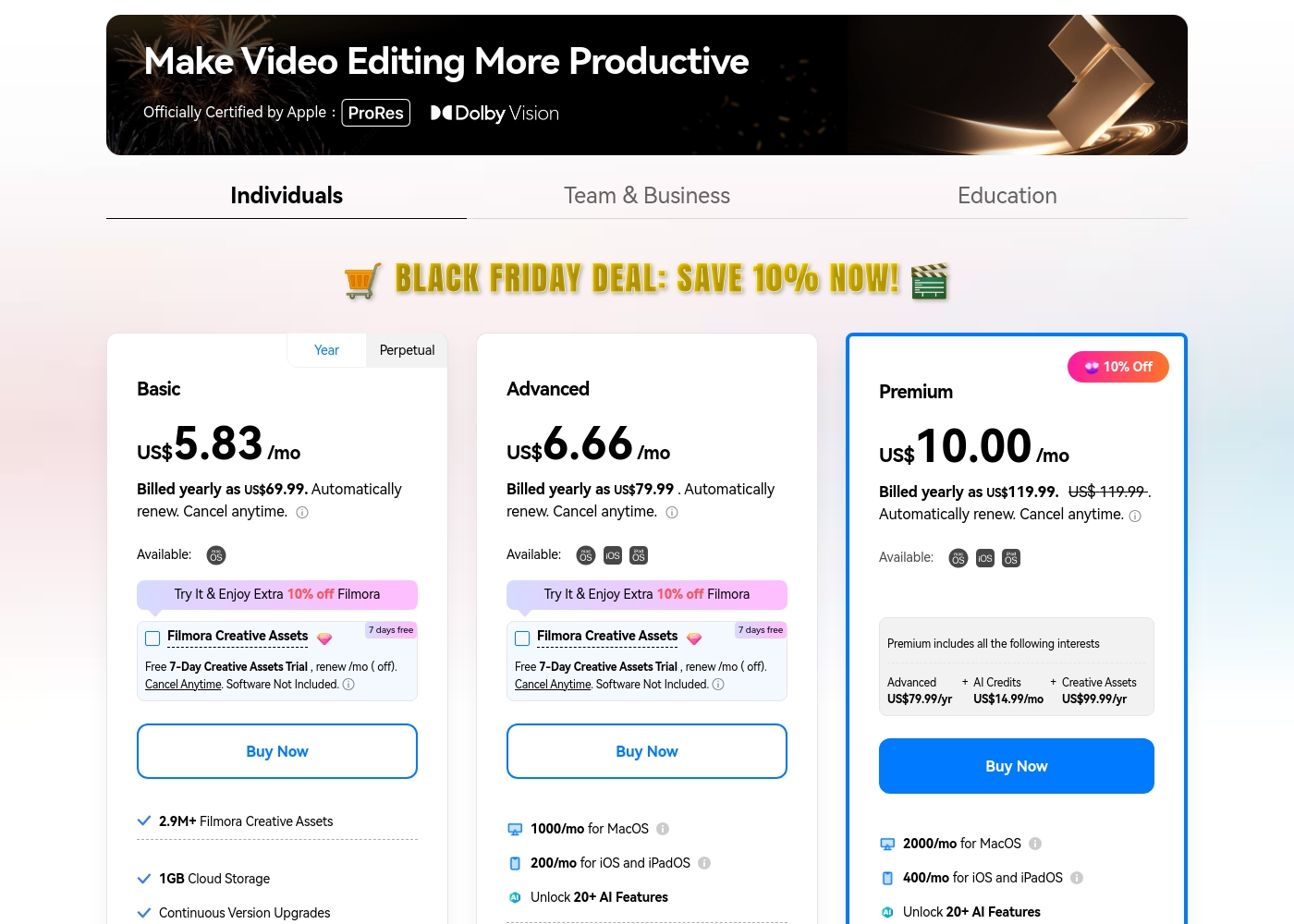
Filmora 14 costs between US$69.99 and US$119.99 per year with three individual annual plans: Basic at US$69.99, Advanced at US$79.99, and Premium at US$119.99.
These individual tiers offer flexible subscription options designed to fit different creator needs, from casual editing to advanced AI-enabled projects. All plans are billed annually and allow you to cancel renewal automatically at any time.
Basic
Price: Billed yearly as US$69.99 (US$5.83/mo) Websites Supported: Not explicitly stated (Implied 1 User/Mac Only) Best For: Not explicitly stated Refund Policy: 30-day money-back guarantee Other Features:
- 2.9M+ Filmora Creative Assets
- 1GB Cloud Storage
- Export without Watermark
- Continuous Version Upgrades
- 2.9M+ Filmora Creative Assets
- 1GB Cloud Storage
- Continuous Version Upgrades
- Export without Watermark
- 4K HD Export
- All Basic Features
- Apple Sync: macOS, iOS, iPadOS
- 10GB Cloud Storage
- 1000 AI Credits/mo for MacOS
- 200 AI Credits/mo for iOS and iPadOS
- All Advanced Features
- 2000 AI Credits/mo for MacOS
- 400 AI Credits/mo for iOS and iPadOS
- 100GB Cloud Storage
- Premium includes advanced bundle and creative assets
- One-time payment structure
- Enjoy Filmora 14 updates only (no major upgrades)
- 1,000 Filmora AI Credits (one-time grant)
- 2.9M+ Filmora Creative Assets
- 1GB Cloud Storage
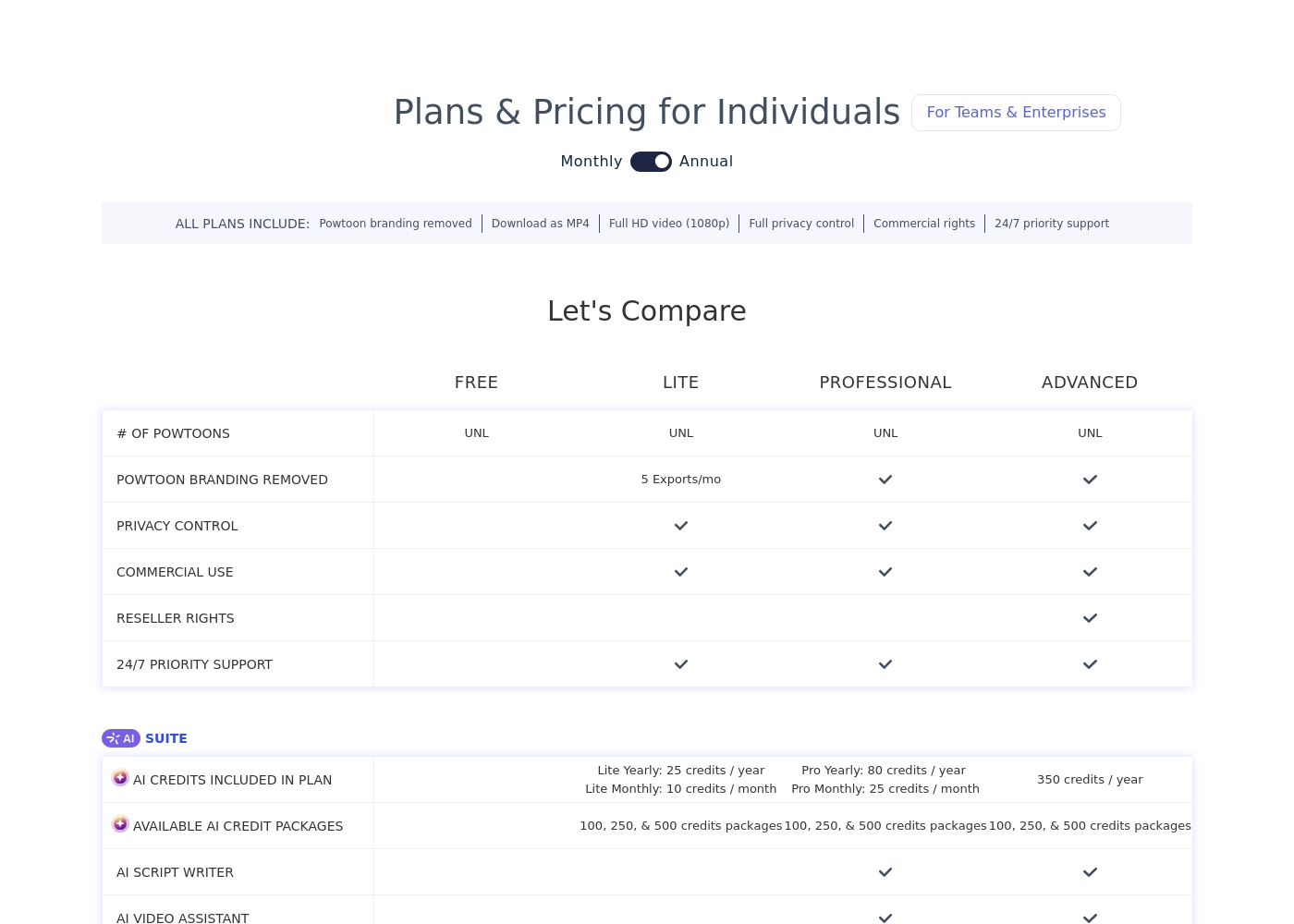
Powtoon offers four core plans—Free, Lite, Professional, and Advanced—but the exact subscription costs are not explicitly stated here; AI credit packages are available for purchase starting at $25 for 100 credits.
We can compare the features of these plans to help you decide which level of service best matches your needs for video creation.
FREE
Price: Not explicitly stated Websites Supported: Not explicitly stated Best For: Not explicitly stated Refund Policy: Not explicitly stated Other Features: Unlimited (UNL) Powtoons
- Unlimited Powtoons
- Unlimited Powtoons
- Powtoon branding removed
- Full HD video (1080p) download
- Full privacy control
- Commercial rights
- Unlimited Powtoons
- Powtoon branding removed
- Full HD video (1080p) download
- Full privacy control
- Commercial rights
- Unlimited Powtoons
- Powtoon branding removed
- Full HD video (1080p) download
- Full privacy control
- Commercial rights
Pricing Notes
- Filmora 14 offers clear annual pricing and perpetual licenses for maximum flexibility.
- Powtoon does not list its core subscription prices, making budget comparisons extremely difficult.
- Both Filmora 14 and Powtoon use a separate, usage-based AI credit system that costs extra, but Powtoon's credit purchases are non-refundable.
- The free version of Filmora 14 always exports videos with a watermark, as does Powtoon's free plan.
- Powtoon users report unexpected charges and billing difficulties often around renewals.
Pricing Head-to-Head
User Reviews
Users consistently praise Filmora for its excellent ease of use and intuitive, simple interface. Many editors, from hobbyists to long-term users, find the built-in features helpful, noting the software performs well even on modest hardware.
However, external feedback sharply pivots when discussing company operations. A significant volume of criticism focuses intensely on deceptive billing practices and poor customer service.
I love using Wondershare’s video editor, Filmora! It’s so easy to use and really fun too. This program keeps up with my creativity every step of the way.
Powtoon consistently earns overwhelmingly positive praise for customer support responsiveness. Users describe the support team as professional, quick, and highly effective.
Reviewers frequently mention support staff by name, noting how they solve technical problems swiftly, sometimes even over weekends, or help transfer extensive work between accounts. 💪 This high level of service suggests a strong commitment to existing customers.
Top-notch responsiveness from the Powtoon support team. Volodymyr wrote back almost immediately regarding a technical problem with text color. The development team actually fixed my issue within just a few hours. This timely communication and swift action made all the difference.
Our Verdict
This isn't a case of better or worse; Filmora 14 and Powtoon are different tools for different jobs. If you need a fast, deep editor that works with classic video footage, Filmora 14 wins. If your job involves rapid-fire animated presentations for a team, Powtoon is the clear champion. Filmora 14’s superpower is making complex editing accessible and performing technical fixes. The AI Video Enhancer polishes low-quality footage instantly. Its Magnetic Timeline and Multi-Camera sync give you real control over complex video structure. Mac users will especially appreciate the integrated Metal rendering for faster performance. Powtoon’s superpower is instant content generation and outstanding human reliability. It can transform static documents into branded explainer videos in minutes using its Imagine AI. Powtoon is backed by a 4M+ asset library and industry-leading, highly praised 24/7 human support. The deciding factor is your output: are you creating highly polished narrative videos (Filmora 14) or frequent, branded animated communications (Powtoon)? Powtoon provides corporate utility and better team control. Filmora 14 provides superior, specialized video enhancement features. Choose Filmora 14 if you are a solo creator who prioritizes software speed and video quality fixes. Choose Powtoon if you are part of a team requiring consistent brand messaging and guaranteed access to swift, human customer support.
Frequently Asked Questions
Which is better for Mac users: Filmora 14 or Powtoon?
Filmora 14 supports integrated Metal rendering for faster Mac performance and smoother playback. Powtoon is a web-based tool. Its performance depends more on browser and internet speed.
Does Powtoon offer multi-camera editing like Filmora 14?
No, Powtoon uses a simpler, presentation-based timeline for animated content. Filmora 14 offers true Multi-Camera editing to sync and switch multiple angles easily for complex shoots.
Which tool is better for creating animated explainer videos for business?
Powtoon is specifically designed for creating highly engaging, animated explainer videos rapidly. It can transform static documents directly into animated content using its Imagine AI suite.
Can I use either product with a one-time perpetual license purchase?
Only Filmora 14 offers a perpetual license option for a single, one-time payment. Powtoon operates strictly on subscription or usage-based AI credit packages.
Which tool has better customer support, Filmora 14 or Powtoon?
Powtoon wins this metric clearly, with users consistently praising its rapid 24/7 Priority Support. Filmora 14 support often relies on frustrating and ineffective automated bots.
How do the fundamental AI capabilities differ between Filmora 14 and Powtoon?
Filmora 14 uses AI mainly for technical polish, like one-click video enhancement and auto-reframing existing footage. Powtoon uses AI primarily for instant content generation, such as scripting and document-to-video conversion.
Ready to Choose?
Both tools have their strengths. Choose based on your specific needs.