Flaticon vs Shade
Flaticon and Shade are both popular tools for creatives, but they solve completely different problems. Flaticon is your go-to for finding and downloading icons. Shade is a central hub for storing and sharing all your team's media files.
Unmatched Icon Library for Design Workflow.
We find Flaticon delivers unmatched variety and highly usable format flexibility for visual assets. The platform excels with its extensive 18-million icon library and highly functional free tier, making it useful for both professionals and casual users like teachers or students. Overall, this is a necessary resource for streamlining nearly any graphic design workflow.
Pros
- Access to a vast library of over 18 million vector icons and stickers.
- High-quality icons available in multiple styles (flat, line, colorful, and 3D).
- Excellent, robust free plan provides professional-grade resources.
- Intuitive interface, efficient search function, and quick customization tools.
Cons
- Free plan requires strict attribution for all downloads.
- Isolated complaints noted concerning difficult account and content deletion processes.
Smart search, but pricing is opaque.
We find Shade offers a compelling centralized hub for media teams, with standout AI search and intelligent file streaming. Overall, it's a strong workflow tool, but the lack of public pricing for team plans is a significant drawback for prospective buyers.
Pros
- All-in-one platform for storage, review, and approval
- Intelligent file streaming for fast access to large files
- Powerful AI search and automated metadata
- Secure archiving for long-term project storage
Cons
- Team and enterprise pricing is not publicly disclosed
- Requires a sales demo for detailed quotes and scalability
- Limited external review data for deep validation
AboutFlaticon
Flaticon is an enormous resource catalog built for creativity. It holds over 18 million vector icons and versatile stickers.
These resources are proudly made by and for designers just like you. You can find more than standard static images here.
Look for various resource types, including Animated icons and essential Interface icons. It truly is a comprehensive library for all your visual needs.
AboutShade
💡 Shade is an all-in-one platform for media storage and management. It's designed for creative and media teams who handle large files daily. It combines intelligent file streaming, review tools, and smart search in a single place.
Highlights
Feature Comparison
Features Overview
We highlight the main differences and pick a winner for each feature.
User Interface
Flaticon is a straightforward search and download engine. Shade is a centralized dashboard for file management.
Flaticon's interface is built for one thing: finding an icon fast. You search, you click, you download. The process is quick and intuitive, with filters for style and color. Shade's interface is your team's media command center. It shows uploaded files, allows for search, and provides sharing links. It's designed for browsing and managing, not just grabbing a single file. The key difference is scope. Flaticon gets you in and out for a specific asset. Shade is where your team lives and collaborates all day. A designer might use Flaticon for 10 minutes to grab a set of icons. A video editor might use Shade for hours to organize project footage.
Core Library & Content
Flaticon gives you access to 18M+ ready-made assets. Shade is an empty vessel for your own team's content.
Flaticon is a treasure trove. It offers over 18.0 million vector icons and stickers in styles like flat, line, and 3D. You're buying into a massive pre-existing library. Shade has no pre-built library. It's a platform for storing your team's unique files—videos, images, documents. Its value is in organizing what you already have. This is the biggest difference. Flaticon is a content provider. Shade is a content organizer. If you need a weather icon for a slide deck, Flaticon has it. If you need to manage the 500 raw videos from a product shoot, Shade is for you.
File Handling & Formats
Flaticon offers multiple download formats for assets. Shade streams files so you don't have to download them.
Flaticon lets you download in formats designers need: SVG, EPS, PSD, and PNG in various sizes. Premium unlocks all formats and removes attribution. Shade focuses on streaming. You can preview and work with large video files directly in your browser without downloading them first, saving bandwidth and time. Flaticon is about getting the right file onto your computer. Shade is about accessing the file without ever leaving the cloud. For a logo, you'll download the SVG from Flaticon. For a 4K video draft, you'll stream and review it in Shade.
Collaboration & Workflow
Flaticon is for individual work. Shade is built for team collaboration and reviews.
Flaticon is a solo tool. You search and download for your own project. There are no features for team sharing, commenting, or approvals. Shade is collaboration-first. It includes review and approval tools, allowing stakeholders to leave time-stamped comments directly on media files. It acts as a single source of truth. The trade-off is clear: Flaticon is for creation. Shade is for communication and workflow. A freelancer would use Flaticon alone. An agency needs Shade to get client sign-off on a video.
Search & Discovery
Flaticon has great keyword search. Shade has AI that understands your files' content.
Flaticon's search is excellent for icons. You can filter by style, color, and orientation. It's built to find the perfect graphic from 18 million options. Shade's search is AI-powered. It automatically generates metadata for your uploaded files, letting you find a video clip by describing its content, even if you don't know the filename. Flaticon helps you discover new assets. Shade helps you rediscover your own assets. You'd use Flaticon to find 'minimalist user icons'. You'd use Shade to find 'the sunset clip from the Q2 campaign'.
Pricing Model
Flaticon has transparent, public pricing. Shade requires a custom quote for teams.
Flaticon's pricing is clear. A free plan exists, with Premium at $8.25/month (annual) or $12.99/month (monthly). You know exactly what you'll pay. Shade has a free tier, but team/enterprise pricing is hidden. You must contact sales for a quote, which adds friction and uncertainty. Flaticon wins on pricing transparency and accessibility. Shade's model is typical for enterprise software but less friendly for small teams. A solo designer can buy Flaticon in minutes. A marketing director needs to schedule a sales call for Shade.
Customer Support
Flaticon offers priority support to paying users. Shade's support is reportedly slow.
Flaticon gives Premium subscribers 'Priority support.' While response times aren't guaranteed, it's a defined benefit for customers. External reviews for Shade consistently mention slow customer support responsiveness. Some users report it took several days to get answers. Reliable support is crucial for business tools. Flaticon appears to have a more structured offering here. If you have a billing question about your icon subscription, you'd expect a faster reply from Flaticon.
Security & Data
Neither tool explicitly details their security protocols publicly.
Neither Flaticon nor Shade provides detailed information about security measures like encryption or compliance certifications on their public sites. This is a common gap for many SaaS tools, but it's important for teams handling sensitive media. You'd need to contact both for their security white papers. Flaticon hosts public asset libraries. Shade hosts your private team files. The latter arguably requires more transparency. For critical projects, you should request security documentation from both vendors before deciding.
Learning Curve
Both tools are designed to be intuitive and easy to pick up.
Flaticon is incredibly simple. Search, filter, click download. Most users are productive within minutes. Shade is also praised for its intuitive interface and low learning curve. Teams can adopt it quickly without extensive training. Neither tool requires a complex onboarding process. This is a tie, as both prioritize user-friendliness in their design. Whether you're grabbing an icon or organizing a library, you won't need a manual for either tool.
Value for Money
Flaticon offers clear, tiered value. Shade's value depends on your team's media chaos.
Flaticon's value is direct: pay $8.25/month for unlimited downloads (2000/day) and vector formats. The ROI is easy to calculate for a designer. Shade's value is in time saved. If your team wastes 5 hours a week searching for files, the tool's cost (once priced) could be justified. Flaticon is a predictable operational expense. Shade is an investment in workflow efficiency. A freelancer picks Flaticon for the assets. A 20-person creative team picks Shade to stop the file hunt.
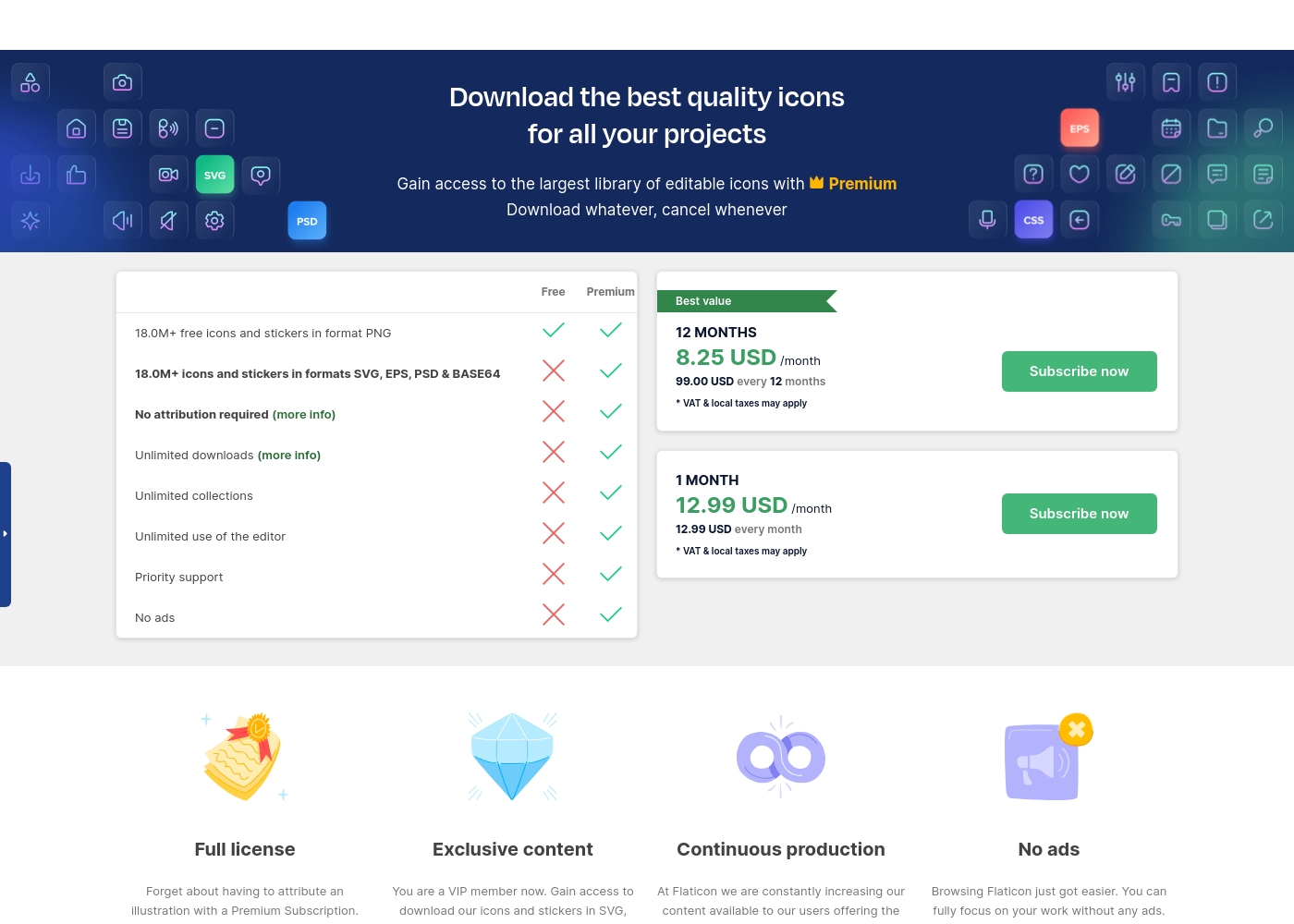
Flaticon costs between $8.25 and $12.99 per month with three plans: Free at $0, Premium (12 Months) at $99.00 yearly, and Premium (1 Month) at $12.99 monthly.
Here is a detailed look at the available subscription levels and what they include.
Free
Price: $0 Websites Supported: Not explicitly stated Best For: Personal projects and basic graphic needs Refund Policy: Not applicable Other Features:
- Access to 18.0M+ free icons and stickers in PNG format
- Limited download access
- Limited to 3 collections (50 icons limit per collection)
- 18.0M+ free icons and stickers in format PNG
- Attribution required
- Limited to 3 collections (50 icons each)
- Access 18.0M+ icons in SVG, EPS, PSD & BASE64 formats
- No attribution required
- Unlimited downloads (up to 2000 daily)
- Unlimited collections (256 icons limit each)
- Unlimited use of the editor
- Access 18.0M+ icons in SVG, EPS, PSD & BASE64 formats
- No attribution required
- Unlimited downloads (up to 2000 daily)
- Unlimited collections (256 icons limit each)
- Unlimited use of the editor
Shade costs an undisclosed amount with at least 1 plan: Start for Free at $0.
Finding the right plan depends on your team's specific media storage and workflow needs.
Start for Free
Price: $0 Websites Supported: Not explicitly stated Best For: Individuals or small teams exploring AI search Refund Policy: Not explicitly stated Other Features: Intelligent file streaming, review and approval, automated metadata, AI search, media archiving
- Intelligent file streaming
- Review and approval
- Automated metadata
- AI search
- Archive
Pricing Notes
- Flaticon's pricing is transparent with public monthly and annual rates.
- Shade's paid plan pricing is not listed; it requires contacting sales for a quote.
- Flaticon's annual plan ($99/year) offers the best value at $8.25/month.
- Flaticon has a 30-day money-back guarantee if the service is unused.
- Shade's free plan is a starting point, but team features likely require a paid quote.
Pricing Head-to-Head
User Reviews
Flaticon enjoys an overwhelmingly positive reception across thousands of reviews, holding a near-perfect score on Trustpilot. Users consistently praise the platform's extensive library, which contains over 18 million high-quality icons in diverse styles, including flat, line, and 3D options.
Recurring themes highlight the exceptional user experience (UX) and the intuitive, efficient search functionality. Reviewers, ranging from graphic designers and developers to students and teachers, find the platform essential for their daily workflow.
I love using these icons because they are so fun and cute. They make my presentations much more personalized. They are very easy to use and access, and I appreciate the different styles available for fresh looks.
External reviews for Shade show a generally positive sentiment, though the sample size appears small. Users on Capterra highlight the platform's ease of use and its strong AI-powered search functionality, which helps teams quickly find files.
Some reviewers note that the onboarding process was smooth and the customer support was responsive. A few mentions point to the value of the centralized media hub for collaboration.
The AI search is a game-changer. We can locate any footage in seconds without digging through endless folders. It has saved our team so much time on projects.
Our Verdict
For most people, this isn't a direct fight—it's about what you actually need to do. Flaticon wins if you're looking for icons. Shade wins if you're drowning in files. Flaticon's superpower is its insane library of 18M+ icons. Need a line icon for an app? A sticker for a presentation? You'll find it in seconds. It's the ultimate toolbox for getting specific design assets quickly and affordably. Shade's superpower is being the central brain for your team's media. It kills the chaos of scattered files. With AI search and streaming, it helps creative teams find any asset instantly without downloads or digging through folders. The deciding factor is your problem. Are you an individual creator missing assets? Pick Flaticon. Are you a team wasting hours every week searching for your own files? That's Shade's territory. So, pick Flaticon if you need to download icons for your next design. Pick Shade if your team needs to organize, search, and collaborate on all its media in one place. They solve different problems for different people.
Frequently Asked Questions
Which is better for small teams: Flaticon or Shade?
It depends on the team's problem. If the team needs lots of icons, Flaticon's free or premium plan is great. If the team needs to organize and share all its media files, Shade is the better choice.
Can I use Flaticon for team collaboration like Shade?
No. Flaticon is designed for individual downloading and use. It has no built-in tools for team reviews, sharing, or project collaboration, which are Shade's core features.
Is Shade worth the extra cost over Flaticon?
You can't directly compare costs as they solve different problems. Shade's value is in saving team time on file management. Flaticon's cost is for access to a massive asset library.
Does Flaticon have AI search like Shade?
No. Flaticon has a powerful keyword and filter search for its icon library. Shade uses AI to automatically tag and search the content of your own uploaded files.
Which tool has better file format support?
They support different needs. Flaticon offers multiple download formats (SVG, EPS, PSD). Shade focuses on streaming your existing files without downloads, supporting your native formats.
Can I try Shade for free before buying a team plan?
Yes. Shade offers a 'Start for Free' plan that includes core features like AI search and streaming. This lets you test the platform, but team features require a custom quote.
Ready to Choose?
Both tools have their strengths. Choose based on your specific needs.