FlexClip vs VEED
FlexClip and VEED are both strong, browser-based video editors that rely heavily on AI to speed up creation. FlexClip offers a huge stock asset library and transparent, budget-friendly pricing. VEED specializes in advanced AI refinement features and structured team collaboration tools.
Easy Video Editor with Powerful AI
We found FlexClip to be exceptionally strong in combining a massive commercial asset library with highly effective AI tools that dramatically speed up the creative process. The user experience is smooth and intuitive, which lowers the barrier to entry significantly for new creators. Overall, we recommend FlexClip as a top choice for individuals and businesses seeking fast, high-quality video production.
Pros
- Highly intuitive, drag-and-drop interface designed for quick and easy video creation.
- Extensive library including 6,000+ templates and millions of searchable stock assets.
- Powerful AI features significantly streamline tasks like video generation and subtitling.
- Offers high-quality 4K download options (available on the Business plan).
Cons
- Advanced editing features like keyframes or keystone adjustments are currently missing.
- AI accuracy can sometimes fail, such as incomplete lyric or subtitle extraction.
- Stock music selection could be broader and more diverse in trending genres.
- Paid plans are necessary to unlock full features, resource access, and remove the trademarked watermark.
Browser-based video editing power.
We find VEED to be a highly accessible, browser-based video editing solution that excels at streamlining content creation using powerful AI. Overall, we recommend this platform, especially for short-form content, despite the premium pricing required for full functionality.
Pros
- Extremely intuitive and beginner-friendly interface.
- Fully web-based; no software installation or downloads required.
- Powerful AI tools for auto-subtitles, translations, and video generation.
- Excellent for creating and editing short-form content (e.g., YouTube Shorts).
Cons
- Subscription costs are frequently cited as a limiting factor.
- Unreliable for long-form video recording and editing (potential data loss/glitches).
- Exporting 4K video is restricted to higher-tier or professional plans.
- AI translations (subtitles) can sometimes be inaccurate or difficult to edit manually.
AboutFlexClip
FlexClip is an all-in-one online video editing solution designed to make powerful video creation accessible to everyone. It's built for folks who need professional output without needing extensive filmmaking experience. Based on user testimonials, this tool is perfect for educators, marketers, designers, and small business owners alike. It provides flexible editing capabilities right in your browser, helping you produce high-quality clips quickly. ✅
AboutVEED
VEED is a complete end-to-end video suite designed for busy teams and creators. It allows you to create, collaborate, and share impressive videos entirely from within your browser. This platform offers seamless workflow consolidation, perfect for everyone from individual content makers to large organizations like the Fortune 500. It includes smart collaboration tools and a dedicated Brand Kit, ensuring your team maintains consistency. Additionally, you access a vast, royalty-free stock library featuring over 2 million video and audio assets. 💡
Highlights
Feature Comparison
Features Overview
We highlight the main differences and pick a winner for each feature.
Stock Asset Library
FlexClip offers over 4 million assets, double VEED’s stock library size.
FlexClip provides access to a massive library of over 4 million videos and photos. All these assets are licensed for easy, one-click commercial use, speeding up production. This huge resource helps FlexClip users find niche footage more easily. VEED also offers a substantial collection, featuring over 2 million royalty-free video and audio assets. Their stock is easily accessible right inside the unified editor. This is great for supplementing user-created content. The key difference is volume; FlexClip provides far more searchable visual variety. FlexClip users leverage this depth to increase content types significantly. If your finished video relies heavily on integrated stock media, FlexClip is the superior choice for sheer quantity.
Advanced AI Tools
VEED has cutting-edge AI features like Eye Contact and Avatar generation.
FlexClip focuses its AI on efficient project initiation—Video Generator, Text to Speech, and Auto Subtitle. These tools quickly streamline the creation of foundational video elements. FlexClip gives 9,600 AI credits yearly in its top Business plan. VEED pushes the boundary with advanced, corrective AI features for presentation quality. This includes Eye Contact Correction and Filler Word Removal for polished speaker videos. VEED also offers AI Avatars and the Clone Yourself capability. The trade-off is between creation speed (FlexClip) and presentation refinement (VEED). VEED's AI tools are designed to make amateur footage look instantly professional. Teams using talking heads or interviews will find VEED's unique correction tools critical for high-quality output.
Pricing Visibility
FlexClip posts all prices clearly; VEED standard paid plans are hidden.
FlexClip's pricing is completely transparent, ranging from $0.00 to $19.99/month on annual rates. Users know exactly what they pay for 1080p or 4K access. The plans clearly define feature limits, storage, and AI credit allocation. VEED requires users to 'Start for free,' but standard paid plan prices aren't publicly listed or clear. This forces users to contact them or search deeply to understand the professional cost. Enterprise pricing requires contacting sales directly. FlexClip's honest, accessible pricing makes budgeting much simpler for individuals and small teams. You can instantly pick the tier that fits your specific needs. If clear budgeting is critical, FlexClip offers instant peace of mind with its published subscription rates.
Team Collaboration
VEED provides centralized Brand Kit and Review Mode for superior team control.
FlexClip supports team workflows primarily through seamless cloud storage (up to 100GB) and file sharing. This allows teammates easy access to project files and custom fonts. It focuses on secure asset management. VEED is purpose-built for scaling video production across organizations with key collaboration features. This includes Asset Sharing and a formal Review Mode. They also enforce a centralized Brand Kit. VEED's Review Mode creates a defined feedback loop, which is often vital for organized marketing teams. FlexClip offers basic file access; VEED offers advanced workflow control. For large teams where brand consistency and structured feedback are mandatory, VEED provides superior process management.
Production Polish Tools
FlexClip provides specialized tools like Chroma Key and Speed Curve controls.
FlexClip includes advanced post-production tools often found in desktop software, like Chroma Key. This helps replace green screens for seamless video integration. The specialized Speed Curve function allows for precise pacing control. VEED focuses more on AI correction (like Eye Contact) and efficiency controls (Magic Cut, Filler Word Removal). Specific traditional editing tools like Chroma Key or Speed Curve aren't prominent features. FlexClip offers more creative control over visual effects and motion dynamics quickly. VEED emphasizes audio and presenter perfection. Creators needing precise control over motion graphics or visual effects will appreciate FlexClip's specialized editing toolkit.
Mobile Workflow
VEED offers a dedicated app for mobile editing, FlexClip is browser-only.
FlexClip’s platform is browser-based, suggesting it is primarily intended for desktop and large-screen use. Users won't find a dedicated published application for phone editing. FlexClip is best used at your desk. VEED explicitly offers the VEED Captions App, turning your phone into an editing powerhouse. This allows users to record, edit, subtitle, and publish professional video right from their device. For users who capture and process content away from a desk (e.g., social media managers), VEED provides true mobile workflow freedom. If creating and posting content directly from your phone is essential, VEED is the superior option.
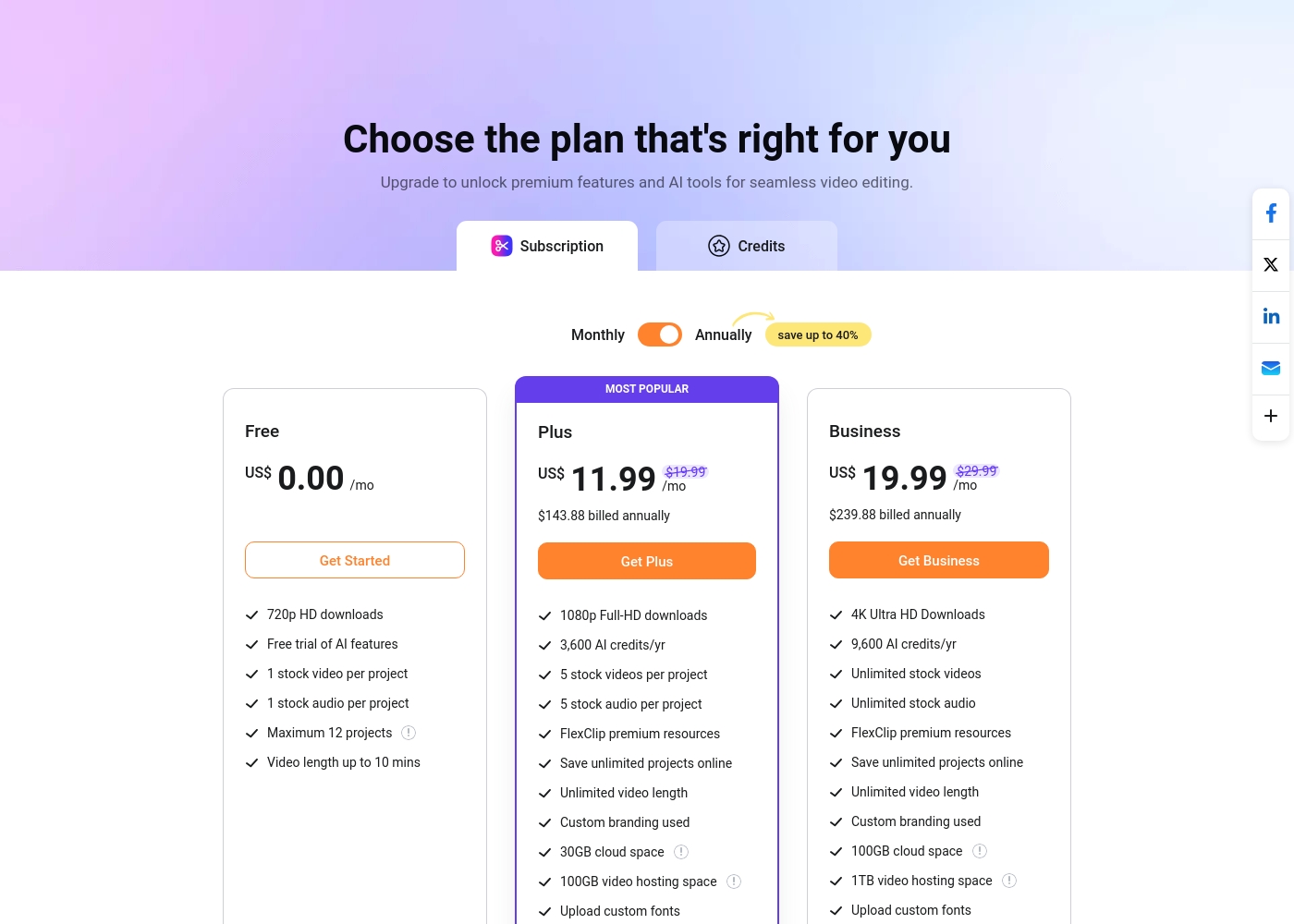
FlexClip costs between US$0.00 and US$19.99 per month with 3 plans: Free at US$0.00, Plus at US$11.99, and Business at US$19.99.
You can examine the different plan options below to decide which one fits your creative needs best.
Free
Price: US$0.00/mo Websites Supported: Not explicitly stated Best For: Testing out the service and casual video creation Refund Policy: Not explicitly stated Other Features:
- 720p HD downloads
- Free trial of AI features
- 1 stock video and 1 stock audio per project
- Maximum 12 projects allowed
- 720p HD downloads
- Free trial of AI features
- 1 stock video per project
- 1 stock audio per project
- 1080p Full-HD downloads
- 3,600 AI credits/yr
- FlexClip premium resources
- Save unlimited projects online
- Custom branding used
- 4K Ultra HD Downloads
- 9,600 AI credits/yr
- Unlimited stock videos
- Unlimited stock audio
- FlexClip premium resources
VEED costs between Not explicitly stated and Not explicitly stated per period with 0 plans: Not explicitly stated.
Specific pricing tables are not publicly detailed here, but VEED does offer multiple ways to engage with the product, ranging from free access to custom enterprise solutions. This structure ensures users of all sizes can find a suitable entry point.
Free Access
Price: Free Websites Supported: Not explicitly stated Best For: Users who want to test core features or single creators with minimal usage needs. Refund Policy: Not explicitly stated Other Features:
- Start for free * No credit card required
- Use the video editor
- Access AI tools like Auto Subtitle Generator

Pricing Notes
- FlexClip offers completely transparent pricing with public tiers up to 4K resolution.
- VEED's standard paid pricing is not publicly stated, making budget comparison difficult.
- FlexClip's Annual billing offers up to 40% savings versus monthly rates.
- VEED locks 4K export capability exclusively behind its higher-tier, unlisted paid plans.
- FlexClip's free plan allows 720p downloads and 12 projects, offering substantial zero-cost functionality.
Pricing Head-to-Head
User Reviews
Users overwhelmingly praise FlexClip’s user-friendly interface and minimal learning curve, noting that it makes powerful video creation accessible to everyone, regardless of prior experience. Many reviewers state that the platform significantly reduces the time required for content creation, often replacing more complex software they previously relied on.
The extensive library of over 6,000 templates and vast stock footage is frequently highlighted as a major efficiency booster. The incorporated AI tools, such as the Video Generator, are generally seen as game-changers, streamlining workflow for commercial and personal projects.
This thing is awesome! I needed to create a simulation video quickly, and FlexClip saved the day by making complex editing simple. It’s highly versatile and intuitive with a minimal learning curve, offering great value for beginners.
VEED enjoys generally positive external feedback, focusing heavily on its ease of use and accessibility. Reviewers consistently praise the web-based platform for being intuitive, beginner-friendly, and having a clean interface, which makes creating professional videos quick and simple.
Many users appreciate the robust features like drag-and-drop functionality, good animation options, and powerful AI tools, particularly for generating content and quickly creating YouTube Shorts. The platform’s ability to handle high-fidelity transcriptions is also frequently mentioned.
VEED simplifies the video creation process significantly. Editing and adding effects, especially utilizing new AI technology, makes improving your product fast and seamless. I highly recommend this platform.
Our Verdict
VEED and FlexClip are both powerful browser-based AI video editors. The choice depends entirely on whether you prioritize polished team collaboration or massive asset volume at a predictable cost. FlexClip secures the clear value win due to transparent pricing and its massive stock library. FlexClip’s immense superpower is asset volume and transparency—everything is easy to budget. You get instant access to over 4 million stock assets and 6,000 templates. Plus, FlexClip clearly defines its 4K access costs at the $19.99 monthly tier, making budgeting simple. It’s the perfect tool for individual creators who need to crank out high volumes of varied content without excessive costs. VEED’s strength lies in its cutting-edge AI and superior team environment tools. Features like Eye Contact Correction and Filler Word Removal instantly upgrade presenter footage quality. Teams thrive using VEED's centralized Brand Kit and Review Mode for structured feedback loops. VEED is built to scale video quality and process management simultaneously across an organization. The deciding factor is transparency versus advanced process control. If clear, budget-friendly 4K access and a colossal stock library matter most, FlexClip is your clear answer. If you manage a team requiring advanced AI polishing, a dedicated mobile workflow, and strict brand consistency, the powerful process control of VEED is worth the investment, despite the hidden pricing. For most creators seeking efficiency and maximum value, FlexClip is the recommended choice due to its high user satisfaction and predictable costs. Enterprise-scale marketing units should invest in VEED to leverage its focused collaboration suite.
Frequently Asked Questions
Which is better for individual creators: FlexClip or VEED?
FlexClip is generally better for individual creators focused on volume and value. It offers 6,000+ templates and a huge 4M+ stock library for quick projects. Its pricing is transparent and more budget-friendly. VEED leans toward team collaboration structures.
Does FlexClip offer advanced AI features like VEED?
FlexClip offers AI focusing on generation (Video Generator, Subtitles, Text to Speech). VEED offers more advanced refinement AI features for presenters. These include Eye Contact Correction and Filler Word Removal for polished looks.
Which software provides better access to stock video assets?
FlexClip wins this category decisively, offering access to over 4 million videos and photos. VEED provides access to a solid but smaller library of 2 million-plus assets. FlexClip's greater volume supports a wider range of projects.
Is 4K export easier and cheaper with FlexClip or VEED?
FlexClip makes 4K access simple via its $19.99/month Business plan, clearly stated upfront. VEED restricts 4K export to higher tiers, the pricing of which is not publicly disclosed. FlexClip offers clearer value and predictable access.
How does FlexClip compare to VEED for team collaboration?
VEED excels with specialized team tools like Review Mode and Asset Sharing through a centralized Brand Kit. FlexClip supports collaboration primarily through cloud storage access and file sharing. VEED is better for structured team workflows.
Can I edit and publish videos on the go using FlexClip or VEED?
VEED offers a dedicated mobile app, the VEED Captions App, for true on-the-go editing and publishing. FlexClip is largely optimized for desktop browser use. Choose VEED if mobile workflow is essential.
Ready to Choose?
Both tools have their strengths. Choose based on your specific needs.