Freshservice by Freshworks vs Techinline
Freshservice and Techinline solve very different IT headaches. Freshservice is a unified IT service platform, while Techinline is a focused remote access tool. Your choice depends entirely on whether you need a service desk or a remote connection.
Solid AI-powered ITSM platform.
We find Freshservice offers a powerful, unified platform for consolidating IT service and asset management. Its AI integration and ease of use are standout features for modernizing IT operations. Overall, it's a strong choice for teams seeking to move beyond legacy tools and work more proactively.
Pros
- Unified platform for ITSM, ITAM, and ESM reduces tool sprawl.
- AI agents automate repetitive tasks within the agent's workflow.
- Emphasizes a user-friendly interface and rapid deployment.
- Transparent, scalable pricing models help predict costs.
Cons
- Detailed public pricing page can be difficult to find for quick comparison.
- Complex custom integrations may require extensive marketplace setup.
- May include unnecessary enterprise features for very small businesses.
- More than a simple ticket-only tool, which adds some complexity.
Solid remote support with scalable pricing.
We found Techinline SetMe to be a capable and secure remote access solution, especially for IT professionals and small teams needing reliable unattended and on-demand support. Its tiered pricing offers flexibility, but the lack of a clear refund policy is a notable gap for potential buyers.
Pros
- Simple, instant client connections via a set.me link.
- Scalable plans from individual use to enterprise-level team management.
- Stable connections with auto-reconnect and multi-monitor support.
- Centralized dashboard for managing all devices and permissions.
Cons
- Limited public user reviews made independent sentiment analysis impossible.
- No explicit refund policy is detailed on the website.
- Advanced team features require upgrading to higher-tier, per-seat plans.
- The 'Core' plan for individual use lacks on-demand support features.
AboutFreshservice by Freshworks
Freshservice is an AI-powered platform for IT and enterprise service management. It’s built for organizations that want to streamline their service desk, manage assets, and automate operations in one place. The core idea is to unify service delivery and asset context, eliminating the need for disconnected tools. It targets businesses looking for a modern, intelligent alternative to traditional ITSM software. ✅
AboutTechinline
SetMe is a remote support and management tool 🛠️ designed for IT professionals, support teams, and managed service providers. It lets you instantly connect to any computer, whether you’re providing live help or managing unattended servers and desktops from a central dashboard.
Highlights
Feature Comparison
Features Overview
We highlight the main differences and pick a winner for each feature.
Core Function
Freshservice is a full ITSM platform. Techinline is a remote access tool.
Freshservice manages tickets, assets, and workflows across IT and other departments. It's built for teams managing internal service requests. Techinline SetMe is built solely for remote computer control. It lets you connect to any machine for live support or unattended management. The difference is fundamental. Freshservice runs your IT department; Techinline connects you to specific computers within it. Think of Freshservice as the office manager and Techinline as the key to the server room.
Remote Support
Techinline is purpose-built for this. Freshservice offers basic remote tools.
Freshservice doesn't natively provide remote desktop access. It relies on third-party integrations from its marketplace for remote support capabilities. Techinline SetMe excels here. It offers zero-lag control, one-click client connections via set.me, and auto-reconnect on network drops. For pure remote support, Techinline is the clear specialist. Freshservice's strength is in managing the ticket that might lead to a remote session. If fixing remote issues is your core job, Techinline is the direct solution.
Service Management
Freshservice is a comprehensive platform. Techinline has no service desk.
Freshservice provides omnichannel ticketing, a self-service portal, and AI-powered request routing. It handles the entire lifecycle of a service request. Techinline has zero service management features. It provides a connection method but no system to track, assign, or resolve support tickets. You can use Techinline to fix an issue, but you can't log it or track it within the tool. For structured IT support, Freshservice is the complete package.
Asset Management
Freshservice includes a unified CMDB. Techinline tracks connected devices.
Freshservice features an auto-updating CMDB. It tracks hardware, software, and cloud assets and their relationships in real-time. Techinline's Business plan manages unlimited unattended devices from a central dashboard. It's for access control, not asset lifecycle management. Freshservice gives you context about your entire IT estate. Techinline gives you direct access to specific endpoints. The distinction is between managing a fleet and directly driving one car.
AI Capabilities
Freshservice uses AI for automation and insights. Techinline has no AI.
Freshservice integrates Freddy AI Agent. It automates common requests, guides agents, and provides predictive insights. Techinline SetMe has no AI features. Its value is in connection stability, speed, and security. AI is a major differentiator for Freshservice, helping reduce ticket volume and agent workload. For Techinline, the connection itself is the product.
Ease of Use
Techinline is simpler for its single task. Freshservice is intuitive for a platform.
Techinline SetMe is designed for quick connections. The set.me link makes it extremely easy for end-users to get help without setup. Freshservice's interface manages complexity across many features. It's described as user-friendly for an ITSM platform, but has a steeper learning curve. For a non-technical user needing remote help, Techinline is simpler. For an IT agent, Freshservice's workflow is logical. Context determines which is 'easier'.
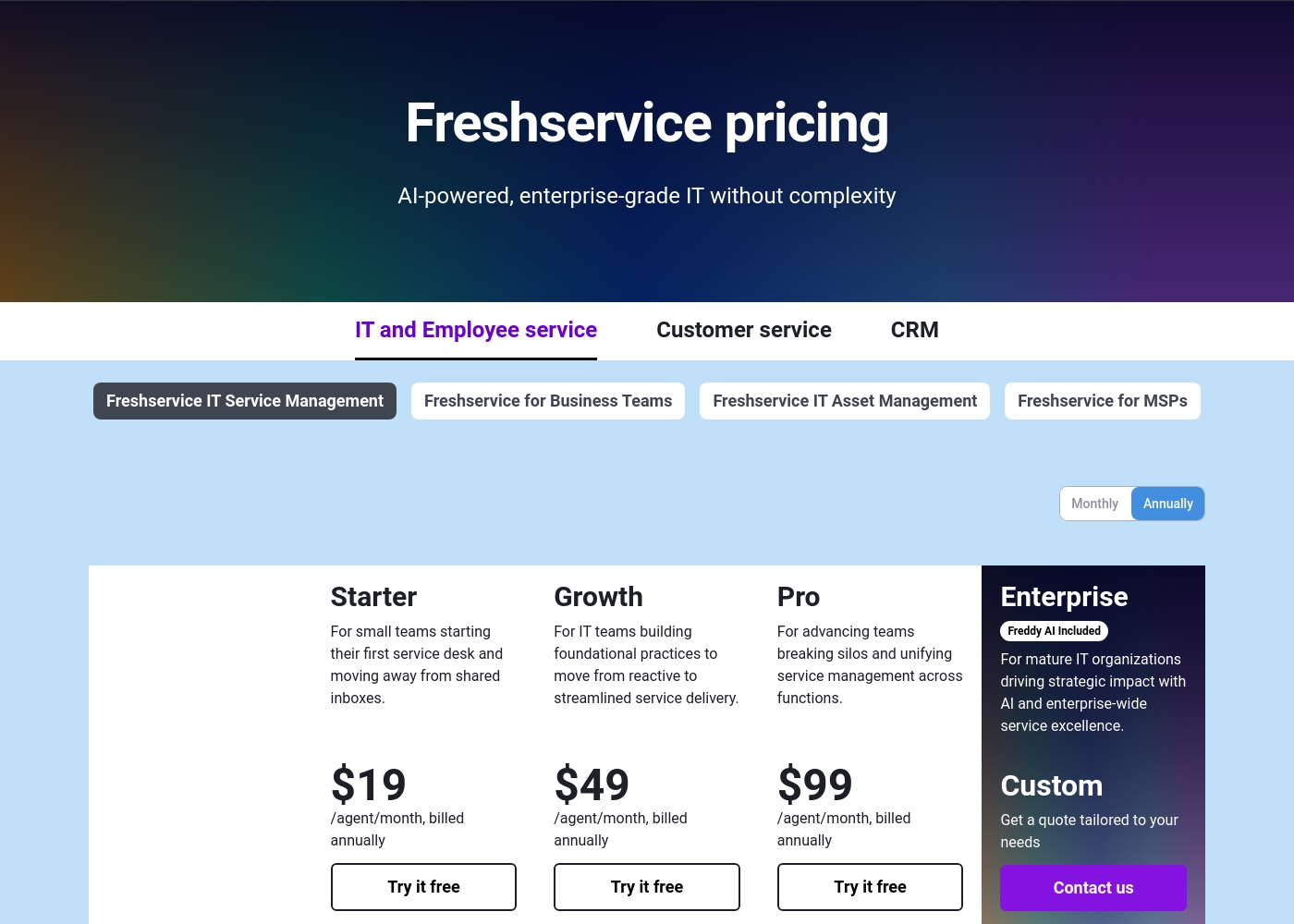
Freshservice by Freshworks pricing: Freshservice by Freshworks offers four scalable plans starting at $19 per agent, billed annually. Pricing is based on agent seats and advanced AI or management features, with both monthly and annual billing options available to fit different business sizes and needs.
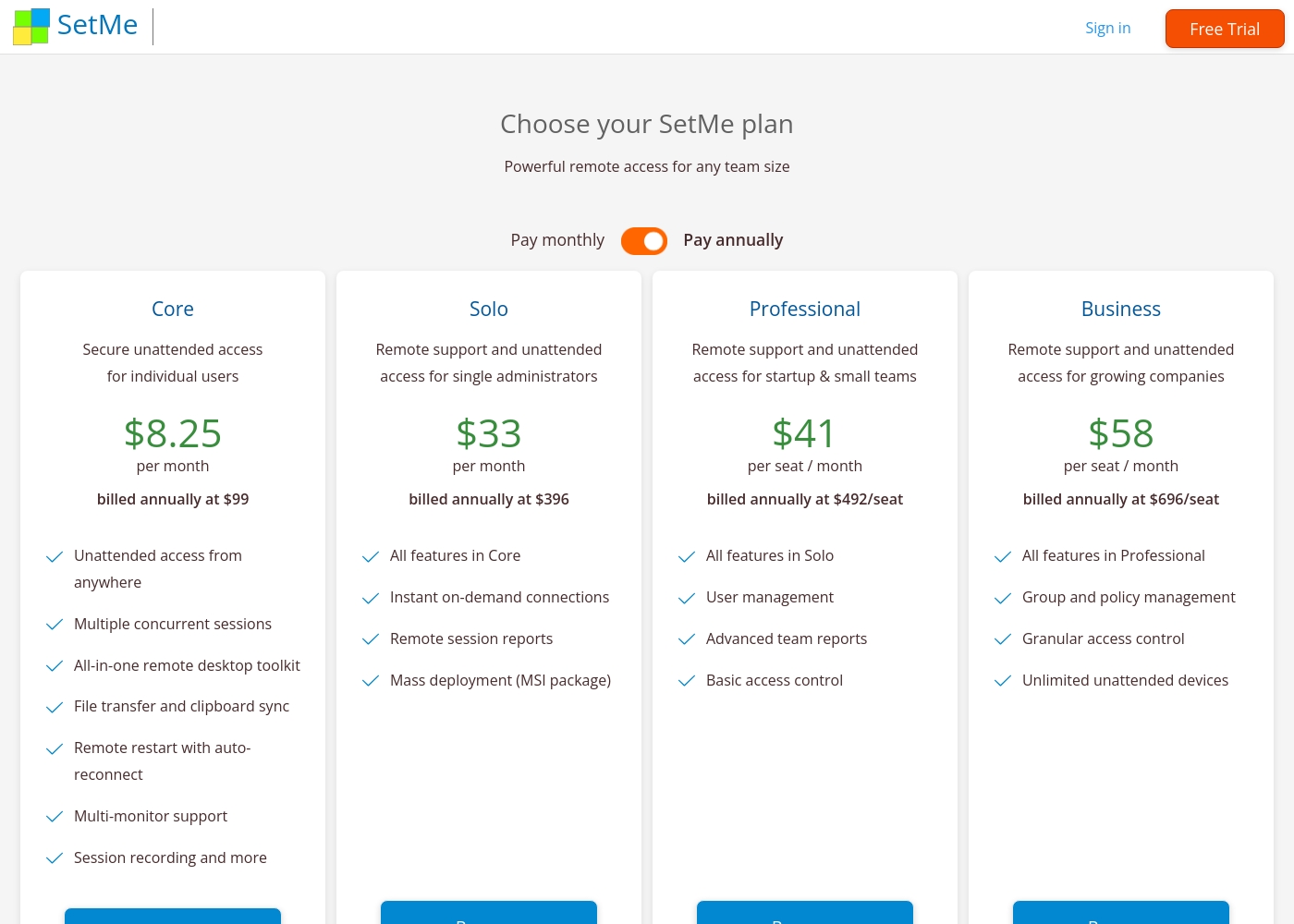
Techinline pricing: Techinline offers four SetMe plans starting at $8.25 per month (billed annually) for individual unattended access. Pricing scales based on features like on-demand support, seat count, and team management tools, with both monthly and yearly billing available for most tiers.
Core
Price: $8.25 per month (billed annually at $99) Websites Supported: Not explicitly stated Best For: Individual users needing secure unattended access Refund Policy: Not explicitly stated Other Features: Multiple concurrent sessions, File transfer and clipboard sync, Remote restart with auto-reconnect, Multi-monitor support, Session recording
This plan is perfect for individuals who only need to manage their own remote machines. It's a reliable choice if you don't need to provide instant on-demand support to new clients.
Pricing Notes
- Freshservice offers a free plan and scales with agent seats and advanced features.
- Techinline's cheapest plan is $8.25/month for individual unattended access.
- Techinline's team plans (Professional/Business) are priced per seat, which can increase costs.
- Both offer free trials, but Freshservice has 14 days while Techinline has 15.
Pricing Head-to-Head
User Reviews
Based on available external sources, we found a significant limitation in gathering public sentiment for this specific review. The Trustpilot link provided was inaccessible due to a verification error, and no Capterra data was supplied. Consequently, we cannot synthesize a balanced external review summary from real user feedback on platforms like Trustpilot or Capterra at this time. Our assessment is therefore based solely on the provided product information.
External reviews for Techinline SetMe were not accessible during this review. The provided Trustpilot URL returned a 403 error, preventing access to user feedback. Consequently, the review relies solely on the product's website information and our independent analysis of its features and pricing structure.
Our Verdict
The choice between Freshservice and Techinline isn't about which is better—it's about which one matches your exact problem. Freshservice by Freshworks is your IT command center. It unifies ticketing, asset management, and AI automation. You use it to run your entire help desk and manage all internal service requests. Techinline SetMe is a precision tool for remote connections. It excels at one thing: getting you into any computer, instantly and securely. The one-click set.me link makes support effortless for non-technical users. The deciding factor is your core need. If you need to manage workflows, assets, and multiple support channels, choose Freshservice. If you just need reliable remote access to fix computers, Techinline is the direct solution. For most IT departments, Freshservice by Freshworks is the foundational platform. But if remote support is your primary function, Techinline SetMe is the specialized tool for the job.
Frequently Asked Questions
Which is better for small teams: Freshservice by Freshworks or Techinline?
It depends on your focus. Freshservice by Freshworks is better if your team manages internal IT requests. Techinline is better if your team primarily provides remote computer support.
Does Freshservice by Freshworks have remote access like Techinline?
Freshservice by Freshworks doesn't include native remote desktop control. It relies on integrations for that functionality. Techinline's core feature is instant remote access.
Is Techinline worth the extra cost over Freshservice by Freshworks?
Techinline's cost is for specialized remote access. Freshservice by Freshworks costs more because it's a full service management platform. Value depends on whether you need ITSM or just remote connections.
Can I use both Freshservice by Freshworks and Techinline together?
Yes, but they serve different purposes. You might use Freshservice by Freshworks to log tickets and Techinline to perform the remote fix. Check integration options to see if they connect.
Which tool has better AI features?
Freshservice by Freshworks has significant AI capabilities with its Freddy AI Agent for automation. Techinline has no AI features; it focuses on connection performance and security.
Which is easier for non-technical employees to use?
For getting remote help, Techinline is easier. The client just visits a set.me link. For submitting IT requests, Freshservice by Freshworks offers a user-friendly self-service portal.
Ready to Choose?
Both tools have their strengths. Choose based on your specific needs.