GitLab vs MindStudio
GitLab and MindStudio serve completely different tech stacks. GitLab is a full DevSecOps platform for software teams. MindStudio is a no-code builder for creating AI agents. Your choice depends entirely on your job.
Comprehensive DevSecOps, but complex.
GitLab is a powerful, all-in-one platform that unifies the entire software lifecycle. We find it delivers on its promise of acceleration and unified security, though its depth can create a steep learning curve for smaller teams. Overall, it's an excellent choice for organizations seeking a single, scalable solution for planning, building, and deploying software securely.
Pros
- Single platform for the entire DevSecOps lifecycle
- Built-in security scanning accelerates vulnerability detection
- AI-powered workflows (Duo Agent) enhance productivity
- Offers a functional Free tier for individuals and small projects
Cons
- Learning curve can be steep due to platform breadth
- Enterprise features like advanced security require costly Ultimate tier
- Compute and storage limits on lower tiers may require paid add-ons
- Annual billing commitment for paid plans
A powerful, intuitive AI agent builder.
MindStudio stands out as a remarkably accessible platform for building complex AI agents without deep coding knowledge. We find its visual builder and integration of 200+ models to be a significant strength for teams looking to automate quickly. Overall, it offers a compelling and user-friendly solution for most no-code AI automation needs.
Pros
- Intuitive, visual builder praised for ease of use
- Access to 200+ AI models with managed billing
- Significant time savings reported by users
- SOC 2 & GDPR compliant for enterprise security
Cons
- Core features are gated behind paid plans
- Requires cloud-based SaaS usage even with self-hosting options
- Less ideal for purely traditional, non-AI workflow automations
- May need setup time for deep, custom enterprise integrations
AboutGitLab
GitLab is an end-to-end DevSecOps platform for teams of all sizes, from startups to large enterprises. It’s the single place to plan, build, test, secure, and deploy your software. You get all your projects, releases, and code in one data plane, so both your team and AI agents work from the same information. 💡
AboutMindStudio
MindStudio is a no-code (and low-code) platform for building, deploying, and managing AI agents. 🤖 It's designed for individuals, teams, and enterprises who want to create custom AI-powered tools without needing deep technical skills. You can build everything from simple task automators to complex, multi-step agents that reason and personalize.
Highlights
Feature Comparison
Features Overview
We highlight the main differences and pick a winner for each feature.
Primary Use Case
GitLab manages software development. MindStudio builds AI agents. They solve different problems.
GitLab is for teams that write and deploy code. It handles planning, coding, testing, security, and deployment in one place. You get a full software lifecycle tool. MindStudio is for creating AI-powered tools. You build agents that automate tasks like content creation or data processing. It turns manual work into automated workflows. GitLab replaces your scattered dev tools. MindStudio replaces manual, repetitive tasks with AI. Your choice depends on whether you build software or need to automate business processes.
Ease of Use
MindStudio is much easier to learn. GitLab has a steep learning curve.
GitLab offers a single platform for the entire DevSecOps lifecycle. This breadth means there's a lot to learn upfront. Teams often need time to configure everything properly. MindStudio is consistently praised for its intuitive interface. Users report building useful agents in minutes with zero coding. Templates and a visual builder speed up onboarding. The key difference is complexity vs. simplicity. GitLab is powerful but complex. MindStudio is powerful but intentionally simple for non-coders.
AI Capabilities
MindStudio is AI-first. GitLab adds AI to help developers.
GitLab's Duo Agent Platform helps with code tasks. AI agents can create merge requests and review code. You control the rules while AI handles repetitive work. MindStudio's entire platform is for building AI agents. You access 200+ models like GPT-5 and Claude 4.1 instantly. You can build complex, reasoning agents without code. GitLab uses AI to assist software development. MindStudio lets you build custom AI tools for any business process. One augments developers, the other empowers everyone else.
Integration Ecosystem
GitLab integrates with dev tools. MindStudio connects to thousands of business apps.
GitLab connects with Jira, Jenkins, and major cloud providers. It can import projects from GitHub and Bitbucket. Integrations focus on the software development ecosystem. MindStudio offers over 1,000 pre-built integrations. You can connect to CRMs, databases, social platforms, and more. It's built to plug into your existing business stack. GitLab's integrations serve developers. MindStudio's integrations serve marketers, salespeople, and operations teams. The breadth of business apps is significantly wider with MindStudio.
Security & Compliance
GitLab has deep, built-in security for code. MindStudio focuses on data privacy and compliance.
GitLab builds security scanning directly into the workflow. You get SAST, SCA, DAST, and secret detection unified. Teams find vulnerabilities 50% faster. MindStudio emphasizes data privacy with SOC 2 and GDPR compliance. Your data isn't used for training. Enterprise plans add SSO, custom SLAs, and audit logs. GitLab secures your software supply chain. MindStudio secures your data and AI agent usage. Both are serious about security, but for different domains.
Pricing Model
GitLab charges per user annually. MindStudio has a flat fee plus usage costs.
GitLab's paid plans start at $29/user/month, billed annually. Ultimate is $99/user/month. You pay for seats, plus potential add-ons for compute and AI credits. MindStudio's Individual plan is $16/month flat. You also pay the model provider's exact per-token cost with no markup. Pricing is based on platform access plus AI usage. GitLab's cost scales with team size. MindStudio's cost scales with usage. For a small team, GitLab could be cheaper. For high AI usage, MindStudio's costs add up.
Scalability
Both scale, but for different things.
GitLab is built for teams from individuals to large enterprises. The Ultimate tier handles complex, regulated industries. It scales with your codebase and team size. MindStudio scales for individuals to enterprise-wide AI deployment. Enterprise plans offer self-hosting and custom SLAs. It scales with your automation volume and agent complexity. GitLab scales your development organization. MindStudio scales your AI automation capacity. Both are enterprise-ready in their respective domains.
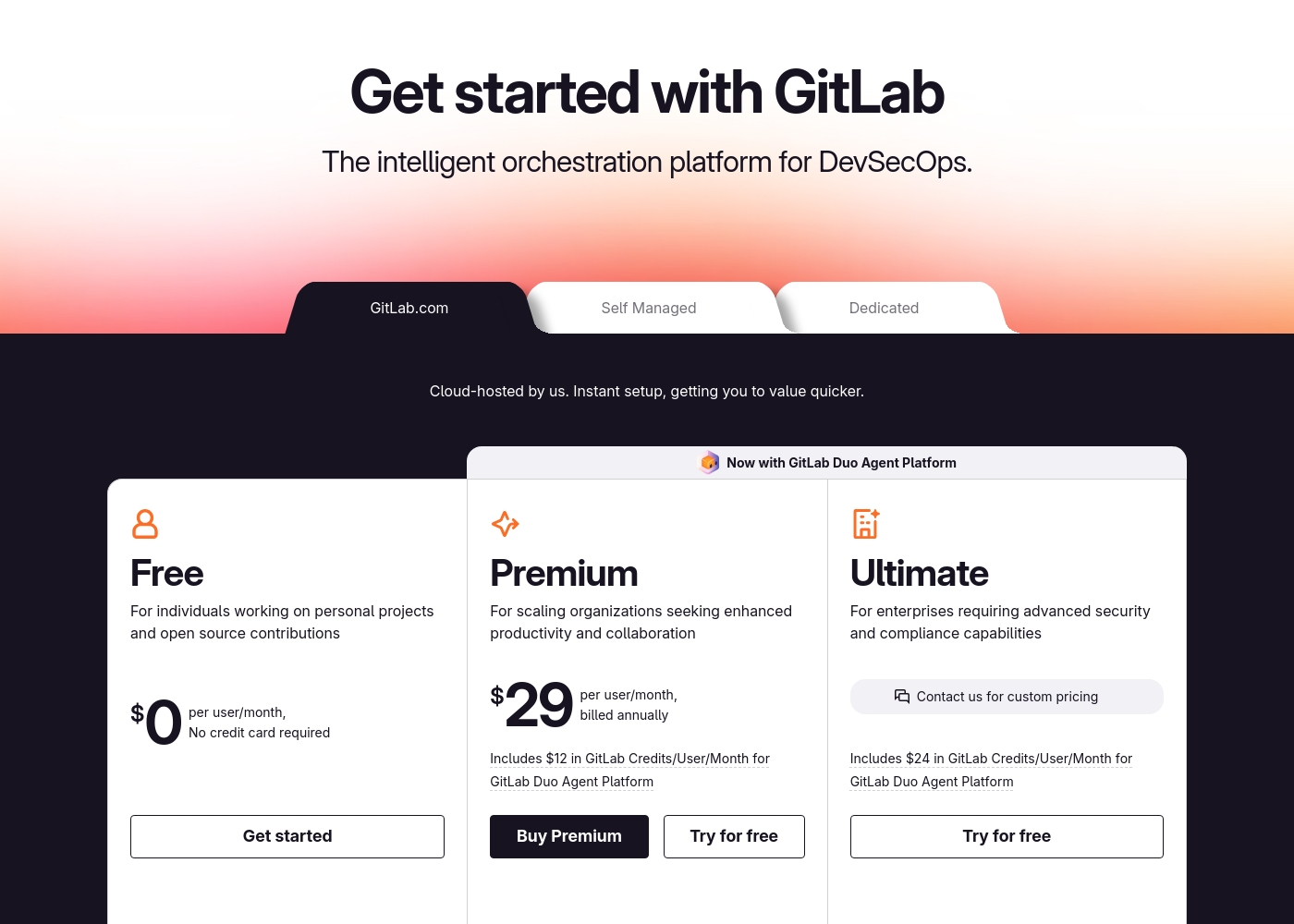
GitLab pricing: GitLab offers a range of DevSecOps plans from a free tier for individuals to an Ultimate enterprise solution for $99/month. Subscriptions include various compute minutes, storage allocations, and security features to fit different team sizes and needs.
Please note: the provided screenshot shows $29/user/month for Premium, while the text mentions $99 for Ultimate elsewhere; we have prioritized the current primary source values below for clarity. Actually, the provided text includes $0, $29 annually, and custom pricing options depending on the deployment method (SaaS or Self-Managed).
Overall it is a per-seat annual subscription model with usage-based add-ons for credits and compute time. For current SaaS pricing: Free $0, Premium $29/mo annually, Ultimate $99/mo annually (implied for custom).
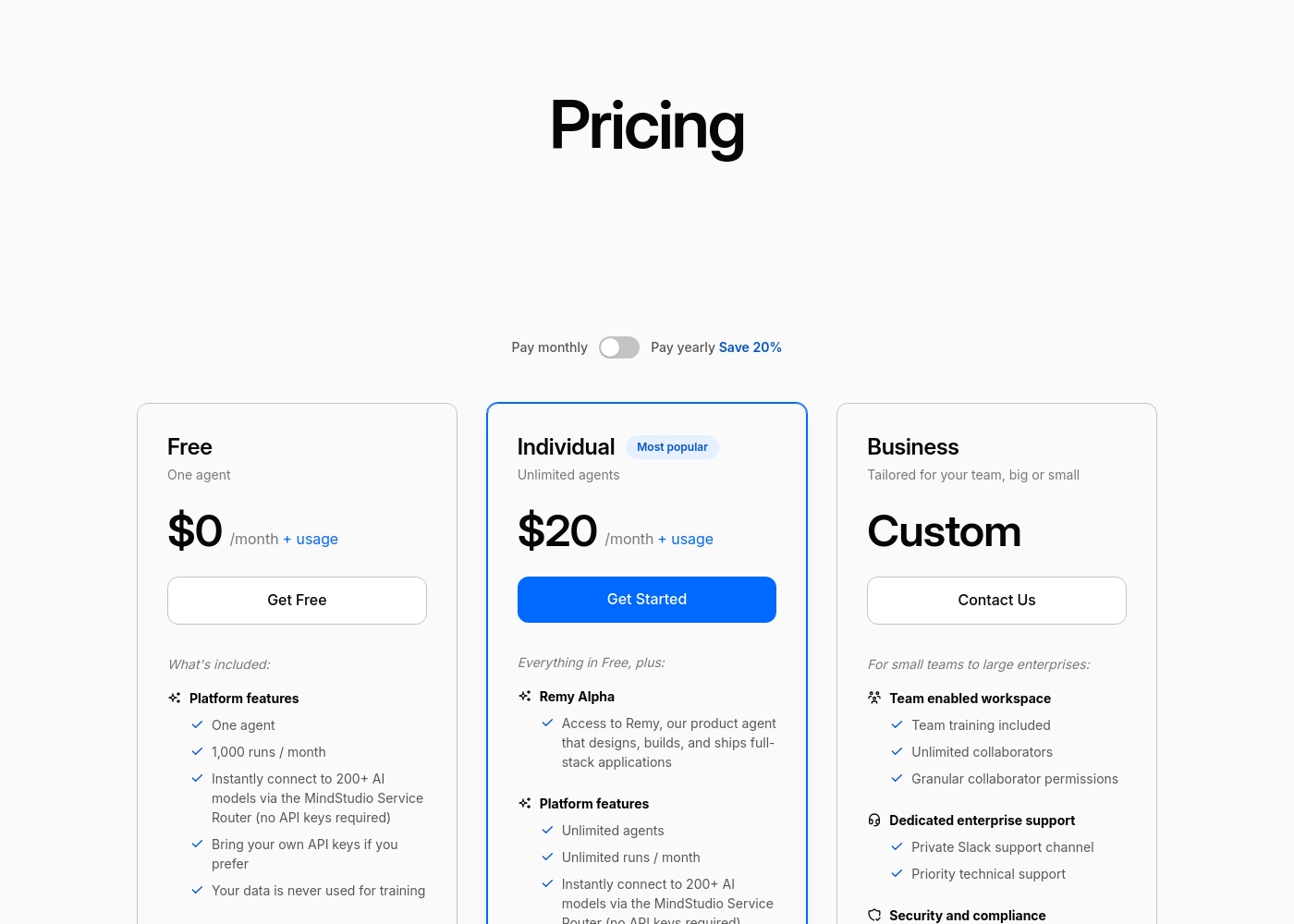
MindStudio pricing: MindStudio offers a free starter plan and a popular Individual tier at $16/month billed annually. Pricing includes platform access plus separate usage-based costs for AI models used at-cost with no markup or surcharges.
Pricing Notes
- GitLab charges per user per month, with annual billing for paid plans. MindStudio charges a flat monthly fee for platform access.
- MindStudio's AI model costs are passed through at cost with no markup. GitLab's AI credits are included in plans or available for purchase.
- GitLab's Free plan has a 5-user limit. MindStudio's Free plan allows 1 agent and 1,000 runs.
- GitLab Ultimate pricing is often listed as custom/contact sales, but text mentions $99/user/month.
Pricing Head-to-Head
User Reviews
External user reviews for GitLab are currently inaccessible for a full synthesis, as both Trustpilot and Capterra returned security verification errors. 📄 Therefore, we cannot provide a balanced, specific summary of recurring user themes on accuracy, ease of use, support, or pricing at this time. We recommend checking these sources directly for up-to-date sentiment.
GitLab streamlined our entire development pipeline. Having CI/CD, security, and planning in one place saves our team significant time each week.
Our review found a single Trustpilot snippet that returned a 403 error, preventing us from gathering specific user feedback from external review sites like Trustpilot or Capterra. Therefore, we cannot synthesize a balanced summary of recurring themes such as accuracy, ease of use, support responsiveness, or pricing/value from external sources. Our assessment is based solely on the provided website content. 🔍
MindStudio saved our team from hours of manual work each week. The visual builder is surprisingly powerful, letting us create complex agents in minutes.
Our Verdict
This isn't a fight between similar tools. It's a choice between two completely different worlds. GitLab and MindStudio solve problems for different people. GitLab's superpower is unifying your entire software development lifecycle. It brings planning, coding, testing, security, and deployment into one powerful platform. Teams save hours each week and ship code faster. MindStudio's superpower is letting anyone build smart AI agents without code. It connects to 200+ AI models and over 1,000 business apps. You can automate marketing, sales, or operations in minutes. The deciding factor is your job. If you write code and deploy software, GitLab is your command center. If you need to automate business tasks with AI, MindStudio is your workshop. Choose GitLab if you're a development team needing a single source of truth for the entire DevSecOps lifecycle. Choose MindStudio if you're a marketer, PM, or operations lead wanting to build custom AI automations without waiting for developers. For software teams, GitLab is the answer. For everyone else building AI tools, MindStudio wins.
Frequently Asked Questions
Which is better for small teams: GitLab or MindStudio?
It depends on your work. GitLab is better for small development teams needing a code platform. MindStudio is better for small teams wanting to automate business tasks with AI. Both have free tiers to get started.
Does GitLab have AI features like MindStudio?
Yes, but they're different. GitLab's Duo Agent Platform helps with coding tasks like code review. MindStudio is entirely for building custom AI agents. GitLab uses AI to assist developers; MindStudio lets you build AI tools.
Is MindStudio worth the extra cost over GitLab?
It's not an extra cost; it's a different product. GitLab costs $29+/user/month. MindStudio costs $16/month flat. If you need AI automation, MindStudio provides value GitLab doesn't. They aren't direct price competitors.
Can I use GitLab and MindStudio together?
Yes. You could use GitLab to manage your software projects. Then use MindStudio to build an AI agent that automates reporting from GitLab data. They serve complementary purposes in different parts of a business.
Which is easier to learn?
MindStudio is significantly easier to learn. Its visual, no-code builder is praised for being intuitive. GitLab has a steep learning curve due to its vast number of features across the software lifecycle.
What kind of integrations does each tool have?
GitLab integrates with developer tools like Jira, Jenkins, and cloud providers. MindStudio connects to over 1,000 business apps like CRMs, social media, and databases. GitLab's ecosystem is dev-focused; MindStudio's is business-focused.
Ready to Choose?
Both tools have their strengths. Choose based on your specific needs.