Infinity vs Motion
Infinity keeps costs low and scales with a solid framework. Motion goes full AI, with tons of integrations. People argue over value vs AI power. Infinity favors budget-friendly growth; Motion favors automation mastery.
High Customization, Low Cost, Manage Everything.
We find Infinity offers excellent functional depth and strong customization features for managing complex projects at a very competitive price point. Overall, we see it as a high-value, flexible alternative for teams looking to significantly reduce their annual expenditure on operational software.
Pros
- Provides powerful and highly customizable work management features.
- Designed to generate significant cost savings over expensive competitors.
- Offers advanced project views (Gantt, Chart, Document) in Pro plan.
- Includes the comprehensive 360° Business Architect framework.
Cons
- Reported issues regarding frustrating UI/UX design by some users.
- Currently has very limited public review data available for assessment.
- No visible standalone free plan or standard free trial offered.
- Discounts require choosing the per-seat annual billing commitment.
AI scheduling that manages your work.
We observed that Motion delivers on its promise of powerful, AI-driven task management and scheduling. Users consistently report massive time savings and reduced cognitive load, but the complex credit and seat pricing structure requires careful study. Overall, Motion is a transformative tool for dedicated users who commit to mastering its full capabilities.
Pros
- Reduces mental load using intelligent auto-scheduling and task prioritization.
- Integrates tasks, projects, and calendar into a single, cohesive productivity suite.
- Helps teams break down major goals into manageable, achievable steps for progress.
- High-quality AI note-taker joins meetings and summarizes them effectively.
Cons
- High price point ($50/month cited as excessive by some single users).
- Steep learning curve requires significant upfront time to fully master the system.
- Reported UX/UI glitches, such as obstructive task preview pop-ups.
- Users note that the mobile app and notification features need improvement.
AboutInfinity
Infinity is designed as an economical alternative for organizations managing their growth and operations. It provides a way to significantly cut costs compared to other expensive market tools. Based on your plan, the software supports customizable numbers of workspace areas and collaborators.
Beyond basic functionality, you can also leverage specialized Professional Services. This support, available for a modest one-time fee, helps integrate these solutions smoothly into your workflow. ✨
AboutMotion
Motion transforms how teams work by offering the world's first AI workforce at your fingertips. ✨ This platform goes far beyond simple automation; it lets you create and deploy enterprise-grade AI Employees specifically built for your business needs. It merges an entire productivity suite—including AI Projects, AI Calendar, and AI Tasks—where all your work is managed and recorded. Motion is trusted by over a million top performers and teams who want a single, powerful platform for managing work efficiently.
Highlights
Feature Comparison
Features Overview
We highlight the main differences and pick a winner for each feature.
User Interface
Infinity is flexible but has mixed UI feedback; Motion is feature-rich but steeper to learn.
Infinity offers deep customization; users report powerful depth but occasional UI challenges. Motion delivers a broad AI-driven experience with many moving parts; onboarding can be steep. The trade-off is speed and depth versus initial ease of use. In practice, Infinity favors power users who can tolerate UI quirks, while Motion rewards teams embracing a learning curve for long-term gains.
Collaboration Tools
Infinity supports scaled workspaces; Motion enables AI-led collaboration across calendars and docs.
Infinity centers collaboration around workspace and member roles, with plan-based capacity. Motion uses AI Employees to share tasks across Projects, Calendar, Docs, and more. If your team needs synchronized AI-assisted collaboration, Motion pulls ahead. For tight, simple team coordination, Infinity remains solid.
Automation
Motion dominates with AI-driven task planning and end-to-end execution; Infinity automates less.
Infinity focuses on customizable work management and visualizations (Gantt, Chart). Motion automates workflows via AI Projects, AI Tasks, and integrated AI Employees. The trade-off is control versus automation; Motion reduces manual coordination significantly. Infinity still automates, but Motion does it more comprehensively.
Reporting & Analytics
Motion provides integrated dashboards and reports; Infinity offers project views and forms.
Infinity includes forms and advanced views for reporting within Pro. Motion delivers dashboards and reports across AI Projects and tasks. If you need end-to-end, live reporting, Motion has the edge. For straightforward project updates, Infinity suffices.
Mobile Experience
Motion provides solid mobile and desktop apps; Infinity mobile details aren’t clear.
Motion lists iOS, Android, and Desktop apps for full access. Infinity’s mobile footprint isn’t explicitly stated in the data. If mobile is critical, Motion is the safer pick. Infinity may still work well, but specifics aren’t documented.
Integration Ecosystem
Motion ships hundreds of integrations; Infinity has core, less-detailed integrations.
Motion emphasizes hundreds of tool integrations, feeding AI context everywhere. Infinity notes core integrations as a feature, with fewer specifics. If you rely on external apps, Motion wins. If you’re fine with core integrations, Infinity remains capable.
Pricing Model
Infinity uses per-user plans; Motion uses seats plus AI credits with annual savings.
Infinity price is per user per month, with a 25% annual discount. Motion uses seat pricing plus monthly AI credits, with a 33% annual discount. For predictable teams, Infinity is simpler; for AI-heavy use, Motion scales costing by usage.
Learning Curve
Infinity’s setup is flexible but UI can hinder beginners; Motion has a steeper start.
Infinity customers praise flexibility yet note UI/UX challenges. Motion users report a learning curve and initial setup time. If you value quick wins, Infinity is easier upfront. If you can invest time, Motion pays off with automation bounties.
Security & Compliance
Motion is SOC 2 Type 2; Infinity security details aren’t specified.
Motion emphasizes SOC 2 Type 2 compliance with encrypted data in transit and at rest. Infinity’s security framework isn’t documented in the data. If governance matters, Motion has a clear credential. For basic usage, Infinity remains viable but less transparent on security.
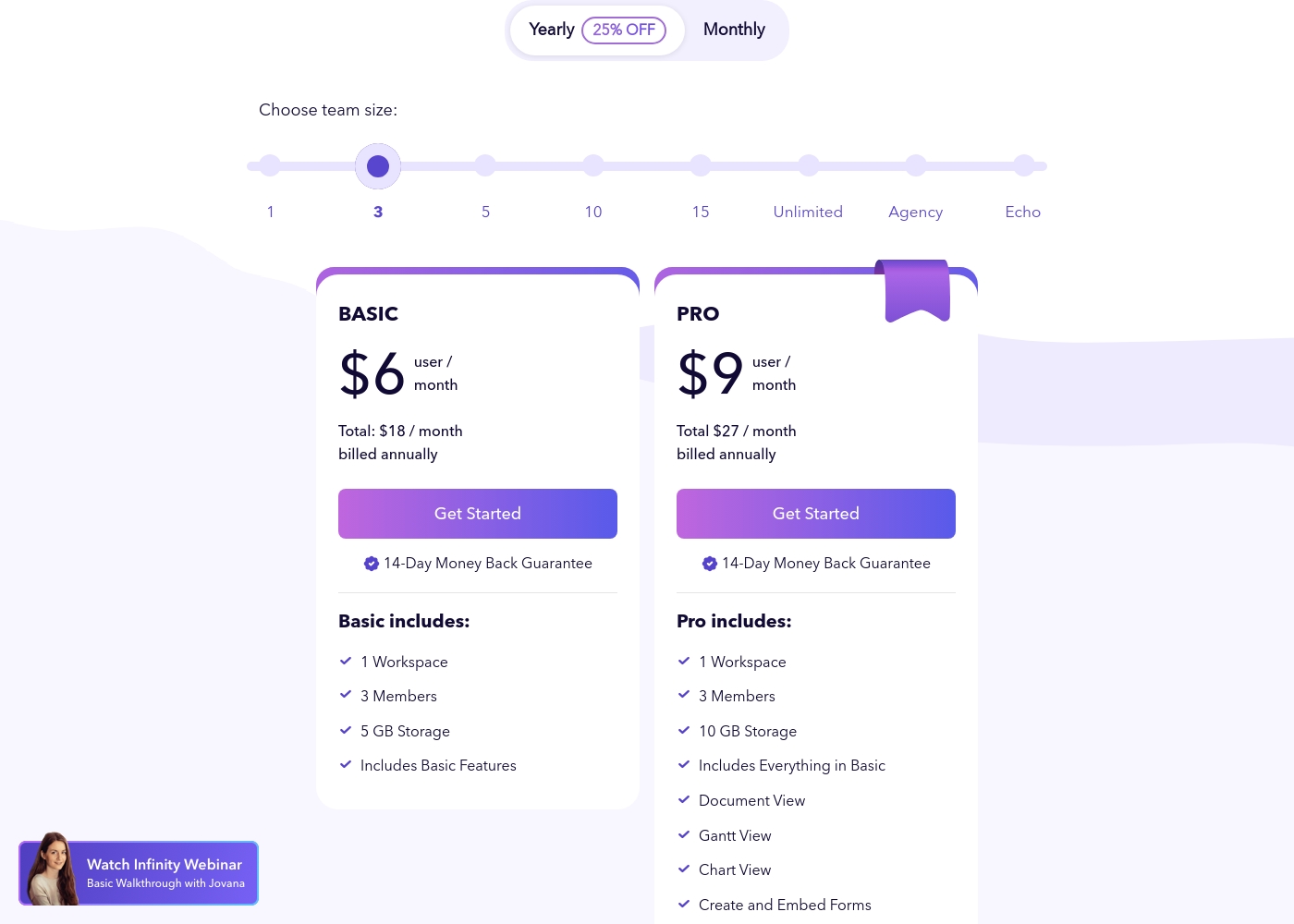
Infinity costs between $18 and $27 per month (billed annually) with two primary plans visible: Basic at $18/month and Pro at $27/month (for a 3-member team).
These plans utilize a per-user, per-month pricing structure when billed annually. You benefit from a 25% discount by selecting the yearly option.
Basic
Price: $6 user/month (Total $18/month, billed annually) Websites Supported: Not explicitly stated Best For: Not explicitly stated Refund Policy: 14-Day Money Back Guarantee Other Features: 1 Workspace, 3 Members, 5 GB Storage, Includes Basic Features
- 1 Workspace
- 3 Members
- 5 GB Storage
- Includes Basic Features
- 1 Workspace
- 3 Members
- 10 GB Storage
- Includes Everything in Basic
- Document View
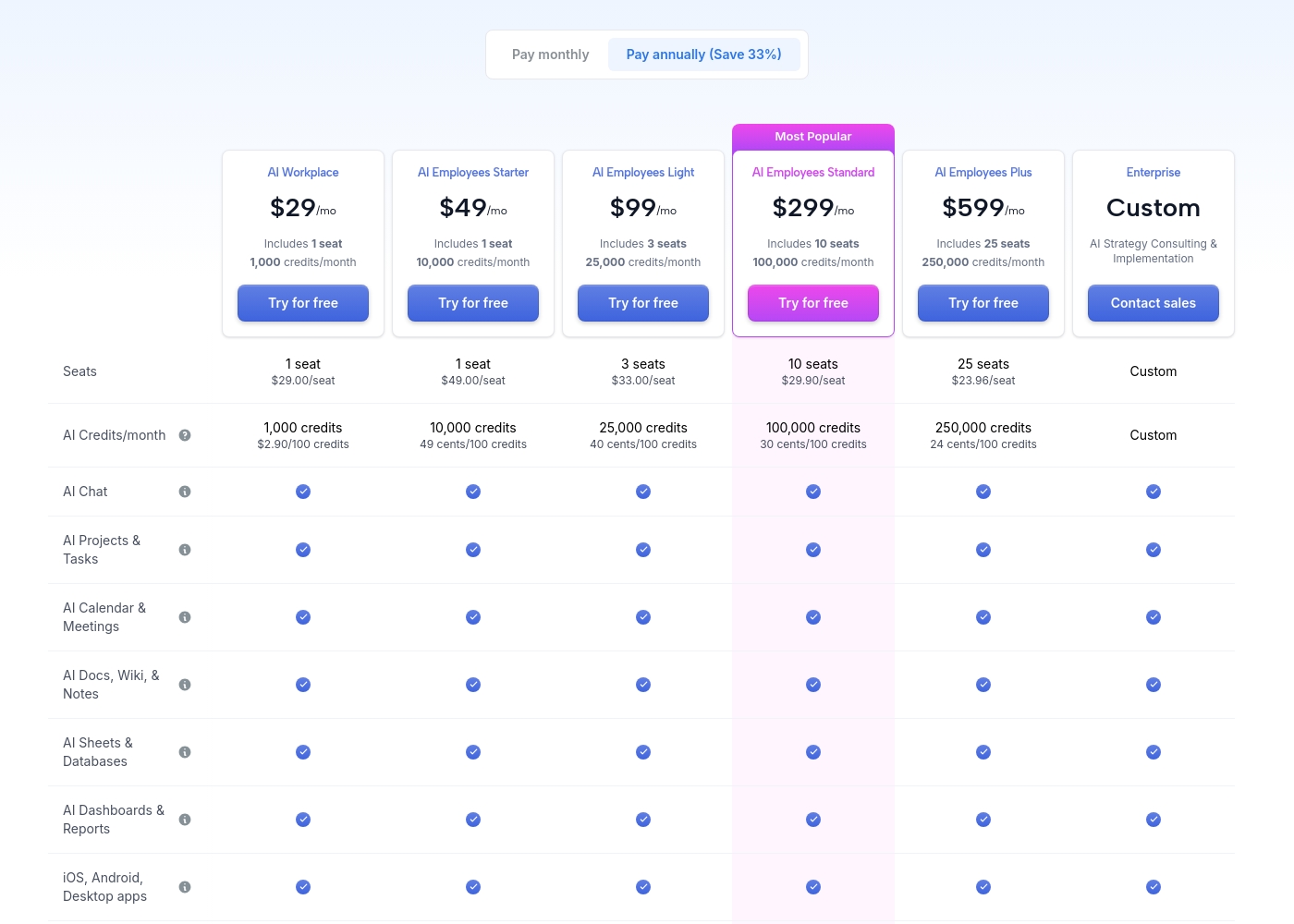
Motion costs between $29 and $599 per month (when billed annually) with 5 primary subscription plans: AI Workplace ($29/mo), AI Employees Starter ($49/mo), AI Employees Light ($99/mo), AI Employees Standard ($299/mo), and AI Employees Plus ($599/mo). There is also a custom Enterprise option.
The prices shown reflect annual billing, which gives you a savings of 33% compared to paying monthly. All plans offer a free trial period.
AI Workplace
Price: $29/mo (billed annually) Websites Supported: Not explicitly stated Best For: Individuals and small startups starting AI integration Refund Policy: Not explicitly stated Other Features:
- Includes 1 seat
- 1,000 credits/month ($2.90 per 100 credits)
- 3 integration connections
- Access to core AI tools (Chat, Projects, Calendar, Docs, Sheets, Dashboards)
- 1 seat
- 1,000 credits/month
- 3 integration connections
- AI Chat, Projects & Tasks, Calendar & Meetings, Docs, Wiki & Notes, Sheets & Databases, Dashboards & Reports
- iOS, Android, Desktop apps
- 1 seat
- 10,000 credits/month
- 5 integration connections
- Everything in AI Workplace
- 3 seats
- 25,000 credits/month
- 10 integration connections
- Everything in AI Employees Starter
- 10 seats (Most Popular)
- 100,000 credits/month
- 20 integration connections
- HTTP Blocks
- Everything in AI Employees Light
Pricing Notes
- Infinity pricing includes a 25% annual discount on Basic/Pro plans.
- Motion pricing is shown for annual billing and includes a free trial on all paid plans.
- Infinity Basic includes 5 GB storage; Pro includes 10 GB storage.
- Motion credits scale with plan, enabling larger AI workloads at higher tiers.
Pricing Head-to-Head
User Reviews
Infinity currently presents a very small public feedback pool, limiting a thorough assessment of recurring themes like long-term reliability or support performance. Based on the limited sentiment available (3.5 stars across only two Trustpilot reviews), users clearly recognize the platform's core strength: its ultimate flexibility and power as a work management solution.
One reviewer highly praised Infinity as flexible software that performs great and effectively replaces competitive products like Airtable and Trello. However, the existing feedback also includes a crucial, concrete critique regarding adoption and user experience.
This is really great software that offers impressive flexibility. It easily handles all our work needs. We are using it to replace older platforms like Airtable and Trello, and it performs wonderfully.
Motion receives overwhelmingly positive feedback, primarily focused on its powerful auto-scheduling and prioritization features. Users frequently praise the application for reducing mental load and decision fatigue by automatically organizing tasks and project workflows.
Many reviewers, including those dealing with complex schedules or ADHD, state that Motion has revolutionized their workflow, saving significant time and boosting productivity. The ability to break down complex goals into achievable tasks is consistently highlighted as a major benefit, making Motion a game-changer for project management teams and individuals alike.
I was recently diagnosed with ADHD, and Motion has made a huge difference in how I structure my day. It removes the stress of figuring out what to do next. It has been well worth the time invested in learning the system, as the benefits are truly clear.
Our Verdict
Infinity vs Motion isn’t a hard win for everyone. Infinity helps budget-first teams stretch dollars and scale with the 360° framework. Motion wins for AI-powered automation and deep integrations that speed up big workflows. If you need a balance, think about your next 12 months: cost control or AI-driven growth. For most teams, Infinity is the safer, money-saving bet; Motion is the smart choice when AI and speed matter most. If you’re replacing Airtable or Trello on a budget, Infinity; if you’re building an AI-first ops stack, Motion.
Frequently Asked Questions
Which is better for small teams: Infinity or Motion?
For 3-10 seats focusing on cost, Infinity often wins. A small team can start at $18/month for 3 users. Infinity also provides a 14-day money-back guarantee.
Does Infinity offer a free plan or a standard free trial period?
Infinity doesn’t show a free plan. There is a 14-day money-back guarantee on the plans.
Is Motion worth the extra cost over Infinity?
Motion delivers AI Employees and hundreds of integrations, which can justify the higher price. If your ROI comes from AI-driven automation, it can be worth it.
Can I migrate from Infinity to Motion easily?
Migration specifics aren’t stated. You should contact support for guidance on moving data and workflows.
What plan is best for a small team starting AI integration?
Infinity Basic fits small teams seeking cost control and core features. Motion AI Workplace suits those starting AI integration with smaller teams.
Is Motion accessible on mobile devices and desktop computers?
Yes. Motion offers iOS, Android, and dedicated desktop apps for full access.
Ready to Choose?
Both tools have their strengths. Choose based on your specific needs.