MoniVisor vs Timedoctor
MoniVisor offers deep, stealth monitoring perfect for security and personal device oversight. Timedoctor focuses purely on scalable workforce analytics for distributed teams. Choosing depends on if you need discreet security checks or sophisticated productivity tracking.
Reliable monitoring, but verify support.
MoniVisor provides a solid set of monitoring features for Windows and macOS, covering activity tracking, digital communication, and data security. Its straightforward interface and flexible plans make it accessible. However, we couldn't independently verify user feedback on support or reliability due to inaccessible external reviews, which tempers our overall assessment.
Pros
- Real-time activity and live screen monitoring.
- Comprehensive tracking of emails, chats, and browsing.
- File change, USB, and print activity logging.
- Stealth operation without user alerts.
Cons
- No verifiable independent user reviews for reliability or support.
- Limited to Windows and macOS platforms.
- Onboarding and integration details not specified in provided content.
- Stealth operation may raise ethical considerations for some users.
Deep Analytics, High Financial Risk
We find Time Doctor offers specialized workforce analytics crucial for distributed teams, providing deep insights into productivity and application usage. Overall, we must caution potential users; while the feature set is comprehensive, recurring and severe reports of billing errors and extremely difficult cancellation processes seriously undermine its operational value.
Pros
- Designed specifically for deep workforce analytics in distributed teams.
- Time tracking functionality is accurate to the second.
- The Premium plan includes powerful AI-based performance analytics and benchmarks.
- Integrates smoothly with over 60 popular management platforms like CRM and PSA tools.
Cons
- Widespread, serious reports of unauthorized charges and duplicate user billing.
- Cancellation and refund processes are frequently difficult or impossible for users.
- Recent shifts to Time Doctor 2 (TD 2) introduced integration bugs and lost features.
- Technical support responsiveness is inconsistent, especially regarding billing disputes.
AboutMoniVisor
MoniVisor is a computer monitoring solution for Windows and macOS. It runs discreetly in the background to track user activity, online communication, and file usage. It's designed for parents who want to safeguard their children's digital world, and for business owners or managers who need to oversee team productivity and secure company data. 💡
AboutTimedoctor
💡 Time Doctor focuses entirely on workforce analytics. This powerful solution is specifically built to support teams that are spread out geographically. If you manage remote employees, this tool addresses your unique data needs. It helps you see crucial performance data clearly.
Highlights
Feature Comparison
Features Overview
We highlight the main differences and pick a winner for each feature.
Core Focus
MoniVisor targets security and deep surveillance; Timedoctor focuses on pure employee productivity.
MoniVisor offers comprehensive oversight for safety, security, and specific system alerts. It is ideal for monitoring families or protecting sensitive data within SMEs. Timedoctor is purpose-built for managing performance in large, distributed remote teams. It delivers specialized data and powerful workforce analytics features. MoniVisor provides deep tracking of files and communication content, acting more as a spy tool. Timedoctor acts as a time management and productivity benchmark system. If you need to know exactly what was said in a chat, pick MoniVisor. If you need clean productivity metrics, choose Timedoctor.
Discreet Operation
MoniVisor runs completely invisible, but Timedoctor operates openly within the workplace trust model.
MoniVisor runs in complete stealth, hiding itself automatically from the Task Manager and desktop view. No notifications are ever sent to the monitored user during operation. Timedoctor, as a workforce monitoring tool, requires more visible user interaction for time tracking functions. It is not designed to be a stealth tool. Choose MoniVisor if the user should not know they are being monitored. Choose Timedoctor if you value transparent communication regarding monitoring. This difference is a major philosophical deciding factor for many users.
Communication Logging
MoniVisor logs full chat content and email text, while Timedoctor only monitors the time spent in apps.
MoniVisor provides comprehensive logging of sent and received emails across major services like Gmail and Outlook. It also logs conversations across popular platforms like WhatsApp and Telegram. Timedoctor tracks whether a user is active in an application, but it does not capture the content of messages or emails themselves. Its focus is strictly recording time usage. If capturing the exact text of a message or email is critical, MoniVisor is required for this deep surveillance capability. Timedoctor treats communication apps the same as any other program for simple time analysis.
Workforce Analytics
Timedoctor has powerful AI-driven insights and schedules; MoniVisor only offers basic desktop time tracking reports.
Timedoctor’s Premium plan offers Benchmarks AI and an Unusual Activity AI Report for deep performance analysis. It helps compare teams against historical data and industry norms. MoniVisor includes specific desktop time tracking and a Team Dashboard for basic oversight metrics. Its reporting capability is centered on raw activity logs and keystrokes. Timedoctor offers specialized management tools like Attendance tracking and Schedule management that MoniVisor lacks entirely. Companies focused strictly on productivity gains and closing performance gaps benefit greatly from Timedoctor’s integrated AI.
Data Security Monitoring
MoniVisor actively monitors file movement and device connections; Timedoctor only monitors software usage time.
MoniVisor tracks file creation, copying, modification, and deletion to safeguard sensitive company data. It includes logging of all connected USB devices to prevent unauthorized transfers. Timedoctor's primary purpose is tracking allocated time and optimizing workflow management. System-level security features like file logging are not included. If stopping unauthorized data transfer or preventing document theft is the main goal, MoniVisor provides critical controls. MoniVisor also tracks clipboard history and printing activities for full data flow oversight.
Pricing Scalability
Timedoctor offers affordable per-user scaling, but MoniVisor applies strict per-device licensing limits.
Timedoctor uses robust per-user pricing starting from $6.70/user/month when billed annually. This model scales easily for large distributed teams. MoniVisor bills per device; the Business plan monitors a maximum of 20 devices for $129.99 monthly. Scaling past 20 devices requires a custom sales quote. For a growing team of 50 users, Timedoctor is significantly more affordable and transparent. MoniVisor is more cost-effective for deep monitoring of one or two personal devices only.
Real-Time View
MoniVisor offers a true "live screen view," while Timedoctor captures sequential screenshots periodically.
MoniVisor offers "Live Screen Monitoring" to view current activities instantly, providing true real-time visibility. This feature allows for immediate intervention or precise observation. Timedoctor relies on capturing periodic screenshots to give managers visual context about work completed during time tracking. The visual output is not truly live. For high-stakes monitoring where immediate visual context is critical, MoniVisor offers a stronger feature set. Timedoctor focuses more on historical proof of activity rather than active supervision.
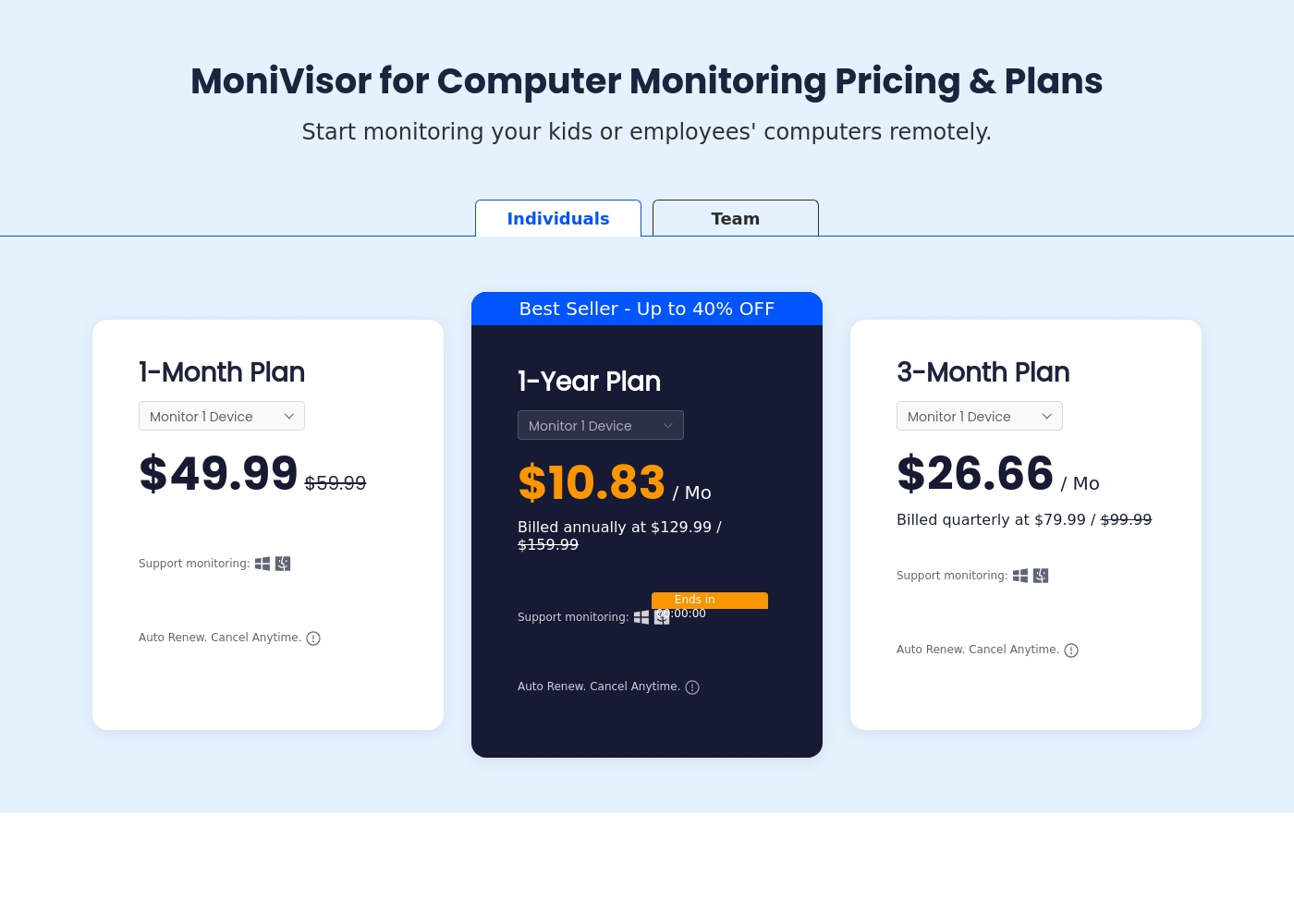
MoniVisor pricing: MoniVisor offers flexible computer monitoring plans starting at $10.83 per month when billed annually. You can choose between monthly, quarterly, or yearly subscriptions based on your specific monitoring duration needs and budget preferences.
All plans include full feature access for a single device with options for larger team deployments available upon inquiry. Use the dashboard to easily manage settings and cancel anytime if your needs change.
It's affordable for individuals and scales perfectly for professional businesses and parents alike. Flexible billing ensures you only pay for what you actually use throughout the year.
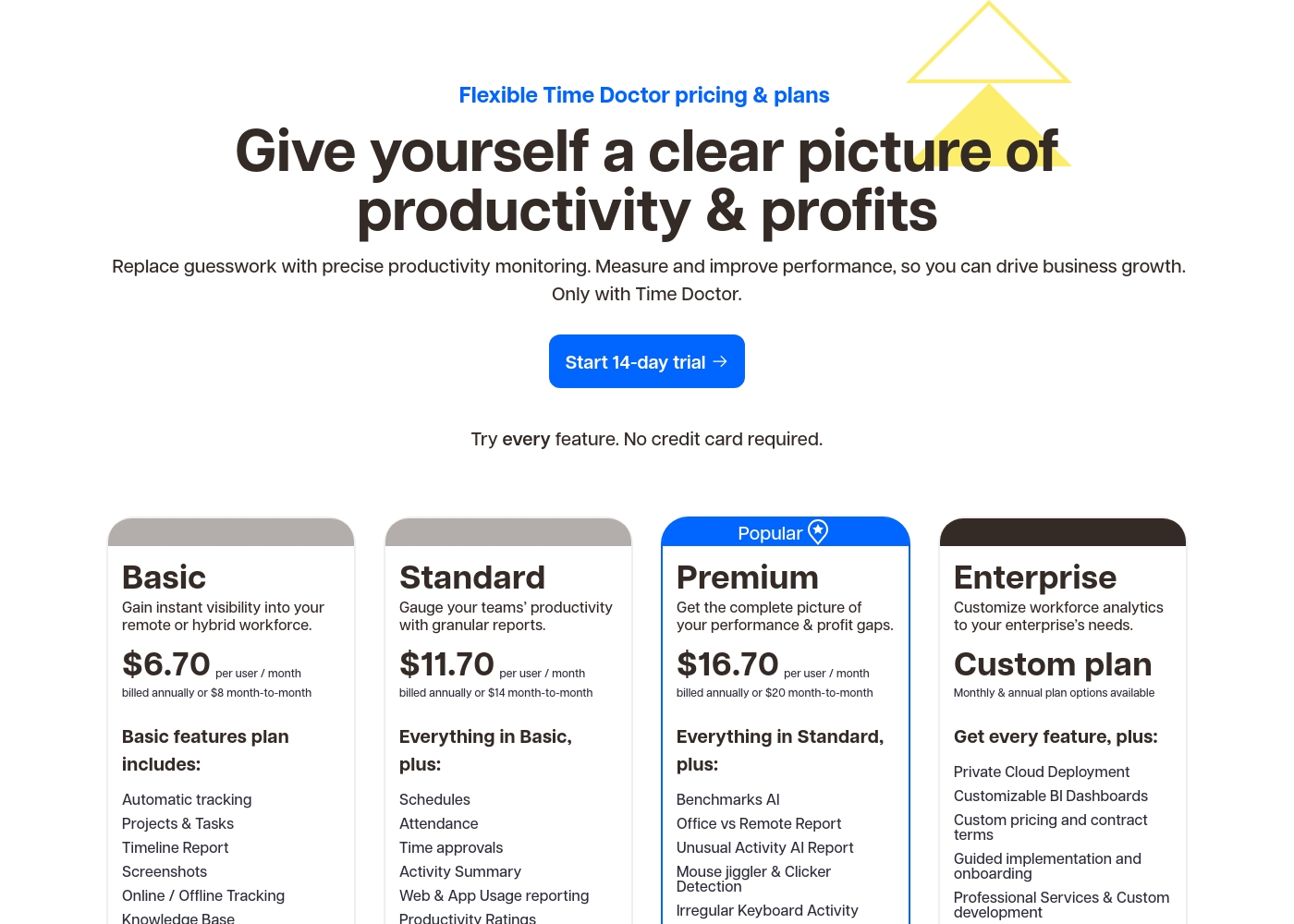
Time Doctor costs between $6.70 and $16.70 per user/month, billed annually, with four plans: Basic at $6.70, Standard at $11.70, Premium at $16.70, and Enterprise (Custom plan).
Let’s look at the features and pricing available for each subscription level.
Basic
Price: $6.70 per user / month (billed annually, or $8.00 monthly) Websites Supported: Not explicitly stated Best For: Gaining instant visibility into remote or hybrid teams. Refund Policy: Not explicitly stated Other Features:
- Automatic tracking
- Projects & Tasks
- Timeline Report
- Screenshots
- Online / Offline Tracking
- Knowledge Base
- Automatic tracking
- Projects & Tasks
- Timeline Report
- Screenshots
- Online / Offline Tracking
- Everything in Basic
- Schedules
- Attendance
- Time approvals
- Activity Summary
- Everything in Standard
- Benchmarks AI
- Office vs Remote Report
- Unusual Activity AI Report
- Mouse jiggler & Clicker Detection
- Get every feature
- Private Cloud Deployment
- Customizable BI Dashboards
- Custom pricing and contract terms
- Guided implementation and onboarding
Pricing Notes
- Timedoctor uses per-user pricing, offering excellent scalability for large teams and enterprises.
- MoniVisor pricing is per device and has a steep jump to the 20-device Business Plan ($129.99/month).
- MoniVisor offers a guaranteed 30-day money-back window, which Timedoctor does not explicitly state.
- Timedoctor offers two months free if billed annually, providing a significant 16.6% discount.
Pricing Head-to-Head
User Reviews
External review data for MoniVisor was unavailable during our check. The Trustpilot page was inaccessible due to a verification wall, and Capterra had no data. We couldn't pull specific user sentiments from these sources for this review.
External reviews for Time Doctor are sharply divided, evidenced by the low 1.5 (Bad) TrustScore. While some users praise the system for significantly improving team productivity and highlight the accuracy of the core time tracking features, most recent complaints revolve around severe financial and support issues.
Many customers report being overcharged, double-billed, or charged without authorization, particularly after encountering glitches or switching between the older Time Doctor 1 (Classic) and the newer Time Doctor 2 platform. Canceling subscriptions or obtaining refunds is frequently described as extremely difficult, with support responses sometimes being unhelpful or slow.
We forgot to cancel our trial period and were charged for 19 months without using the contract. Fortunately, after explaining our situation, their support desk agreed to reimburse us in full. Thank you to the department for its attention to customers.
Our Verdict
Choosing between MoniVisor and Timedoctor is simple: it depends on your monitoring philosophy. MoniVisor delivers deep, system-level surveillance for security and comprehensive safety. Timedoctor provides sophisticated, scalable workforce analytics designed for large remote teams. Both MoniVisor and Timedoctor excel in their niche, so your chosen use case is the only deciding factor here. MoniVisor’s superpower is its completely discreet operation and deep data dive capability. MoniVisor hides from the task manager, giving you true stealth monitoring and access to sensitive content. You get full logs of emails, IM chats, and sensitive documents being copied or deleted. MoniVisor also logs USB connections and printing activities. Timedoctor, conversely, is built for scale and optimized management in a distributed environment. Timedoctor provides necessary HR functions like attendance, scheduling, and helpful AI benchmarks for performance analysis. Its affordable per-user pricing allows Timedoctor to easily support hundreds of remote employees efficiently. Timedoctor helps managers analyze productivity gaps, focusing purely on measurable work metrics. The core trade-off is stealth surveillance versus transparent specialization. MoniVisor is costly for large scale deployment, capping at 20 devices in the business tier. Timedoctor is more scalable but users report serious billing and cancellation difficulties. MoniVisor offers a clear 30-day money-back guarantee for reassurance that Timedoctor lacks. If you are a corporate manager overseeing 50+ employees, Timedoctor is the logical, scalable choice for productivity measurement. If you need robust data security controls, live screen viewing, or total discreetness, MoniVisor offers superior system-level tracking capability.
Frequently Asked Questions
Which is better for small team productivity tracking: MoniVisor or Timedoctor?
MoniVisor focuses more on security and overall activity logging for up to 20 devices. Timedoctor offers better structured productivity features like scheduling and robust web/app usage reports. Timedoctor is the superior choice for focused productivity management.
Does Timedoctor log communication content like MoniVisor?
No, Timedoctor focuses on time spent in communication applications for analytics purposes. MoniVisor captures the actual text content of emails and instant messages across several platforms. If you require content logging, MoniVisor is necessary.
Which is cheaper for a large team of 50+ remote employees?
Timedoctor is far cheaper as it uses scalable per-user pricing starting from $6.70 monthly. MoniVisor caps its business plan at 20 devices for $129.99/month, making it unsuitable for 50+ users.
Which software offers a better money-back guarantee and clear cancellation policy?
MoniVisor explicitly offers a generous 30-day money-back guarantee for all purchases. Timedoctor's refund policy is unclear, and external reviews report serious difficulty receiving refunds or canceling accounts.
Does MoniVisor or Timedoctor offer specialized AI analysis tools?
Timedoctor includes powerful AI features, such as Benchmarks AI and Unusual Activity reports, in its Premium tier. MoniVisor's offerings are limited to reporting and basic activity logging without AI analysis.
Is Timedoctor capable of operating in stealth mode like MoniVisor?
No, Timedoctor is built for organizational transparency and does not operate discreetly in stealth mode. MoniVisor is designed for total quiet operation and hides from the desktop and task manager entirely.
Ready to Choose?
Both tools have their strengths. Choose based on your specific needs.