Nickel vs Pabbly Subscriptions
Nickel and Pabbly Subscriptions sit at opposite ends of the billing spectrum. Nickel leans toward fast, simple payments; Pabbly Subscriptions handles complex pricing. Choose based on team size, automation needs, and regional compliance.
Solid for payments and cash flow.
Overall, we find Nickel to be a capable platform for consolidating payment collection, bill pay, and basic credit operations into a single dashboard. Its strong value lies in the free ACH tier and clear pricing, though teams needing advanced reporting or very fast support may encounter some limitations.
Pros
- Free core plan with unlimited ACH transfers.
- Clean, intuitive interface for managing payments.
- Strong integration with QuickBooks Online.
- Transparent, scalable pricing with no hidden fees.
Cons
- Customer support response times can vary.
- Advanced reporting and analytics are somewhat limited.
- Learning curve for setting up credit decision workflows.
- Transaction limit on the free tier may be restrictive.
Feature-packed, but lacking reliability and support.
We find Pabbly Subscriptions offers an impressive suite of features, including advanced revenue recovery technology and robust global tax compliance, making it technically appealing for complex billing needs. However, the overwhelming external evidence details critically poor customer support, widespread platform bugs, and a disturbing pattern of failing to honor their money-back guarantee. Overall, we cannot recommend Pabbly due to severe operational and trust concerns.
Pros
- Advanced dunning system minimizes churn and maximizes payment recovery.
- Supports 35+ payment gateways and 55 currencies globally.
- Ensures compliance with global tax rules (EU VAT, GST).
- Highly secure system (SOC2 Type 2 and ISO 27001 certified).
Cons
- Customer support is repeatedly described as slow, unresponsive, and unhelpful.
- Reports indicate the 30-day money-back guarantee is frequently not honored.
- Users report significant platform bugs and broken automations.
- Lack of flexibility in essential account management (e.g., changing email addresses).
AboutNickel
Nickel is a unified payment and credit platform built for businesses. It replaces your fragmented stack of financial tools. ✅
You can accept payments, pay bills, and offer net terms to customers—all from a single dashboard. It's designed to give you full control over your money cycle.
AboutPabbly Subscriptions
Pabbly Subscription Billing is a professional and robust platform built to manage and automate your recurring revenue globally. It is designed to accommodate nearly all types of pricing, including usage-based, variable, and dynamic models.
The system works seamlessly with over 35 payment gateways and supports around 55 currencies. This vast compatibility allows you to sell products both locally and internationally.
You can integrate Pabbly using simple checkout page links, embedded forms, APIs, or webhooks. This comprehensive approach ensures Pabbly fits into virtually any existing application or technology stack, including PHP, React, and Angular.
Highlights
Feature Comparison
Features Overview
We highlight the main differences and pick a winner for each feature.
Real-time accounting & QuickBooks Sync
Nickel offers real-time QuickBooks Online sync for invoices and bills.
Nickel keeps invoices and bills up to date automatically. Pabbly Subscriptions provides APIs and webhooks for integrations with many platforms, including QuickBooks-like flows through connectors. The trade-off is that Nickel emphasizes native QuickBooks Sync, while Pabbly focuses on broad integration reach. In practice, Nickel reduces manual reconciliation effort; Pabbly scales across systems and currencies.
Automation & Workflows
Nickel provides credit insights and decision workflows; Pabbly offers dunning and gateway switching.
Nickel's workflows help you activate customers with credit insights and net terms. Pabbly Subscriptions automates failed payments via dunning and can switch gateways on failure. Nickel is simpler; Pabbly packs deeper automation and recovery mechanisms. Real-world: you automate approvals in Nickel; you automate retries in Pabbly.
Billing Makeover & Net Terms
Nickel Pro adds net terms, while Pabbly focuses on customization and global billing.
Nickel Pro introduces net-60 terms for customers and a credit workflow. Pabbly emphasizes global tax rules and multi-currency invoices. Trade-off: Nickel targets cash flow speed; Pabbly targets compliance and scale. Real-world: a seller can fund terms with Nickel; a global store opts for Pabbly's tax and currencies.
Checkout Customization
Pabbly excels in advanced checkout customization and multi-brand handling.
Nickel offers a standard payment portal with approval controls. Pabbly allows embedded/hosted checkout forms and per-brand customization. Key trade-off: simplicity (Nickel) vs. depth (Pabbly). Real-world impact: Pabbly enables brand-specific checkout experiences across products.
APIs & Developer Tools
Pabbly provides comprehensive APIs and webhooks with 800+ integrations via Connect.
Pabbly supports custom apps, APIs, and webhooks, plus Connect for many platforms. Nickel's data integration focus is more limited to native QuickBooks sync. Trade-off: broad reach (Pabbly) vs. native depth (Nickel). Real-world: your dev team can plug Pabbly into diverse stacks.
Migration & Data Import
Pabbly explicitly supports Stripe-to-Pabbly migrations and CSV imports.
Nickel's migration path isn't described in the provided data. Pabbly offers Stripe data import and CSV uploads. Trade-off: Pabbly makes onboarding easier for existing customers; Nickel may require setup from scratch. Real-world impact: move customers without re-creating subscriptions.
Branding & Multibrand
Pabbly supports multi-brand checkout branding; Nickel's branding depth isn't stated.
Pabbly UNLIMITED includes custom domain branding and per-product branding controls. Nickel doesn't have explicit multi-brand features in the data. Trade-off: branding flexibility favors Pabbly. Real-world: run multiple brands under one Pabbly account.
Security & Compliance
Both platforms emphasize security; Nickel notes PCI/SOC2, Pabbly adds ISO 27001.
Nickel cites PCI and SOC 2 compliance with a holding account. Pabbly shows SOC 2 Type 2 and ISO 27001:2022. Trade-off: different standards, both strong. Real-world: choose based on your preferred compliance framework.
Support & Onboarding Quality
Nickel offers white-glove onboarding and 24/7 human support; Pabbly's support is mixed.
Nickel provides real human onboarding plus fast channels. Pabbly's reviews describe slow or unresponsive support. Trade-off: Nickel wins for service; Pabbly wins for feature depth. Real-world: quick setup vs. broader capabilities.
Nickel pricing: Nickel offers a range of payment management plans starting from a free tier up to custom enterprise solutions. Pricing is designed to scale with your business needs, featuring unlimited free ACH transfers on all plans and a 20% discount for annual billing on the Plus tier.
- Nickel Core: $0/month
- Nickel Plus: $35/month (billed annually) or $45/month (billed monthly)
- Nickel Pro: Custom pricing for specialized credit operations
All plans include standard card payment processing at a 2.9% flat rate and native QuickBooks Online integration to streamline your financial workflows.
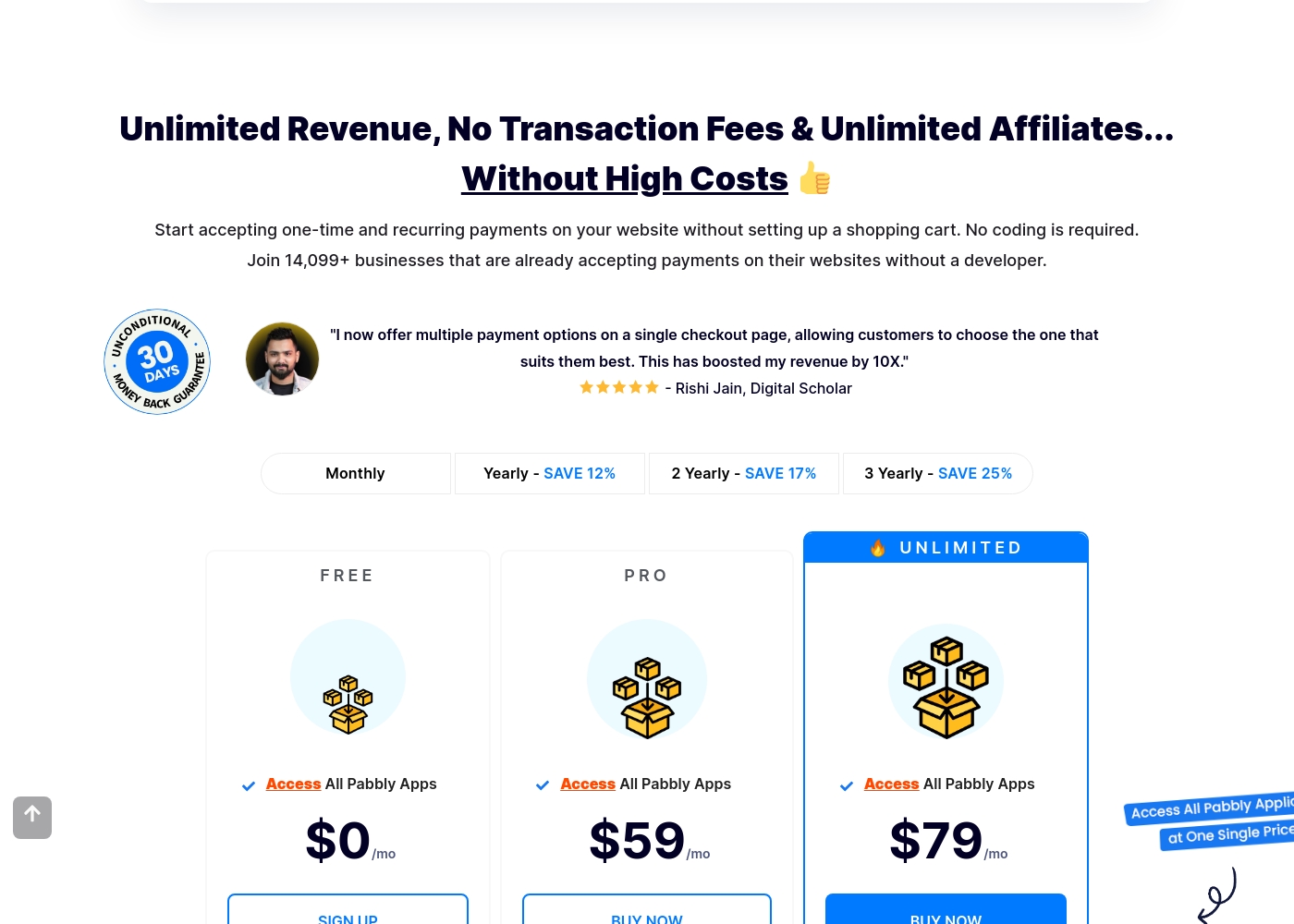
Pabbly Subscriptions costs between $0 and $79 per month with 3 plans: FREE at $0/mo, PRO at $59/mo, and UNLIMITED at $79/mo.
These prices reflect the monthly billing option. You can save money by choosing longer subscription periods like yearly (12% savings) or three-yearly (25% savings).
FREE
Price: $0/mo Websites Supported: Not explicitly stated Best For: Not explicitly stated Refund Policy: Not applicable for $0 plan Other Features:
- Access All Pabbly Apps
- Supports multiple payment gateways
- ISO 27001:2022 certified security
- Access All Pabbly Apps
- Supports 35+ payment gateways
- GST/EU VAT compliant invoicing
- SOC2 Type 2 compliant
- Access All Pabbly Apps
- Affiliate management system
- Flexible commission settings
- Automatic dunning system
- Access All Pabbly Apps
- Custom domain branding (one per account)
- API and Webhook access
- Advanced checkout page customization
Pricing Notes
- Nickel Core is free; Nickel Plus is $35/mo; Nickel Pro price not stated.
- Pabbly offers FREE, PRO ($59/mo), and UNLIMITED ($79/mo). Annual billing saves 12% (typical) and up to 25% with longer commitments.
- Nickel provides annual billing; Pabbly explicitly highlights annual/multi-year savings.
Pricing Head-to-Head
User Reviews
We found that external feedback on Nickel is generally positive, with users highlighting its ease of use and impact on cash flow. Many appreciate the intuitive interface for handling payments and the significant time saved through automation and QuickBooks integration.
😊 The free ACH transfers and transparent pricing are frequently praised as major value drivers for small businesses. However, some reviews point to occasional customer support delays and a learning curve for more advanced features like credit management.
Nickel has been a game-changer for our small business. Getting paid via ACH for free and paying our vendors through the same platform saves us so much time and money. The QuickBooks sync is flawless.
External feedback for Pabbly Subscriptions is sharply polarized. While the platform boasts powerful and efficient automation capabilities—some users call Pabbly Connect the best available service—the overall customer experience rating is exceptionally low.
The primary and most severe complaints revolve around customer support, which users repeatedly describe as poor, useless, or diabolical. Reviewers state that support agents fail to read tickets, use canned responses, and take days to reply.
The platform is full of bugs, and automations constantly break. You will likely spend weeks trying to figure things out without success. Their bundled product pitch feels like a trap. Avoid the stress and use proper tools instead.
Our Verdict
For most teams, Nickel and Pabbly Subscriptions land in a near-tie. Nickel wins on simplicity and fast onboarding; Pabbly Subscriptions wins on deep automation and global capabilities. If you run a tiny shop, Nickel is the safer starting point. If you sell globally or need tax rules and dunning, Pabbly Subscriptions shines. The deciding factor is your scale and risk tolerance. Start with Nickel Core to validate payment flows, then move to Pabbly Subscriptions if you need advanced tax, API access, or multi-brand checkout. In short: choose Nickel for speed and ease; choose Pabbly Subscriptions for power and reach. If you’re evaluating both for a mid-size team, begin with Nickel to prove cash flow and migration plan, then test Pabbly Subscriptions for expansion and compliance.
Frequently Asked Questions
Which is better for small teams: Nickel or Pabbly Subscriptions?
Nickel offers a free Core plan, white-glove onboarding, and simple payments. Pabbly Subscriptions provides advanced billing options and global capabilities. For tiny teams, start with Nickel Core; consider Pabbly if you need global tax rules or API access.
Does Nickel have automation like Pabbly Subscriptions?
Nickel has scheduling and recurring payments plus credit workflows in Pro. Pabbly Subscriptions adds an automated dunning system and gateway switching. If you need heavy automation, Pabbly is stronger.
Is Pabbly Subscriptions worth the extra cost over Nickel?
If you rely on 35+ gateways, 55 currencies, EU VAT, and API access, Pabbly may be worth it. Nickel offers simplicity and a free Core plan. Compare total cost of ownership over 12 months with your needs.
Can I migrate from Nickel to Pabbly Subscriptions easily?
Pabbly supports migrating data from Stripe or CSV. Nickel-to-Pabbly migration isn’t described in the data. Plan a data migration strategy if you switch.
What about free plans and trials?
Nickel Core is free; there’s no stated trial. Pabbly has a perpetual FREE plan and paid PRO/UNLIMITED plans with a 30-day money-back guarantee.
Does Nickel integrate with QuickBooks Online?
Yes, Nickel offers real-time QuickBooks Online sync for invoices and bills. This helps keep books up to date without manual entry.
Ready to Choose?
Both tools have their strengths. Choose based on your specific needs.