Parentaler vs Webwatcher
Parentaler and Webwatcher both promise parents crucial visibility into their child’s digital life, but their reliability is vastly different. Parentaler is a discreet and robust mobile-focused tool with verified support. Webwatcher offers broader device coverage including PCs, but user sentiment warns of serious financial risk. The comparison often comes down to choosing stability over platform breadth.
Powerful Tracking, Compromised Purchase Transparency.
We assess Parentaler as a highly functional monitoring tool with robust security features, including comprehensive communication viewing and precise GPS alerts. However, we found serious and recurring concerns regarding product fulfillment and billing transparency, as multiple users report being directed to the mSpy service upon purchase. Overall, we advise potential users to be keenly aware of these recurring payment and product delivery issues.
Pros
- Provides reliable GPS tracking and Geofencing alerts.
- Keyword Alert feature helps parents intervene quickly in serious situations.
- Enables comprehensive viewing of photos, videos, and communication logs.
- Effective for setting limits and managing screen time overuse.
Cons
- Widespread complaint of a bait-and-switch (users purchase Parentaler but receive mSpy).
- Reports of unauthorized annual charges despite selecting monthly plans.
- Customer support is reportedly resistant to issuing refunds for non-technical reasons.
- Advertised social media features may not be delivered via the substitute product.
Extreme risk due to billing and support issues.
We found Webwatcher markets itself strongly on guaranteed functionality and comprehensive support for parental monitoring needs. However, our review of public user feedback showed severe, concrete accusations of fraudulent billing, refusal to issue refunds, and complete non-response from customer support. Overall, the serious financial and reliability risks reported by consumers necessitate a very low rating.
Pros
- Advertised compatibility across major devices (Android, iPhone, PC, Mac).
- Unlimited data storage is included in the current subscription plan.
- Setup is claimed to be quick and easy (under five minutes).
- Functionality is officially guaranteed with a full refund if issues cannot be resolved.
Cons
- Users report being refused refunds despite the official money-back guarantee.
- Specific claims of fraudulent double billing and funds theft were reported.
- Customer support was reported as non-responsive or misleading ('runaround').
- Product allegedly failed to work properly for some customers.
AboutParentaler
Parentaler is a top-notch parental control app. It gives you a detailed overview of your child’s phone and online activities, helping you monitor them remotely and with full confidentiality.
The application works smoothly on any iPhone, iPad, or Android device. You can then access all features through a simple dashboard using any device or browser.
Crucially, the app operates quietly in the background. It sends no notifications or alerts to your child’s phone, meaning they won't know when you are checking data.
AboutWebwatcher
WebWatcher is a specialized parental monitoring app. It is primarily aimed at supervising teenagers who may be involved in risky online behavior. The software gives parents necessary visibility into their child's digital footprint.
It works across major platforms including Android, iPhone, PC, and Mac devices. You can monitor everything seamlessly from anywhere using your secure, web-based online account. The application is designed to be discrete and tamper-proof once it's correctly installed. 💡
Highlights
Feature Comparison
Features Overview
We highlight the main differences and pick a winner for each feature.
Device Compatibility
Webwatcher monitors PC and Mac devices; Parentaler is strictly focused on Android and iOS mobile systems.
Parentaler offers seamless, full monitoring compatibility for Android and iOS mobile devices. Webwatcher provides comprehensive coverage across phones, tablets, PC, and Mac systems. Webwatcher is necessary if you need to monitor computer activity like websites and email. However, Parentaler's mobile-first approach is often simpler to manage on the go.
Location Features
Parentaler offers advanced geofencing alerts for safety; Webwatcher only provides basic GPS location monitoring.
Parentaler excels with live GPS location tracking, history, and geofencing alerts for defined zones. Webwatcher focuses on tracking current GPS location but lacks proactive geofencing boundaries. Parentaler alerts you immediately if a child leaves a designated safe area. This gives Parentaler a crucial safety edge over Webwatcher's simple tracking.
App & Content Blocking
Parentaler allows active blocking of apps and sites; Webwatcher primarily monitors usage and provides logs.
Parentaler offers active, actionable controls like blocking specific apps, websites, and Wi-Fi networks. This helps prevent unauthorized use and enforces necessary screen time limits. Webwatcher tracks installed apps and web history but lacks explicit blocking or time management tools. Parentaler offers the granular control many frustrated parents require for prevention.
Customer Reliability
Parentaler has verified 24/7 support; Webwatcher is plagued by severe user reports of non-responsive support and alleged fraud.
Parentaler provides reliable, 24/7 multilingual support that users praise for swift responsiveness. Webwatcher advertises 'great customer care,' but reviews allege total non-response and misleading answers. Users reported extreme difficulty getting help or resolving serious billing discrepancies with Webwatcher. Trusting Parentaler's stable support system is a far safer bet than Webwatcher.
Social Media Depth
Parentaler covers broad conversations; Webwatcher provides unique deep monitoring for Snapchat on Android.
Parentaler monitors texts, calls, emails, and conversations on popular chat apps for wide visibility. Webwatcher has a unique advantage on Android, taking screenshots and capturing messages specifically for Snapchat. Snapchat's disappearing messages are high-risk for parents. While Webwatcher is deep on that one platform, Parentaler covers a broader range of general messaging platforms effectively.
Billing Transparency
Webwatcher’s single plan is clearer; Parentaler’s pricing has a massive $1 to $97 range.
Webwatcher clearly prices a 3-Month Android plan at $19.98/month, providing upfront cost clarity for a single device. Parentaler’s pricing range is massive, from $1 to $97, suggesting complex or hidden tiering mechanisms. Understanding the exact final cost per device for Parentaler requires more careful investigation. Webwatcher’s explicit single plan is simpler to budget, despite the high risks.
Data Storage
Webwatcher guarantees unlimited storage; Parentaler has undefined limits on data retention.
Webwatcher explicitly includes unlimited data storage for the entire subscription period, ensuring all activity is saved. Parentaler does not specify its data retention limits or storage capacity in its available plan details. If you need to keep logs indefinitely for legal or detailed safety review, Webwatcher's unlimited storage is a clear technical advantage.
Proactive Controls
Parentaler offers active controls like Wi-Fi blocking; Webwatcher lacks these management tools.
Parentaler allows parents to actively block specific Wi-Fi networks, which is useful for enforcing limits outside the home. It also includes comprehensive content and app blocking functionalities. Webwatcher focuses primarily on observation, recording activity without providing tools for proactive intervention. Parentaler enables better control over the child’s device environment.
Parentaler utilizes a subscription model, but the specific costs and plan names are not explicitly detailed in the available information.
To begin using the comprehensive monitoring tools, you first need to select a subscription option.
Standard Subscription Plan
Price: Not explicitly stated Websites Supported: Not explicitly stated Best For: Any parent or guardian needing full phone monitoring capabilities Refund Policy: Not explicitly stated Other Features:
- Monitors social media and messenger conversations
- Detailed GPS location tracking and Geofencing alerts
- Website and Apps & Games blocking
- Access to SMS, calls, emails, and contacts
- Keyword alerts and screen capture functionality
- Full phone monitoring overview
- GPS location and Geofencing alerts
- Website porn and app blocker
- Monitor SMS, calls, and email
- Keyword alerts and screen capture
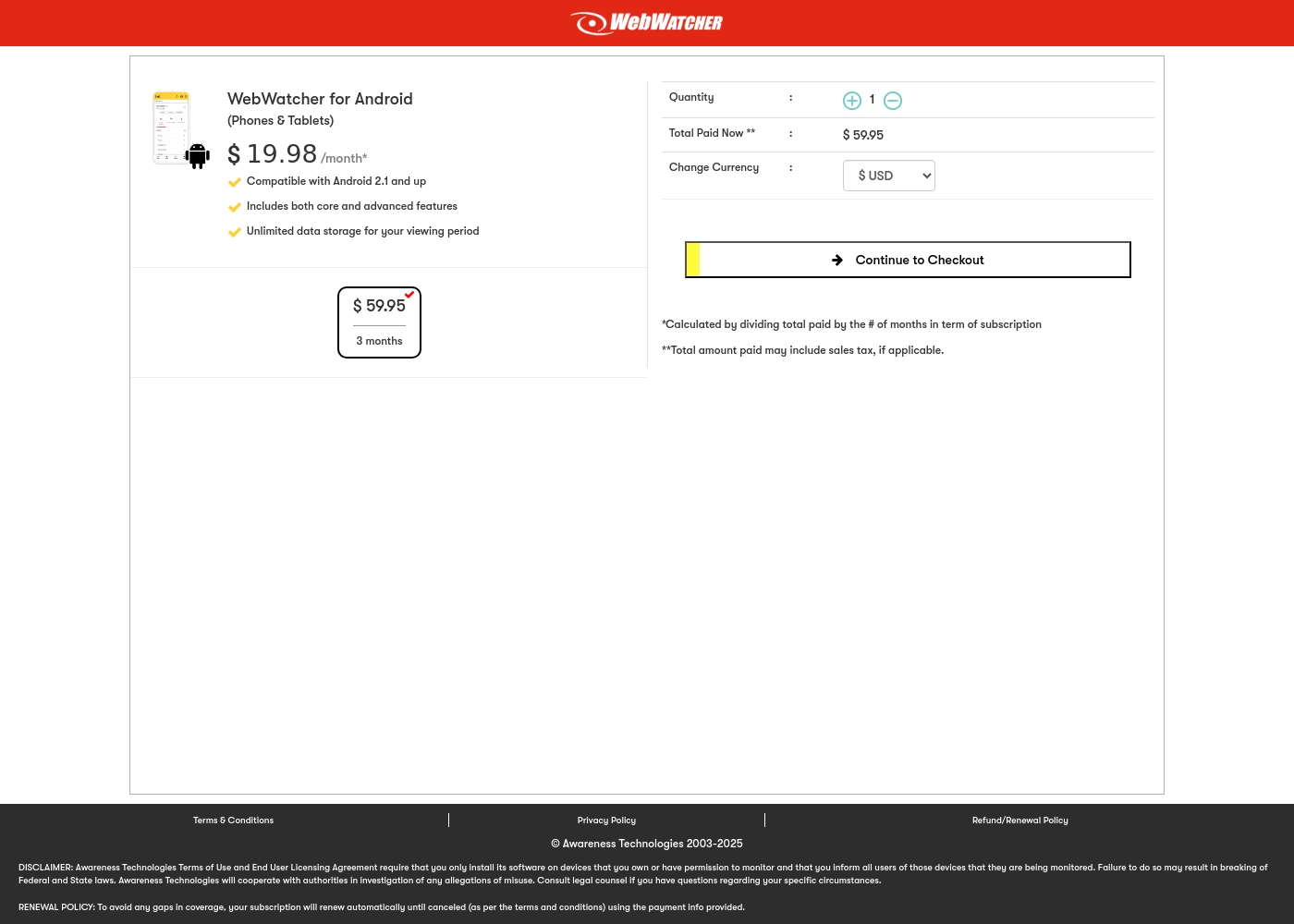
Webwatcher costs $19.98 per month with one explicitly priced plan: the 3-Month Android Subscription at $59.95 total.
Finding the right monitoring solution for your family is simple. Here is a detailed look at the pricing and features available in the current purchase flow.
3-Month Android Subscription
Price: $59.95 (paid every 3 months, calculated at $19.98/month) Websites Supported: Not explicitly stated (Monitoring for one device is implied by Quantity: 1) Best For: Parents monitoring Android phones and tablets Refund Policy: Full refund guaranteed if issues cannot be resolved Other Features:
- Compatible with Android 2.1 and newer versions
- Includes both core and advanced features
- Unlimited data storage for your full viewing period
- Compatible with Android 2.1 and up
- Includes both core and advanced features
- Unlimited data storage for your viewing period
Pricing Notes
- Parentaler pricing has a wide range ($1-$97), suggesting complex tiering or promotional rates, requiring careful verification.
- Webwatcher clearly defines its 3-Month Android Subscription at $59.95, which equals $19.98 per month per single device.
- Despite Webwatcher's advertised 'Risk Free' trial, user reports state they were refused refunds, making the offer unreliable.
- The lack of transparency in Parentaler's specific plan costs contrasts with Webwatcher's clear three-month subscription price.
Pricing Head-to-Head
User Reviews
Parentaler holds a mixed user rating of 3.6 on Trustpilot. Many parents praise the app's capability to provide essential monitoring features, specifically emphasizing reliable location tracking and timely Geofencing alerts which have helped in real-world emergencies, like locating a child after a vehicle breakdown.
Users also frequently cite the value of communication oversight, noting they successfully intervened in cases of potential cyberbullying, unsafe conversations, and concerning online searches using the Keyword Alert feature. The software is appreciated for helping manage excessive screen time, leading to positive changes in children's behavior and improved family understanding.
My daughter's car broke down deep in the country, and she didn't know her location. I used Parentaler to pinpoint her immediately. It let me reassure her that I was only minutes away. This app is absolutely essential for parent peace of mind.
Webwatcher’s external feedback is extremely limited, stemming only from two reviews which resulted in a very low 2.9 TrustScore. While the platform advertises a strong 'risk-free' guarantee and promises excellent, responsive customer care, the limited user reports strongly contradict these claims.
Both reviewers cited severe issues primarily centered on billing and refunds. Users claim they were refused refunds entirely, even when requested within the advertised refund window, despite the monitoring product reportedly failing to work properly.
They refused to honor the risk-free money-back guarantee, even though I submitted the request properly. Furthermore, the product I purchased never actually worked for me as advertised. I absolutely feel like they are ripping me off.
Our Verdict
If you’re deciding between these monitoring tools, Parentaler is the clear winner for safety and operational reliability. The features are great, but the lack of fraud allegations against Parentaler is the real selling point here. You need trust when monitoring your kids. Parentaler's superpower lies in its robust mobile controls and stellar 24/7 support system. Parentaler gives you actionable proactive tools like geofencing alerts and specific app blocking controls. You know precisely where your child is and can safely restrict harmful online access. Parentaler users confirm the multilingual support team is truly helpful when issues arise. Webwatcher’s core strength is its impressive device compatibility, especially including PCs and Macs. If you need to track browsing history and searches on a desktop computer, Webwatcher provides that comprehensive view. Webwatcher also provides unlimited data storage, which is useful for long-term review. The deciding factor should be operational stability and customer trust. Webwatcher is linked to numerous serious reports of fraudulent billing, unauthorized charges, and refusal to process refunds. Parentaler is a tested and fundamentally dependable platform with verified support. Do not risk your money or peace of mind with Webwatcher. Go with Parentaler if you value reliable mobile monitoring, concrete blocking features, and confirmed customer support. Only consider Webwatcher if PC monitoring is absolutely non-negotiable and you accept the high probability of serious billing headaches.
Frequently Asked Questions
Which is more secure: Parentaler or Webwatcher?
Parentaler is significantly more secure regarding financial and operational risks. Webwatcher has widespread user complaints alleging fraudulent billing and refused refunds. Parentaler enjoys positive, reliable user sentiment for routine monitoring.
Does Webwatcher offer geofencing like Parentaler?
No, Webwatcher only provides basic GPS location tracking for current whereabouts. Parentaler includes advanced geofencing features that alert you when a child enters or leaves specific areas. Parentaler allows for more proactive location controls.
Is Parentaler available for PC and Mac monitoring?
Parentaler focuses exclusively on monitoring Android and iOS smartphones and tablets. Webwatcher offers cross-platform support, monitoring activity on PC and Mac systems as well. If desktop monitoring is a must, Webwatcher is necessary.
Why are the user reviews for Webwatcher so negative?
User reviews for Webwatcher cite serious problems with poor support and billing practices. Users have alleged fraudulent double billing and a refusal to honor the money-back guarantee. Parentaler user feedback emphasizes satisfaction with product reliability.
Which tool has better customer support?
Parentaler is the undisputed winner for support, offering 24/7 multilingual help that users praise. Webwatcher users report its customer service is non-existent or gives evasive answers. Parentaler ensures you get assistance when you need it most.
How do the content blocking features compare between Parentaler and Webwatcher?
Parentaler includes robust controls to block specific apps, websites, and even Wi-Fi networks. Webwatcher primarily focuses on recording what websites are visited and apps are running. Parentaler provides active prevention, while Webwatcher provides activity logs.
Ready to Choose?
Both tools have their strengths. Choose based on your specific needs.