Proton Pass vs RoboForm
Proton Pass is the security expert, offering unparalleled privacy backed by Swiss law and robust identity features. RoboForm relies on decades of experience, focusing on sophisticated form filling and exceptional reliability. This comparison helps you choose between cutting-edge security and mature, convenient functionality.
Top-tier security marred by operational issues.
We find that Proton Pass offers industry-leading zero-knowledge encryption and a robust feature set, including an excellent free plan. However, the company's organizational stability is undermined by severe customer support failures and confusing billing practices reported by numerous users. Overall, we recommend the product for its security but caution users about potential difficulties if they require technical or billing support.
Pros
- Zero-knowledge, end-to-end encryption ensures maximum privacy.
- Robust, permanent free plan offers unlimited password storage.
- Includes 10 hide-my-email aliases for identity protection.
- Supports secure passkeys and integrated 2FA authenticator.
Cons
- Widespread reports of extremely slow and unhelpful customer support.
- Billing practices and subscription models are reported as confusing and opaque.
- Users report significant difficulty in obtaining guaranteed refunds.
- Reports of arbitrary account suspension/lockout due to aggressive algorithms.
Trusted, reliable password management with decades of history.
We found RoboForm offers exceptional security features like robust zero-knowledge encryption and powerful cross-platform sync capabilities deeply valued by long-term users. Overall, it is a highly reliable product, but potential users should note the reports of inconsistent customer service regarding unique billing and complex account changes.
Pros
- Trusted historical product with high user loyalty (10+ years experience).
- Zero-knowledge architecture ensures exceptional user privacy.
- Highly reliable form filling and quick login capabilities.
- Supports logins for non-browser interfaces, including Windows applications.
Cons
- Customer support is inconsistent for billing and complex account changes.
- No visible money-back guarantee policy was explicitly disclosed.
- Some users report data loss issues during critical account recovery.
AboutProton Pass
Proton Pass is a comprehensive password manager prioritizing privacy and protection. It securely stores your logins and credentials using the same zero-knowledge, end-to-end encryption that protects Proton Mail. This advanced security means no one else, even Proton itself, can access your items stored inside. 🛡️ Proton was launched in Switzerland by scientists who met at CERN. They built the company around the vision of an internet where privacy is the default. This mission-driven focus on the public good has helped Proton grow into a leading privacy company, now serving over 100 million accounts globally.
AboutRoboForm
RoboForm is an application designed specifically to store and manage every password you use online. It creates a secure vault where all your login credentials are encrypted and accessible only to you. You maintain total control over your data. ✅
This application includes a superb password generator for instantly creating robust, unique credentials. It allows for reliable auto-filling of logins on various websites and applications. If you want to simplify your digital access while maintaining the highest level of protection, RoboForm is the ideal tool for you. 💡
Highlights
Feature Comparison
Features Overview
We highlight the main differences and pick a winner for each feature.
Security Foundation
Proton Pass is anchored in Swiss privacy laws; RoboForm is pure, reliable encryption.
Proton Pass utilizes zero-knowledge encryption, protected legally by strict Swiss privacy laws. This offers an extra layer of political and legal protection for user data. RoboForm also uses robust zero-knowledge AES256 encryption with PBKDF2 SHA256 hashing. All encryption stays local. Proton Pass wins purely because of its unique organizational commitment and strong Swiss legal jurisdiction. Both platforms guarantee that only your Master Password can decrypt your securely stored credentials.
Identity Protection
Proton Pass offers proactive email aliasing; RoboForm only monitors for breaches.
Proton Pass is built for privacy, providing 10 ‘hide-my-email’ aliases free to shield your inbox. This prevents spam and protects your identity proactively. RoboForm offers Dark Web Monitoring in paid plans to check if your five designated emails leak. It does not create protective aliases. Proton Pass delivers crucial active identity defense the moment you sign up for new services. If minimizing your digital footprint is key, Proton Pass is the clear winner here.
Application Compatibility
RoboForm works outside the browser; Proton Pass is strictly browser/mobile based.
Proton Pass provides seamless autofill and sync across all major browsers and mobile operating systems. RoboForm offers cross-platform parity but crucially extends functionality to log into Windows desktop applications. This is a unique offering. If you frequently use application software requiring secure logins, RoboForm is far more versatile. Proton Pass is excellent for web logins, but RoboForm manages your whole computer login experience.
Form Filling Depth
RoboForm is unequaled in complex form automation; Proton Pass offers standard quality.
Proton Pass autofills credentials reliably wherever passwords or credit card information is needed online. RoboForm’s historical strength is its exceptional ability to fill virtually *any* complex form quickly and accurately. This is beyond typical password managers. RoboForm excels at automating tedious registration fields and lengthy online surveys. If you spend a lot of time filling out complex online documentation, RoboForm saves significant time.
Free Plan Value
Proton Pass’s Free plan works across unlimited devices; RoboForm's is limited to one device.
Proton Pass offers a free-forever plan with unlimited passwords and full Passkey support across all devices. You also get 10 free email aliases. RoboForm’s permanent Free plan is strong but limits unlimited password storage to a single dedicated device. For users who need core functionality on a phone, laptop, and tablet without paying, Proton Pass provides much better value. Proton Pass is truly functional for multi-device users even at the zero-cost tier.
Emergency Access
Proton Pass includes recovery widely; RoboForm restricts it to the expensive Family plan.
Proton Pass includes its Emergency Access feature to designate trusted contacts for vault recovery in an emergency. This is available as a standard feature. RoboForm only makes Emergency Access available to users on the Family plan, not the individual Premium annual tier. Proton Pass makes critical recovery assurance available to single users more easily than RoboForm does. If you rely on this feature for peace of mind, Proton Pass is the more accessible choice.
Customer Support Quality
RoboForm has a better reputation for dedicated support; Proton Pass support is widely criticized.
Proton Pass users frequently report long wait times and poor response quality for customer support issues. This is a consistent criticism. RoboForm maintains a strong, positive reputation regarding its routine, dedicated product support over many years. RoboForm’s priority support is included with paid plans, offering live chat and phone access. While both have flaws, RoboForm appears far more reliable for general, non-billing support inquiries.
Proton Pass costs between Free and Not explicitly stated per Not explicitly stated with two explicitly stated plans: Free at Free and Proton Pass for Business at Not explicitly stated.
Now, let's explore what each of these secure password manager plans includes.
Free
Price: Free Websites Supported: Unlimited logins Best For: Everyday users seeking secure, end-to-end encrypted storage. Refund Policy: Not applicable (Free plan) Other Features: Passkey support on all devices, 10 hide-my-email aliases, alerts for weak and reused passwords, access to free tiers of Proton Mail/VPN/Calendar/Drive.
- Unlimited logins
- Passkey support on all devices
- 10 hide-my-email aliases
- Alerts for weak and reused passwords
- Access to free tiers of Proton VPN, Mail, Calendar, and Drive
- Improve business security
- Easy to create unique passwords
- Safely share passwords across teams

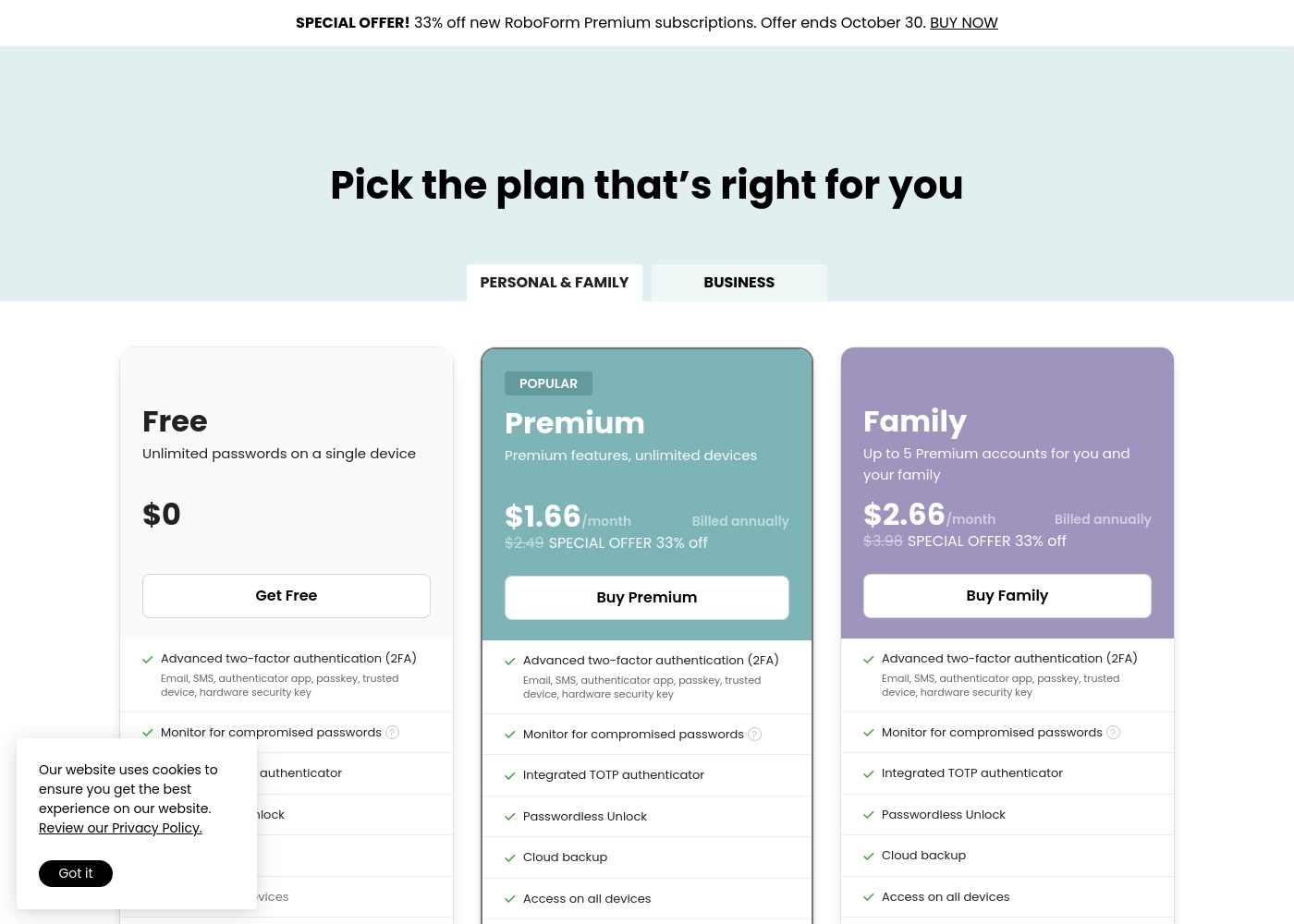
RoboForm costs between $0 and $31.92 per year with 3 plans: Free at $0, Premium at $19.92/year (billed annually), and Family at $31.92/year (billed annually).
If you're ready to secure your passwords, we have a plan designed specifically for you or your family. Take a look at your options below.
Free
Price: $0 Websites Supported: Not explicitly stated Best For: Single-device users needing basic password storage Refund Policy: Not applicable Other Features: Unlimited password storage, Advanced two-factor authentication (2FA), Monitor for compromised passwords, Email support
- Unlimited passwords (single device)
- Advanced two-factor authentication (2FA)
- Monitor for compromised passwords
- Includes 24/7 email support
- Premium features, unlimited devices
- Cloud backup and access on all devices
- Integrated TOTP authenticator
- Securely share items and folders
- Data Breach Monitoring for 5 emails
- Up to 5 Premium accounts for your family
- Cloud backup and access on all devices for all users
- Emergency Access
- Securely share items and folders
- Data Breach Monitoring for 5 emails
Pricing Notes
- Proton Pass offers an extremely generous, free-forever plan that is fully functional across unlimited devices.
- RoboForm's paid plans are highly transparent and affordable, starting at $1.66/month (billed annually).
- Proton Pass does not publicly disclose pricing for its 'Pass for Business' tier, requiring contact with sales.
- RoboForm offers excellent value with its Family plan coverage for five individual users at only $31.92 annually.
Pricing Head-to-Head
User Reviews
The sentiment across Trustpilot reviews, which cover the entire Proton ecosystem, is highly polarized. While some users describe the core product like Proton Pass as “amazing” and praise the inherent security and alias features, the overall user satisfaction is low.
The most consistent and severe complaint centers entirely on customer support. Users report extremely slow response times, support staff who are unable to resolve complex issues, and a lack of clear resolution processes, especially concerning accidental account lockouts.
The password manager product is amazing. The security and aliases are great. However, it's very hard to get in contact with a support team or developers if you need help or want to provide feedback on the service.
RoboForm users on Trustpilot consistently praise the software’s longevity and reliability. Many reviewers are extremely loyal, reporting usage spanning 10 to 20 years, highlighting its ability to evolve alongside changing technology. Users frequently describe RoboForm as a dependable and automatic time-saver that excels at generating strong passwords and syncing perfectly across multiple environments like Windows, iOS, and Android. The primary function—remembering passwords—is widely deemed “fast and reliable.”
General support is often called "terrific" and "quick" when dealing with simple trouble tickets. However, we noted significant, specific complaints related to complex account management and billing issues, where support was reportedly nonexistent. These negative accounts point to a structural concern when users require assistance beyond the basic technical help. Overall, the sentiment is overwhelmingly positive regarding the product's performance and value, but the service team may struggle with unique financial issues. 💡
I've been using RoboForm for well over a decade now. It has been great, easy to maintain, and is an excellent product. On the rare occasion I needed help, I found great customer service.
Our Verdict
Choosing between Proton Pass and RoboForm hinges on security jurisdiction versus functional depth. If maximum legal privacy backed by Swiss law is your priority, Proton Pass is the winner. If decades of dependable functionality and deeper compatibility are key, RoboForm is the superior choice. Proton Pass excels at identity protection, offering a highly generous free-forever plan across unlimited devices. You get integrated 'hide-my-email' aliases and full Passkey support right out of the box. However, be aware that Proton Pass support is frequently criticized for being slow and unresponsive. RoboForm is a mature workhorse, especially loved for its ability to fill virtually any complex online form. Its unique capacity to provide secure logins for Windows desktop applications sets RoboForm apart. Plus, its paid plans are highly transparent and incredibly affordable. Your internal security needs are the decider here. Pick Proton Pass if you value a privacy-first, zero-knowledge ecosystem that actively protects your email identity. Choose RoboForm if you need highly reliable autofill that works everywhere, including outside the browser environment. Ultimately, privacy-conscious individuals and Free plan users should go with Proton Pass. Small families and business users needing application access will find RoboForm is the dependable choice.
Frequently Asked Questions
Which offers a better Free plan: Proton Pass or RoboForm?
Proton Pass offers a more generous Free plan, allowing usage across unlimited devices. RoboForm restricts its Free plan to unlimited passwords on only a single device. Proton Pass also includes 10 free 'hide-my-email' aliases; RoboForm does not.
Can RoboForm log me into non-browser applications like Proton Pass?
Yes, RoboForm can log you into Windows desktop applications, which is a major capability difference. Proton Pass is focused solely on browser and mobile application access. Choose RoboForm if you need to secure and automate app logins.
Which password manager is better known for reliable form filling?
RoboForm has a decades-long reputation for exceptional form filling reliability. It can accurately save and fill highly complex online forms. While Proton Pass is good, RoboForm is dedicated to this advanced automation.
Is the customer support better for Proton Pass or RoboForm?
External reviews consistently suggest that RoboForm offers more reliable, dedicated customer support. Proton Pass frequently receives criticism regarding slow response times, potentially due to its large ecosystem.
Which has a cheaper paid plan for a family of five?
RoboForm is significantly cheaper and more transparent, offering the Family plan for five users at $31.92 per year. Proton Pass pricing for its business/family tiers is not publicly disclosed.
Does Proton Pass offer Emergency Access on its standard paid tiers?
Yes, Proton Pass includes Emergency Access as a standard feature for setting up vault access. RoboForm reserves this critical recovery feature only for its highest-priced Family subscription.
Ready to Choose?
Both tools have their strengths. Choose based on your specific needs.