Quickbooks vs Xero
Quickbooks and Xero are always the main competitors in the accounting space. Quickbooks offers deep financial power and superior scalability for larger teams. Xero provides a much easier user experience and superior customer support. Deciding means choosing between raw feature power and operational polish.

Power, Precision, and Painful Support.
We observe that QuickBooks offers market-leading feature depth and scalability, catering strongly to diverse business needs and growth stages with its tiered plans and AI tools. Overall, however, the severe and repeated reports of poor customer support and reliability issues necessitate caution, significantly hindering its operational effectiveness for many users.
Pros
- Scalable plans supporting solo operations up to 25 users.
- Customized experience based on specific business size and needs.
- Integration of advanced AI tools like Intuit Assist and Accounting Agents.
- Includes a 30-day free trial period for risk-free testing.
Cons
- Customer service is consistently reported as inefficient and unhelpful.
- Aggressive and frequent increases in subscription pricing.
- Software is frequently unstable, unreliable, and prone to accounting errors.
- Constant, unplanned user interface updates frustrate long-time users.
Smart features, frustrating support structure.
We found Xero delivers a powerful, intuitive cloud accounting experience, enhanced by automation tools like Hubdoc and their new AI assistant, JAX. Overall, this is a highly recommended platform, provided users are prepared for its chat-centric customer support model.
Pros
- Intuitive interface that is easy to master for daily bookkeeping tasks.
- Excellent core features, including seamless bank reconciliation and Hubdoc capture.
- Highly effective and prompt dedicated onboarding support is available for new users.
- Support staff is professional and helpful once communication is successfully established.
Cons
- Customer support is difficult to access, mainly relying on a chat-only system.
- Users report long wait times and often need to contact support multiple times for issue resolution.
- Reporting structure sometimes proves challenging or differs greatly from standard accounting practice.
- Some users feel newer features primarily benefit large businesses, impacting value for small businesses.
AboutQuickbooks
QuickBooks is a system designed to support modern businesses, regardless of their size. It’s built to personalize the site experience using simple criteria, like how many employees you have. ✨
Whether you are running a large team or operate as "Just me," the system aims to tailor features specifically to your needs. This focus on customization helps pave the way for successful business growth.
AboutXero
Xero is trusted cloud accounting software used by over 4.6 million subscribers worldwide. It's built for everyday businesses, offering an all-in-one, paperless way to manage your financial records. This system centralizes your finances in a safe and secure environment. Xero helps you manage your cash flow, control your finances, and connect seamlessly with other apps. Accountants and bookkeepers also use Xero to keep their practices steps ahead. 💡
Highlights
Feature Comparison
Features Overview
We highlight the main differences and pick a winner for each feature.
Customer Support Quality
Xero provides outstanding 24/7 online support and specialist onboarding help. Quickbooks support is notoriously difficult and often unhelpful.
Quickbooks users frequently report atrocious, unknowledgeable, and frustrating customer service experiences. Many users complain about long hold times and unresolved accounting issues. Xero offers reliable 24/7 online support that users consistently praise for patience and speed. Onboarding specialists guide new users for the first 90 days. The difference in user sentiment regarding support is vast, making this a critical factor. Quickbooks' powerful features are often overshadowed by poor support. If responsive guidance is critical to your operations, Xero provides a much safer, more reliable user experience.
Advanced AI Features
Quickbooks uses dedicated AI Agents for deep financial analysis and planning. Xero focuses automation on routine, time-saving functions.
Quickbooks integrates specialized AI Agents for complex, niche tasks in higher tiers. The Finance Agent handles high-level KPI analysis and planning. Quickbooks offers AI-powered reconciliation (BETA) to find errors automatically. Xero automates core administrative tasks like bank reconciliation and automated invoice reminders. This cuts down significantly on daily, manual administrative effort. Quickbooks aims for high-level financial analysis and complex management controls. Xero seeks to streamline day-to-day administrative efficiency for small businesses. If strategic forecasting and deep analytical tools are a necessity, Quickbooks offers more advanced features.
Scalability & Users
Quickbooks offers clear, structured scaling up to 25 defined paid users. Xero is priced per organization, offering collaboration flexibility.
Quickbooks has clear tiers ranging from 1 user (Simple Start) up to 25 users (Advanced plan). This structure ensures precise access control. Quickbooks is built for teams needing defined user governance. Xero operates on a per-organization model, facilitating easier access for unlimited collaborators and accountants. Pricing tiers generally focus on organizational feature needs. The trade-off is clear governance versus flexible team collaboration. Quickbooks guarantees strict user limits with tailored feature access. If you manage a business needing 5 or more defined financial roles, Quickbooks provides structured growth tiers up to 25 seats.
Ease of Use
Xero is known for its intuitive interface and fast setup, even for beginners. Quickbooks is powerful but criticized for clunky, unwanted UI changes.
Xero users find its cloud-based interface easy to navigate, leading to fast setup and adoption. The 90-day specialist onboarding helps reduce user friction. Quickbooks users frequently complain about constant, unplanned UI updates that disrupt workflow. Long-time users find the platform often feels clunky. Quickbooks prioritizes feature depth, which often increases general complexity and steepens the learning curve. Xero prioritizes clean, simple navigation. For users with limited accounting backgrounds, Xero offers a smoother ramp-up and a more pleasant daily accounting experience.
Pricing Clarity
Quickbooks has predictable, fixed price tiers based on user count and features. Xero offers a free plan but has less defined subscription steps.
Quickbooks clearly sets pricing from $38 to $275 per month across four defined tiers. The cost reflects the precise number of users and AI features included. Xero offers a wider price range ($0 to over $10k), indicating diverse plans including a free option. Pricing is generally billed per organization monthly. Quickbooks users report frequent and aggressive price increases after promotional periods end. Xero users also mention rising costs but less aggressively. If you need a transparent, precise structure based on user headcount, Quickbooks provides that clarity from the start.
Data Intake
Xero integrates the robust Hubdoc tool for automated bill and receipt intake. Quickbooks relies on native 'Smart expense organization' functionality.
Hubdoc, integrated with Xero, pulls bills and receipts into the system automatically. This function allows for secure, paperless record-keeping and easy access. Quickbooks offers "Smart expense organization" built into all plan tiers. This is key for efficiently reviewing transactions and boosting accuracy. Hubdoc provides dedicated functionality focused purely on document intake automation. Quickbooks integrates its expense tools directly into the core platform. Both tools offer strong features to categorize and manage expenses, significantly cutting down on manual data entry time.
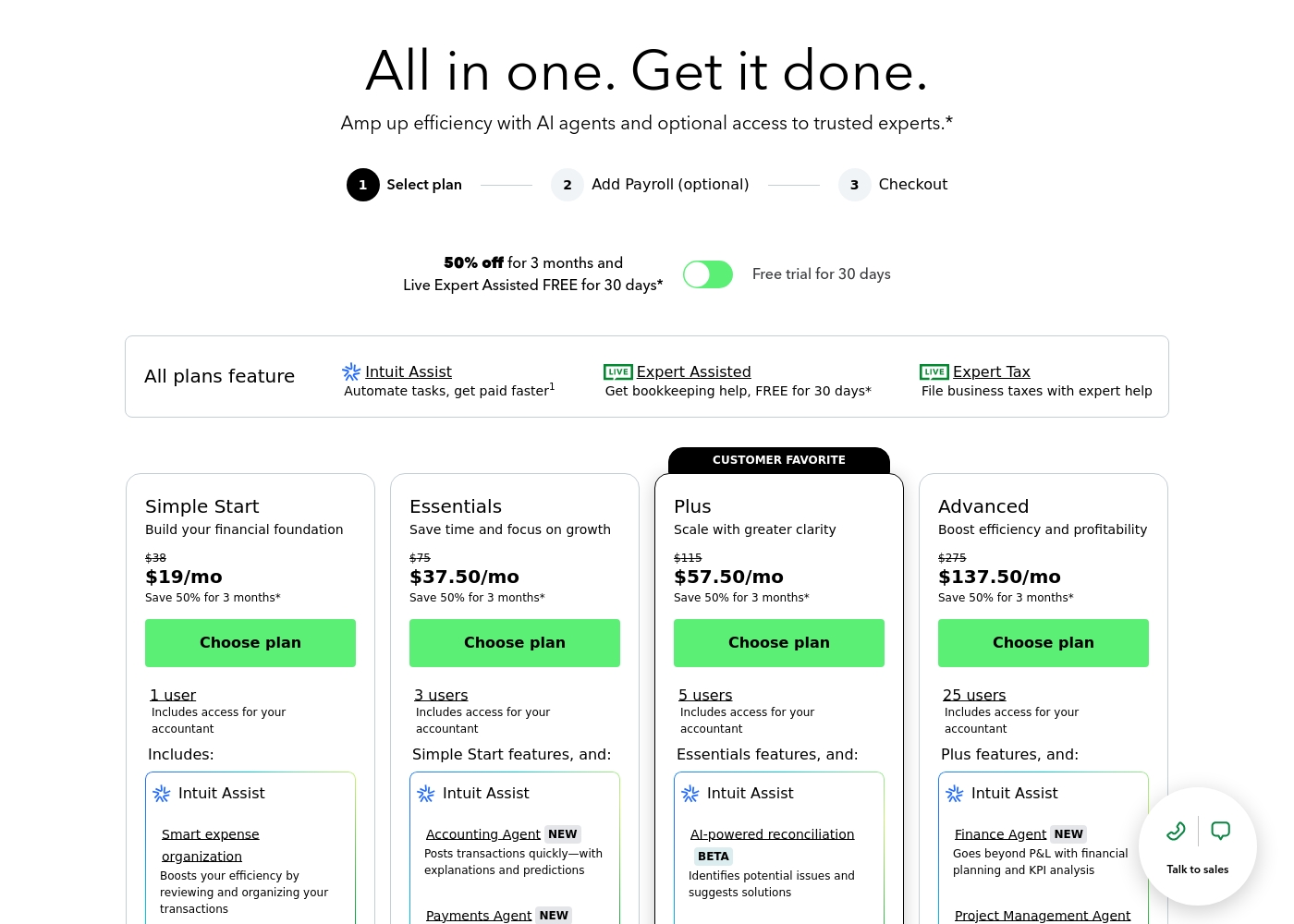
QuickBooks costs between $38 and $275 per month with 4 plans: Simple Start at $38, Essentials at $75, Plus at $115, and Advanced at $275.
Here’s a closer look at what features and capacity are included with each plan.
Simple Start
Price: $38/month (or $19/month for 3 months) Websites Supported: Not explicitly stated Best For: Building your financial foundation Refund Policy: Not explicitly stated Other Features:
- 1 user access
- Includes access for your accountant
- Intuit Assist
- Smart expense organization
- 1 user access
- Includes access for your accountant
- Intuit Assist
- Smart expense organization
- 3 users access
- Simple Start features included
- Accounting Agent NEW
- Payments Agent NEW
- 5 users access
- Essentials features included
- AI-powered reconciliation (BETA)
- 25 users access
- Plus features included
- Finance Agent NEW (Financial planning and KPI analysis)
- Project Management Agent
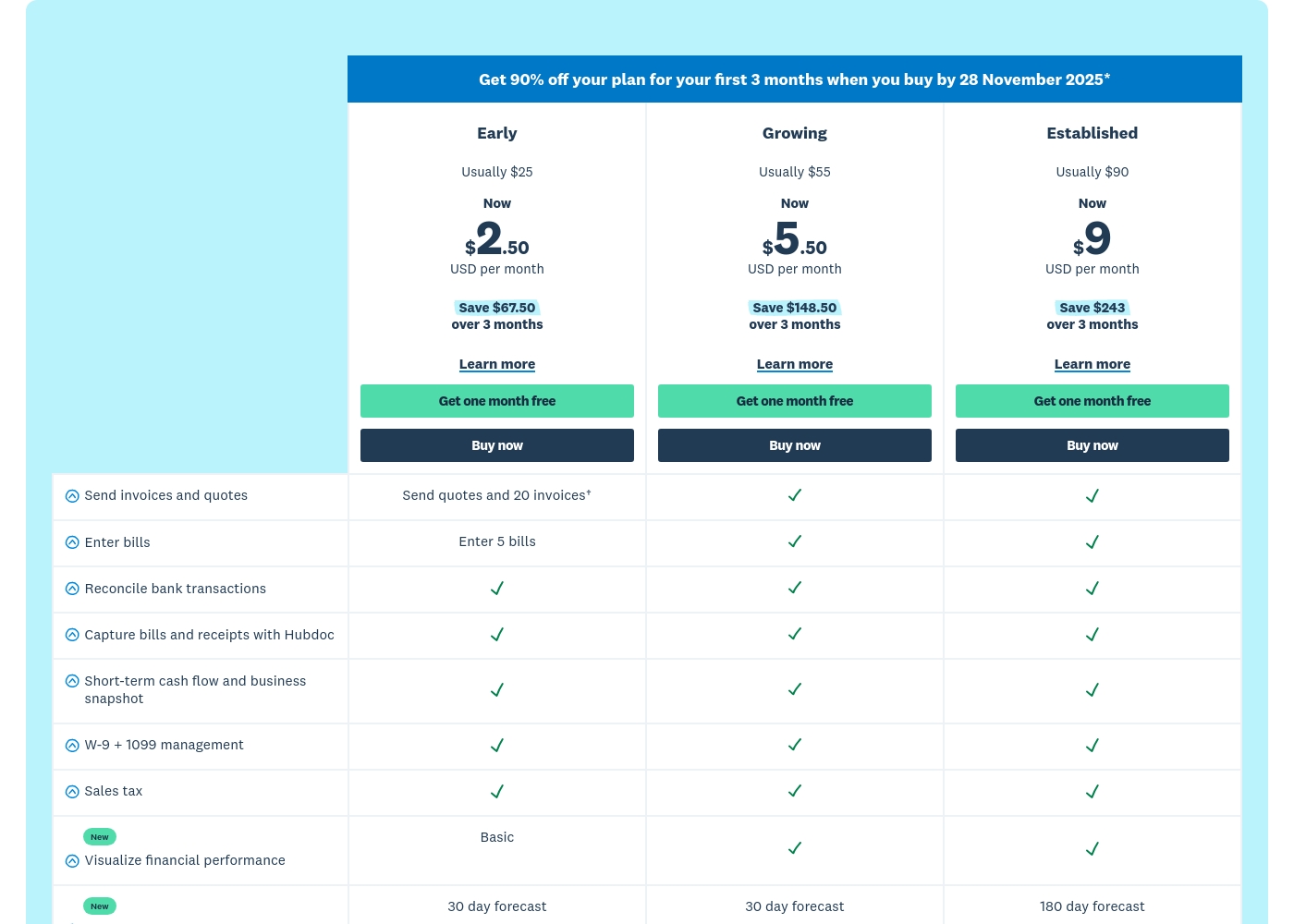
Xero costs between $25 and $90 per month with 3 plans: Early at $25/month, Growing at $55/month, and Established at $90/month.
Prices are quoted monthly, and you can see what's included in each tier below. Remember, when you purchase any plan, your first month is free!
Early
Price: $25 USD per month (Usually; promotional rate is $2.50 per month for 3 months) Websites Supported: Not explicitly stated Best For: Small or new businesses with limited transaction volumes Refund Policy: Subscriptions auto-renew monthly until canceled Other Features:
- Send quotes and 20 invoices
- Enter 5 bills
- Reconcile bank transactions
- Capture bills and receipts with Hubdoc
- W-9 + 1099 management and Sales tax
- Reconcile bank transactions
- Capture bills and receipts with Hubdoc
- Short-term cash flow and business snapshot
- W-9 + 1099 management
- Sales tax
- Send invoices and quotes (unlimited implied)
- Enter bills (unlimited implied)
- Reconcile bank transactions
- Capture bills and receipts with Hubdoc
- Short-term cash flow and business snapshot
- Send invoices and quotes (unlimited implied)
- Enter bills (unlimited implied)
- Reconcile bank transactions
- Capture bills and receipts with Hubdoc
- Short-term cash flow and business snapshot
Pricing Notes
- Quickbooks is structured with fixed user limits, starting at 1 user and scaling up to 25 users.
- Xero offers a free plan entry point, while Quickbooks starts at $38/month for the Simple Start plan.
- Quickbooks offers a 50% discount for the first three months across all subscription tiers.
- Quickbooks users frequently report aggressive, sudden price increases following the initial introductory discount period.
Pricing Head-to-Head
User Reviews
User sentiment collected primarily from Trustpilot is overwhelmingly negative, frequently contrasting with the platform’s marketing promises of accuracy and seamless growth. While QuickBooks offers feature depth and personalized experiences, the recurring themes of frustration are significant among users.
Customers consistently report atrocious and unhelpful customer service, often involving extremely long holding times, multiple transfers, and conflicting information without resolution. Reliability is a major concern; users describe the software as unstable, prone to costly accounting errors, and sometimes necessitating external accountant intervention.
I spent almost three months migrating from the Desktop to the Online version. The transition was supposed to be easy, but I had constant issues. Customer support was unknowledgeable and unable to assist me thoroughly.
Xero generally receives positive external feedback, focusing heavily on its ease of use and intuitive cloud interface. Many users, including accountants, praise the platform for streamlining bookkeeping and its excellent bank reconciliation feature.
Onboarding support is frequently highlighted as outstanding, with dedicated specialists making transitions smooth for new customers. The extensive ecosystem of connected apps is also noted as a major benefit for business operations.
Habib was excellent and guided me through all the things I needed to migrate over to Xero from our previous software. He gave me confidence that I was doing things correctly and answered all my questions.
Our Verdict
These two accounting titans serve starkly different audiences and masteries. Quickbooks delivers raw financial power, but Xero focuses intensely on the user experience. For most small business users, Xero wins on usability and platform reliability. Quickbooks struggles with execution despite its powerful feature list. Quickbooks is the champion of high-end feature depth and structured enterprise scaling. It handles growth up to 25 users across its fixed, predictable tiers. Quickbooks offers unique specialized AI Agents for analysis and complex financial planning. If you need maximum financial control and granular reporting, Quickbooks is the superior tool. Xero’s primary superpower is its rock-solid functionality and superior support experience. Xero is intuitive for daily use, avoiding Quickbooks' clunky, frustrating interface updates. The bank feed automation is consistently praised and saves significant administrative time. Xero offers dedicated specialist onboarding for the first 90 days. The crucial deciding factor is operational experience versus sheer feature scale. Quickbooks is technically powerful but severely hindered by support and instability issues. Xero is enjoyable to use and backed by helpful, responsive 24/7 support. Choose Quickbooks if your organization requires 5-25 user seats and deep financial AI capabilities. Pick Xero if you prioritize an intuitive interface, reliable 24/7 support, and seamless bank automation for your growing small business.
Frequently Asked Questions
Which is better for small teams: Quickbooks or Xero?
Xero is generally better for small teams due to its superior support and ease of use. Quickbooks starts at $38/month for one user. Xero offers a free plan and strong automation for efficient daily bookkeeping tasks.
Does Quickbooks have a free plan like Xero?
No, Quickbooks does not currently offer a free usage plan option for its services. Quickbooks plans start at $38 per month for the Simple Start tier. However, both Quickbooks and Xero offer substantial free trial periods.
Which tool offers the best customer support, Quickbooks or Xero?
Xero provides significantly better customer support based on overwhelmingly positive user reviews. Xero offers 24/7 online support and onboarding specialists. Quickbooks support is reported as inefficient and highly frustrating.
How do the user limits compare between Quickbooks and Xero?
Quickbooks uses defined user limits, scaling up to 25 users on its Advanced tier. Xero is primarily priced per organization and allows more flexible access for collaborators. Quickbooks gives you more control over seat licensing.
Should I choose Quickbooks if I need advanced financial reporting?
Yes, Quickbooks offers deeper reporting potential in its high-end plans. The Quickbooks Advanced plan includes a Finance Agent for KPI analysis and complex financial planning features. Xero offers robust customizable reports, but less specialized AI insight.
Can I easily switch from Quickbooks to Xero?
Xero provides dedicated onboarding specialists and guides during your first 90 days. This support is designed to ensure that data migration and initial setup go smoothly when moving from Quickbooks. Xero aims to accelerate setup.
Ready to Choose?
Both tools have their strengths. Choose based on your specific needs.