Quicken vs Xero
Quicken and Xero target very different financial management needs. Quicken rules complex personal finance, budgeting, and investment tracking. Xero is the modern, automated choice for small business cloud accounting. The choice depends entirely on whether your focus is personal wealth or business growth.
Unrivaled depth matched with modern friction.
We find Quicken remains an incredibly powerful, detailed solution suitable for complex personal finance tracking, investment analysis, and integrated business needs. While the functional depth is unmatched for traditional desktop users, we noted widespread concerns regarding software stability, problematic bank data feeds, and challenges related to the mandatory subscription pivot. Overall, the persistent performance issues prevent us from providing a top reliability score.
Pros
- Unmatched functional depth for complex personal finances, investing, and business.
- Reliable tracking and analysis for budgets, historical expenses, and investments.
- Offers comprehensive reporting, including built-in tax schedules (C, E, F).
- Ability to securely track loans, credit cards, and multiple accounts in one place.
Cons
- The mandatory subscription model is a point of frustration for long-time users.
- Frequent reports of unreliable bank and broker data feeds (missing or incorrect transactions).
- Users report software instability, glitchiness, and slow performance on updates.
- Customer support is frequently cited as being unhelpful or unresponsive.
Smart features, frustrating support structure.
We found Xero delivers a powerful, intuitive cloud accounting experience, enhanced by automation tools like Hubdoc and their new AI assistant, JAX. Overall, this is a highly recommended platform, provided users are prepared for its chat-centric customer support model.
Pros
- Intuitive interface that is easy to master for daily bookkeeping tasks.
- Excellent core features, including seamless bank reconciliation and Hubdoc capture.
- Highly effective and prompt dedicated onboarding support is available for new users.
- Support staff is professional and helpful once communication is successfully established.
Cons
- Customer support is difficult to access, mainly relying on a chat-only system.
- Users report long wait times and often need to contact support multiple times for issue resolution.
- Reporting structure sometimes proves challenging or differs greatly from standard accounting practice.
- Some users feel newer features primarily benefit large businesses, impacting value for small businesses.
AboutQuicken
Quicken is a trusted, comprehensive platform designed to integrate all your financial information into one secure place. For over 40 years, this #1 best-selling finance app has helped millions gain clarity over their budgets, investments, and business cash flow. You can select the specific solution that meets your needs, whether you are focused on simple savings and budgeting (Quicken Simplifi), or require specialized tools for invoicing and tax preparation (Quicken Business & Personal). 💡
If organizing essential documents like birth certificates and estate plans is your priority, Quicken LifeHub provides step-by-step guidance. Consumers looking for the classic desktop experience can still choose Quicken Classic, available on Windows and Mac, which stores your data locally.
AboutXero
Xero is trusted cloud accounting software used by over 4.6 million subscribers worldwide. It's built for everyday businesses, offering an all-in-one, paperless way to manage your financial records. This system centralizes your finances in a safe and secure environment. Xero helps you manage your cash flow, control your finances, and connect seamlessly with other apps. Accountants and bookkeepers also use Xero to keep their practices steps ahead. 💡
Highlights
Feature Comparison
Features Overview
We highlight the main differences and pick a winner for each feature.
Target Audience
Quicken is built for consumers; Xero is built for businesses.
Quicken is fundamentally designed for complex personal finance tracking and budgeting. This includes deep tools for investments and retirement planning. Quicken allows integrated management of small, non-complex business finances, especially for tax purposes. Xero is a dedicated professional cloud accounting solution for small businesses. It focuses on invoicing, accurate cash flow, and team collaboration. Xero supports specific industry workflows like construction, real estate, and retail. They serve highly distinct markets, so direct feature comparison isn't always helpful. Quicken is an integrated finance organizer; Xero is a centralized accounting engine. Choose Quicken if you need to manage your household budget and personal investments first. Choose Xero if getting paid quickly and managing business expenses is your primary goal.
Platform & Access
Quicken offers desktop flexibility; Xero is purely cloud-based.
Quicken offers Classic desktop software for Mac and Windows, providing local data storage. This is preferred by users worried about data privacy or needing maximum speed and stability. Quicken also offers the cloud-based Simplifi for mobile-only users. Xero is entirely cloud-based, which supports real-time access and collaboration globally. Accountants and business partners can easily view and manage the books simultaneously. This eliminates the need for manual data transfers and ensures consistent data. Quicken offers a choice between desktop control and cloud access, depending on the plan you choose. Xero forces you into the cloud model, emphasizing flexibility over traditional desktop stability. If local data storage is a mandatory requirement for you, Quicken is the clear choice. If team access and paperless cloud collaboration are key, Xero excels.
Investment Tracking
Quicken specializes in investing; Xero offers no investment depth.
Quicken Classic Premier provides best-in-class investment tools and analysis features. It includes advanced performance metrics and a capital gains estimator vital for tax planning. Quicken users rely on this feature to track portfolios across 14,000+ institutions. Xero focuses solely on core business metrics like P&L, cash flow, and accounts receivable/payable. Tax calculation in Xero is focused on sales tax and payroll, not personal investment schedules. Xero has no specific features for advanced personal stock or portfolio analysis. For anyone with marketable securities or complex investment portfolios, Quicken is non-negotiable. Xero simply lacks the function required to manage significant personal investments. If deep portfolio analysis helps you make financial decisions, only Quicken offers the functionality you need.
Invoicing & Receivables
Xero's invoicing is vastly superior and fully automated.
Quicken Business & Personal plans include basic invoicing tools suitable for simple freelancing or single-client needs. The platform handles unlimited clients and basic invoice creation. Quicken focuses on tracking the income rather than the entire receivables workflow. Xero offers robust, automated invoicing integrated seamlessly into its accounting system. It sends automated invoice reminders to accelerate cash flow dramatically. Xero also provides 60 days of free online invoice payments via Stripe, boosting early liquidity. While Quicken offers invoicing, Xero treats it as a core, automated business function built for efficiency. Xero helps you get paid faster with less manual effort. Small businesses depending on timely invoice payments should prioritize Xero for its automation and integrated payment features.
Receipt Management
Xero automates receipt capture using Hubdoc; Quicken uses manual feeds.
Quicken relies primarily on connecting to bank feeds and manual transaction categorization. Receipt attachment or automated bill capture is not a dedicated strength in Quicken's design. This means more time is spent managing paper and manual data entry. Xero includes integrated access to Hubdoc, which automatically pulls bills and receipts into the system. This creates centralized, paperless, and verifiable financial records instantly. Hubdoc saves enormous time on expense management. The difference is critical for businesses looking to streamline expense tracking and tax preparation. Xero provides a fully automated paperless workflow. If you hate handling stacks of business receipts, Xero and Hubdoc will save you hours every month during reconciliation.
Tax Integration
Quicken includes built-in tax schedules; Xero helps accountants export data.
Quicken simplifies tax time with built-in reports specific to US tax schedules. This includes built-in forms for Schedule C (Self-Employment) and Schedule E (Rental Income). This is incredibly helpful for sole proprietors and landlords for direct tax preparation. Xero provides standard financial reports like Profit & Loss and general summaries. Accountants use these detailed exports to prepare business tax filings efficiently. Xero itself does not generate integrated tax schedules or forms. Quicken offers a more self-guided tax preparation tool focusing on small business owners' schedules. Xero is designed for professional accountant interaction. If you manage your own small business taxes using Schedules C or E, Quicken offers substantial tax preparation shortcuts.
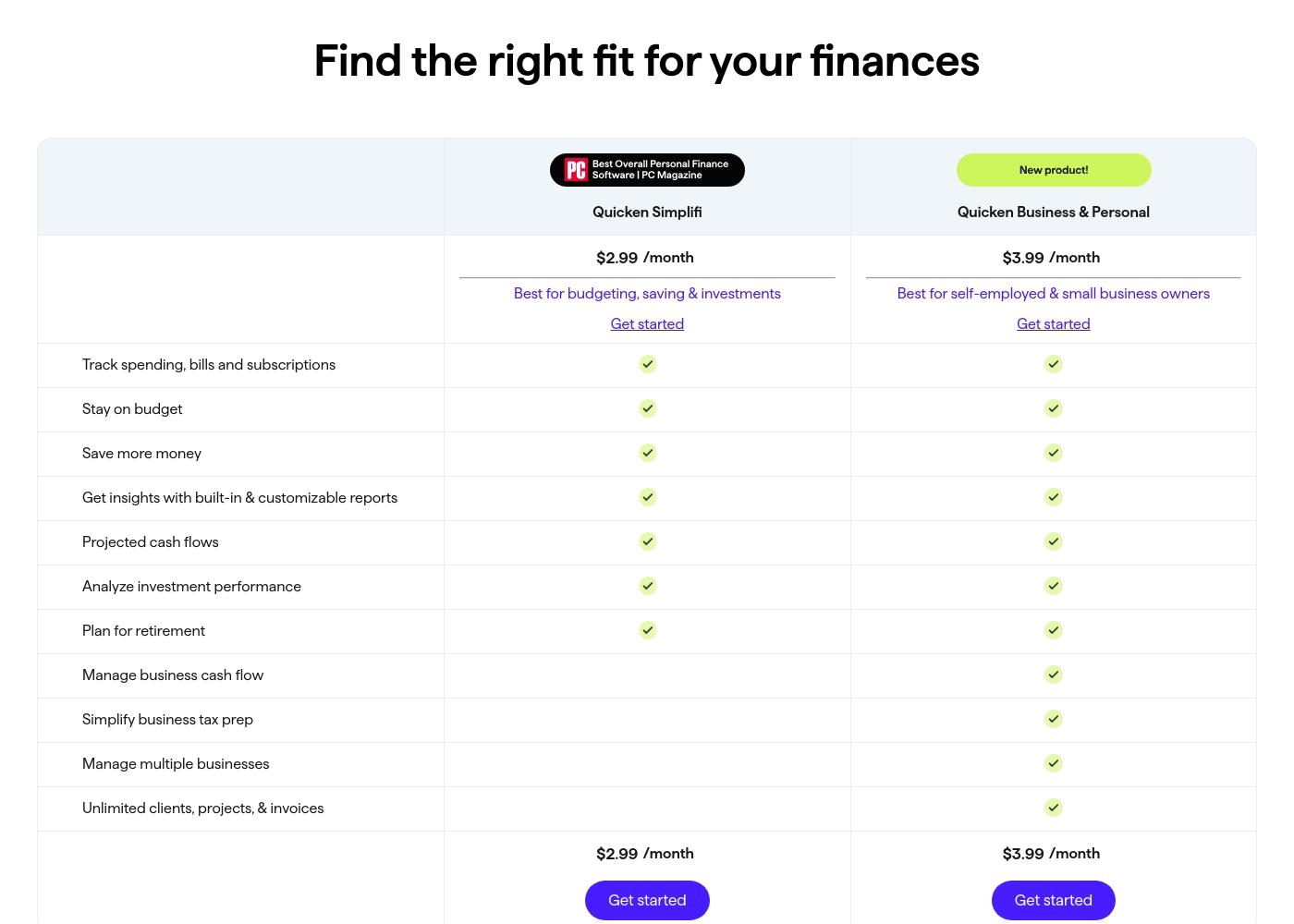
Quicken costs between $2.99 and $5.99 per month (billed annually) with five main plans: Quicken Simplifi at $2.99/month, Classic Deluxe at $2.99/month, Quicken Business & Personal at $3.99/month, Classic Premier at $4.19/month, and Classic Business & Personal at $5.99/month.
Let's look closely at the different subscription options available to help you choose the best fit for your financial goals.
Quicken Simplifi (Mobile Web)
Price: $2.99/month (Billed annually; standard $5.99/month) Websites Supported: Not explicitly stated Best For: Budgeting, saving & investments Refund Policy: 30-day money-back guarantee Other Features:
- Always know what you have left to spend or save
- Get better insights with reports & real-time alerts
- Make informed decisions about your investment portfolio
- Plan for the future with projected cash flows
- Budgeting, saving & investments
- Track spending, bills, and subscriptions
- Projected cash flows
- Analyze investment performance
- Plan for retirement
- Create multiple budgets
- Manage & reduce debt
- Simplify tax time
- Create a secure retirement
- Desktop software with companion apps
- All Simplifi features included
- Manage business cash flow
- Simplify business tax prep (Schedules C, E & F)
- Manage multiple businesses
- Unlimited clients, projects, & invoices
- Best-in-class investing tools
- Built-in tax reports
- Reconcile to the penny
- Track & pay bills in Quicken
- Set budgets, manage debt, create a retirement plan
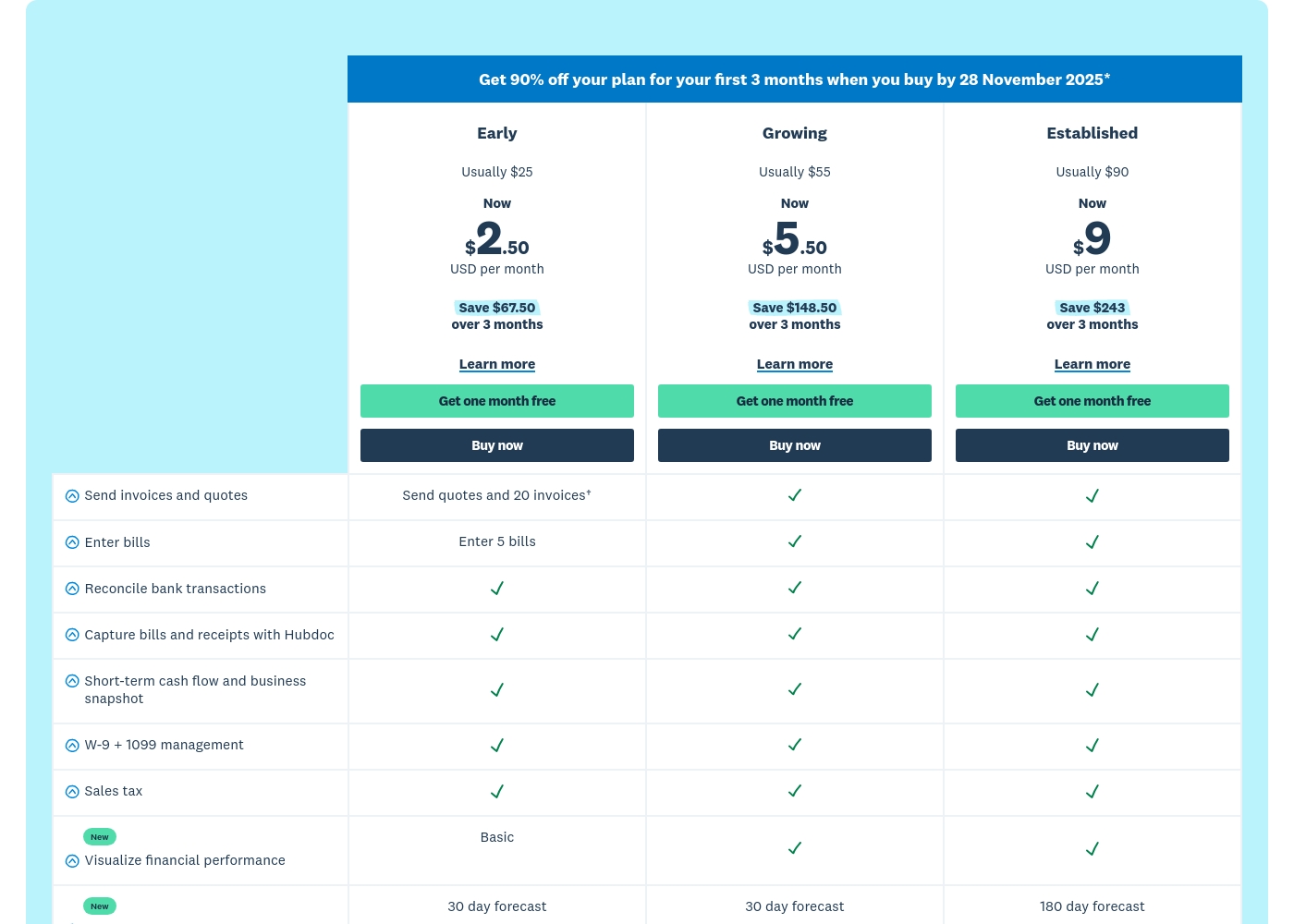
Xero costs between $25 and $90 per month with 3 plans: Early at $25/month, Growing at $55/month, and Established at $90/month.
Prices are quoted monthly, and you can see what's included in each tier below. Remember, when you purchase any plan, your first month is free!
Early
Price: $25 USD per month (Usually; promotional rate is $2.50 per month for 3 months) Websites Supported: Not explicitly stated Best For: Small or new businesses with limited transaction volumes Refund Policy: Subscriptions auto-renew monthly until canceled Other Features:
- Send quotes and 20 invoices
- Enter 5 bills
- Reconcile bank transactions
- Capture bills and receipts with Hubdoc
- W-9 + 1099 management and Sales tax
- Reconcile bank transactions
- Capture bills and receipts with Hubdoc
- Short-term cash flow and business snapshot
- W-9 + 1099 management
- Sales tax
- Send invoices and quotes (unlimited implied)
- Enter bills (unlimited implied)
- Reconcile bank transactions
- Capture bills and receipts with Hubdoc
- Short-term cash flow and business snapshot
- Send invoices and quotes (unlimited implied)
- Enter bills (unlimited implied)
- Reconcile bank transactions
- Capture bills and receipts with Hubdoc
- Short-term cash flow and business snapshot
Pricing Notes
- Quicken requires customers to commit to an annual subscription to access the advertised lower monthly prices.
- Xero offers a limited free plan and the option of flexible monthly billing, providing greater payment flexibility.
- Quicken’s highest tier ($5.99/month) is vastly cheaper for complex personal/integrated business tracking than Xero’s dedicated accounting platform.
- Xero provides specialized onboarding support for the first 90 days, which is vital for new businesses and accounts for some of the cost difference.
Pricing Head-to-Head
User Reviews
Quicken maintains a devoted user base, with many customers reporting continuous use for over 20 or 30 years. Reviewers across both Trustpilot and Capterra consistently praise Quicken’s ability to serve as a comprehensive hub for managing budgets, investments, and tracking historical data.
Many find it indispensable for reconciling accounts and managing complex personal or small business finances. Users appreciate having all their critical information in one accessible place.
I’ve been using Quicken since the late 1980s, and it’s become essential for managing my complex finances. It’s a great product that continues to fulfill its purpose. I rely on it to keep my portfolio organized and accessible.
Xero generally receives positive external feedback, focusing heavily on its ease of use and intuitive cloud interface. Many users, including accountants, praise the platform for streamlining bookkeeping and its excellent bank reconciliation feature.
Onboarding support is frequently highlighted as outstanding, with dedicated specialists making transitions smooth for new customers. The extensive ecosystem of connected apps is also noted as a major benefit for business operations.
Habib was excellent and guided me through all the things I needed to migrate over to Xero from our previous software. He gave me confidence that I was doing things correctly and answered all my questions.
Our Verdict
Choosing between Quicken and Xero is easy because they target different needs entirely. Quicken is the undisputed champion of complex personal finance and investing control. Xero is the intuitive, automated leader for modern small business cloud accounting. Quicken’s superpower lies in its analytical depth and flexibility. The Classic desktop plans offer local data storage, satisfying maximum privacy concerns. Quicken is crucial for self-employed individuals, including built-in tax schedules like C, E, and F. Xero’s superpower is superior cloud automation and user collaboration. Features like Hubdoc automate receipt capture, eliminating paper records entirely from your workflow. Xero's excellent 90-day onboarding support ensures new businesses get started quickly and correctly. The deciding factor is your primary focus: wealth management or business operations. If your priority is tracking your retirement portfolio and budgeting household expenses, Quicken wins. If you need robust invoicing, payroll, and accountant access for your thriving business, Xero is crucial. Pick Quicken if you are a serious investor, a landlord, or need integrated personal and business tax reports. Choose Xero if you need professional, paperless cloud accounting and seamless collaboration with your accountant.
Frequently Asked Questions
Which is better for growing small teams: Quicken or Xero?
Xero is decisively better for growing teams due to its focus on cloud collaboration. Xero allows real-time accountant access and multiple team users seamlessly. Quicken is designed primarily as a single-user personal finance tool.
Does Quicken offer integrated debt reduction tools like Xero?
Yes, Quicken Classic Deluxe includes specific debt reduction tools and goal-based planning. Xero focuses more on business debt (payables) rather than personal loans or mortgages. Quicken offers more granular personal debt management.
Is Xero worth the extra cost over Quicken for a freelancer?
Xero is generally more expensive but worth it if you need advanced invoicing automation and Hubdoc receipt scanning. Quicken's Business & Personal tracks tax data effectively at a much lower price. The value depends on how much you rely on automation to save time.
Can I use Quicken to manage my stock market investments?
Yes, Quicken Classic Premier is highly specialized for advanced investment tracking and analysis. It provides performance reports and capital gains estimators. Xero is dedicated to business accounting and offers virtually no tools for personal investment management.
Does Xero offer a desktop software application like Quicken?
No, Xero is completely cloud-based to enable collaboration and remote access instantly. Quicken offers desktop options (Classic) for local data storage preference. If you require a traditional installed desktop application, only Quicken provides it.
What kind of customer support does Quicken offer compared to Xero?
Xero offers dedicated onboarding specialists for your first 90 days, plus 24/7 online support. Quicken provides standard free phone and chat support for most plans. Xero focuses heavily on helping new users get set up quickly.
Ready to Choose?
Both tools have their strengths. Choose based on your specific needs.