Quicken vs Zoho Books
Quicken and Zoho Books are powerful financial tools built for very different jobs. Quicken dominates deep personal finance analysis and investment tracking. Zoho Books is dedicated, end-to-end cloud accounting for a growing business. This comparison helps you pick the right financial focus for your primary needs.
Unrivaled depth matched with modern friction.
We find Quicken remains an incredibly powerful, detailed solution suitable for complex personal finance tracking, investment analysis, and integrated business needs. While the functional depth is unmatched for traditional desktop users, we noted widespread concerns regarding software stability, problematic bank data feeds, and challenges related to the mandatory subscription pivot. Overall, the persistent performance issues prevent us from providing a top reliability score.
Pros
- Unmatched functional depth for complex personal finances, investing, and business.
- Reliable tracking and analysis for budgets, historical expenses, and investments.
- Offers comprehensive reporting, including built-in tax schedules (C, E, F).
- Ability to securely track loans, credit cards, and multiple accounts in one place.
Cons
- The mandatory subscription model is a point of frustration for long-time users.
- Frequent reports of unreliable bank and broker data feeds (missing or incorrect transactions).
- Users report software instability, glitchiness, and slow performance on updates.
- Customer support is frequently cited as being unhelpful or unresponsive.
Scalable Accounting with Clear Value.
We find that Zoho Books provides a comprehensive and budget-friendly alternative to complex accounting systems. The scalability, permanent free tier, and full financial management capabilities are major strengths. Overall, this is a top recommendation for growing businesses needing feature-rich accounting without high legacy costs.
Pros
- Permanent Free plan available for micro-businesses.
- Highly scalable pricing structure with competitive annual rates.
- Cloud-based, comprehensive solution covering invoicing, inventory, and expenses.
- User-friendly interface simplifies daily financial tasks.
Cons
- Severe MFA reset issues reported across the Zoho suite can lock users out of accounts.
- Mixed reports regarding customer service responsiveness.
- All plans impose explicit annual limits on invoices and expenses.
- External accounting-specific feedback on accuracy and reliability is limited.
AboutQuicken
Quicken is a trusted, comprehensive platform designed to integrate all your financial information into one secure place. For over 40 years, this #1 best-selling finance app has helped millions gain clarity over their budgets, investments, and business cash flow. You can select the specific solution that meets your needs, whether you are focused on simple savings and budgeting (Quicken Simplifi), or require specialized tools for invoicing and tax preparation (Quicken Business & Personal). 💡
If organizing essential documents like birth certificates and estate plans is your priority, Quicken LifeHub provides step-by-step guidance. Consumers looking for the classic desktop experience can still choose Quicken Classic, available on Windows and Mac, which stores your data locally.
AboutZoho Books
Zoho Books is comprehensive, cloud-based accounting software built specifically for growing businesses. It helps you manage your entire financial workflow seamlessly, integrating key functions into one place. You can handle everything from tracking expenses to controlling inventory and processing invoices. Because it’s available through mobile apps for iOS and Android, you can easily manage your books on the go. ✅
Highlights
Feature Comparison
Features Overview
We highlight the main differences and pick a winner for each feature.
Financial Focus
Quicken dominates personal financial depth; Zoho Books handles necessary business accounting.
Quicken is truly built for the individual, tracking every penny across budgets and complex investment accounts. Quicken offers specialized tools for debt payoff and retirement planning. For small business needs, Quicken integrates personal and business transactions. Zoho Books is built from the ground up as dedicated formal accounting software. It specializes in general ledger, invoicing, and managing payables and receivables. Zoho Books handles core business operations more robustly than Quicken's business add-ons.
Investment Analysis
Quicken is essential for serious investors; Zoho Books ignores personal portfolios.
Quicken Classic Premier offers unparalleled analysis for individual investors. This includes portfolio tracking, capital gains estimation, and Morningstar reports. Users rely on Quicken for historical investment performance depth. Zoho Books is business accounting software and does not feature personal investment tools. It focuses on P&L and managing business assets and liabilities. If investment mastery is a priority, Zoho Books is completely unsuitable.
Core Accounting
Zoho Books provides end-to-end bookkeeping; Quicken offers specialized tax reports.
Zoho Books gives small businesses full, dedicated accounting functionality. This includes inventory management, detailed invoicing, and project tracking. It handles formal double-entry bookkeeping processes seamlessly. Quicken's business plans help the self-employed with cash flow and tax categorization. Quicken excels in simplifying tax time with built-in reports for Schedules C, E, and F. Quicken’s business solution is better for the freelancer hybrid user than a growing SMB.
Scalability & Ecosystem
Zoho Books scales for teams; Quicken is primarily focused on the single user.
Zoho Books is designed to grow with your business and supports multi-user collaboration. It is part of the extensive and integrated Zoho ecosystem (CRM, etc.). Integrating Zoho Books with sales channels like Zoho CRM is incredibly seamless. Quicken is fundamentally a single-user tool focused on consolidating one person's finances. User additions in Quicken are limited to companion mobile apps or specific high-tier plans. Quicken’s strength is financial institution coverage, not internal team workflow.
Global Transactions
Zoho Books excels with multi-currency; Quicken is limited to North American banks.
Zoho Books is built for global business transactions and supports multi-currency. It applies real-time exchange rates, ensuring compliance and accurate reporting. Businesses with international clients or vendors need Zoho Books. Quicken connects to banks only in the U.S. and Canada. If your business requires frequent transactions in foreign currencies, Quicken will fall short. For global reach, Zoho Books is the clear, decisive choice.
Deployment Type
Quicken offers desktop or cloud; Zoho Books is purely cloud-based.
Quicken Classic offers the option to store data locally on a Mac or Windows desktop. Many long-time users prefer Quicken for this traditional, secure data control model. Quicken also offers modern cloud-only access via Simplifi for mobility. Zoho Books is a dedicated cloud application, accessed solely via web browser or mobile apps. This cloud-only model in Zoho Books ensures team members always see the latest data instantly.
Pricing & Free Access
Zoho Books offers a free plan; Quicken requires a mandatory paid subscription.
Zoho Books offers a persistent Free plan for very small businesses and solopreneurs. Paid plans are affordably priced per organization, with low-cost add-ons for extra users. Zoho Books also includes free migration support for switchers. Quicken requires an annual subscription starting at promotional rates around $2.99/month. While Quicken offers a 30-day money-back guarantee, there is no perpetually free access. Zoho Books is significantly more accessible for budget-conscious startups.
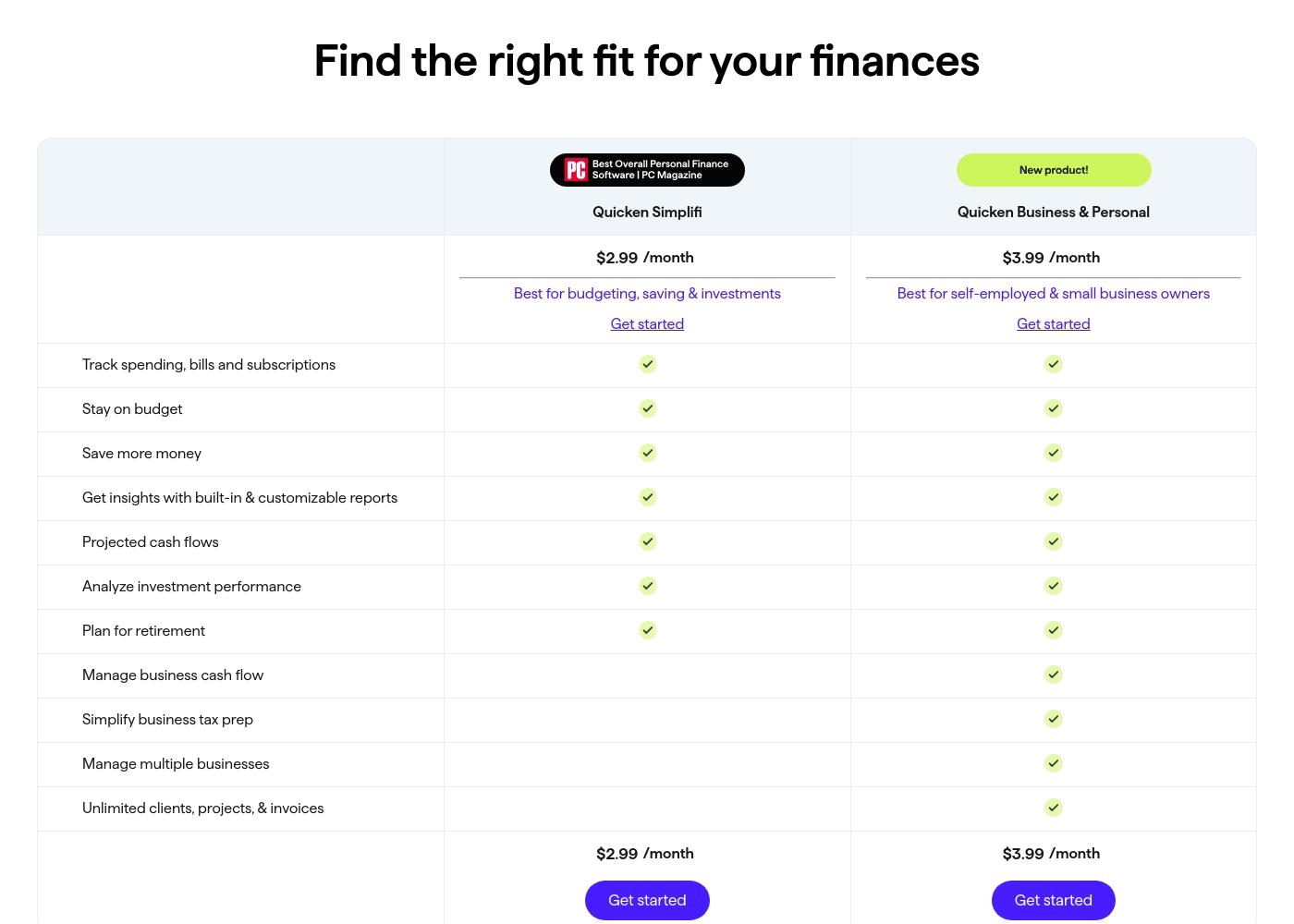
Quicken costs between $2.99 and $5.99 per month (billed annually) with five main plans: Quicken Simplifi at $2.99/month, Classic Deluxe at $2.99/month, Quicken Business & Personal at $3.99/month, Classic Premier at $4.19/month, and Classic Business & Personal at $5.99/month.
Let's look closely at the different subscription options available to help you choose the best fit for your financial goals.
Quicken Simplifi (Mobile Web)
Price: $2.99/month (Billed annually; standard $5.99/month) Websites Supported: Not explicitly stated Best For: Budgeting, saving & investments Refund Policy: 30-day money-back guarantee Other Features:
- Always know what you have left to spend or save
- Get better insights with reports & real-time alerts
- Make informed decisions about your investment portfolio
- Plan for the future with projected cash flows
- Budgeting, saving & investments
- Track spending, bills, and subscriptions
- Projected cash flows
- Analyze investment performance
- Plan for retirement
- Create multiple budgets
- Manage & reduce debt
- Simplify tax time
- Create a secure retirement
- Desktop software with companion apps
- All Simplifi features included
- Manage business cash flow
- Simplify business tax prep (Schedules C, E & F)
- Manage multiple businesses
- Unlimited clients, projects, & invoices
- Best-in-class investing tools
- Built-in tax reports
- Reconcile to the penny
- Track & pay bills in Quicken
- Set budgets, manage debt, create a retirement plan
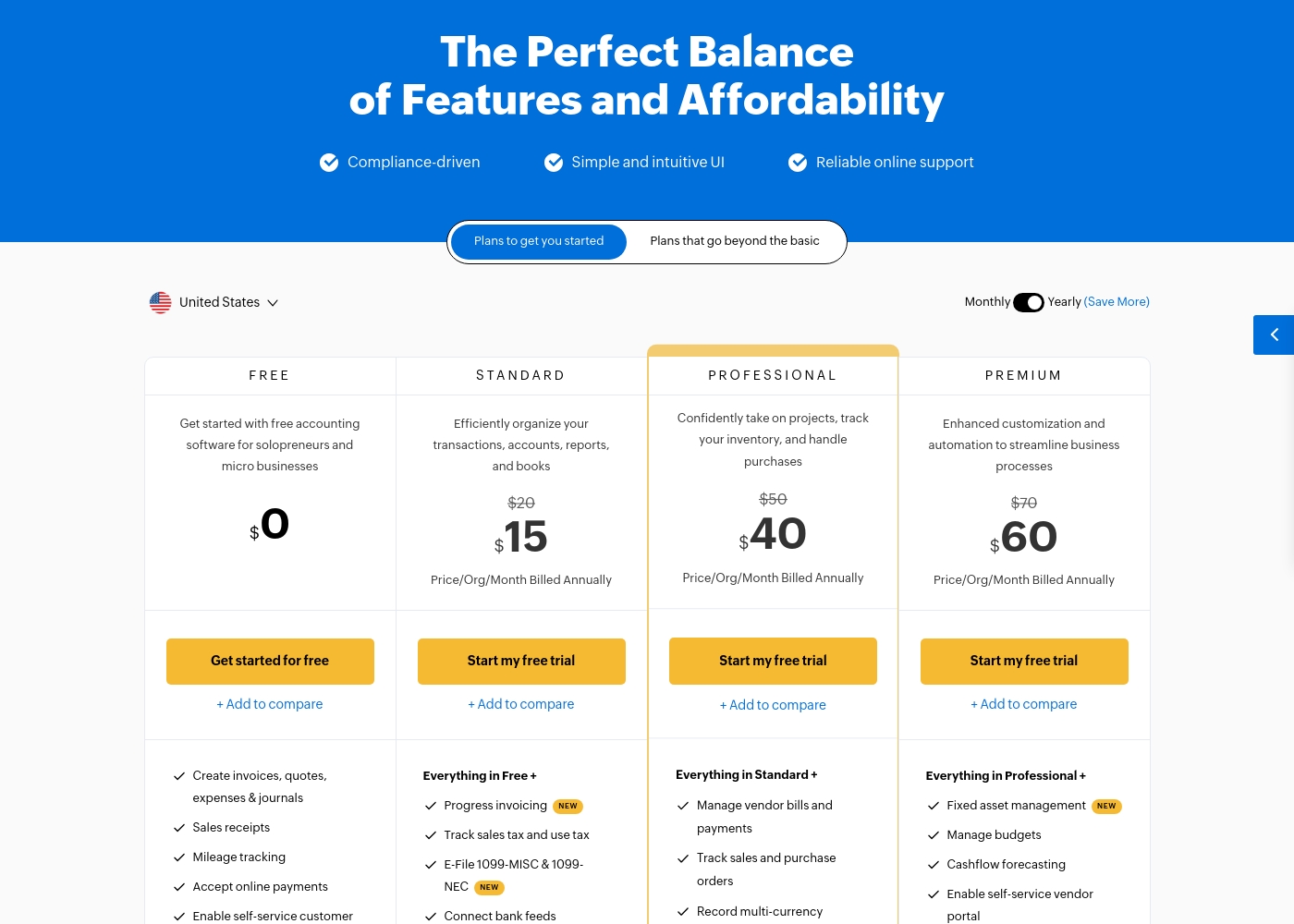
Zoho Books costs between $0 and $240 per month (billed annually) with six plans: FREE at $0, STANDARD at $15, PROFESSIONAL at $40, PREMIUM at $60, ELITE at $120, and ULTIMATE at $240.
Zoho Books offers plans built to grow with your company, from sole proprietors to large teams. Let's look closely at what is included in each option.
FREE
Price: $0.00 Websites Supported: Not explicitly stated Best For: Solopreneurs and micro businesses (up to $50K annual revenue) Refund Policy: Not explicitly stated Other Features:
- Create invoices, quotes, expenses, and journals
- Process sales receipts and track mileage
- Enable self-service customer portal
- Email Support (1 User + 1 Accountant)
- Create invoices, quotes, expenses & journals
- Sales receipts
- Mileage tracking
- Accept online payments
- Enable self-service customer portal
- Progress invoicing
- Track sales tax and use tax
- E-File 1099-MISC & 1099-NEC
- Connect bank feeds
- Generate divisional reports with reporting tags
- Manage vendor bills and payments
- Track sales and purchase orders
- Record multi-currency transactions
- Bill timesheets
- Project profitability
- Fixed asset management
- Manage budgets
- Cashflow forecasting
- Enable self-service vendor portal
- Set up custom domain
Pricing Notes
- Quicken pricing is based entirely on annual subscription tiers, frequently using promotional rates.
- Zoho Books offers a robust Free plan, making it highly accessible for startups and solopreneurs.
- Quicken offers a 30-day money-back guarantee, not a traditional free trial, but Zoho Books offers a 14-day free trial.
- Zoho Books uses $3/user/month add-ons for extra users, offering flexible organization pricing.
- Zoho Books provides free migration from competing accounting solutions, reducing user friction.
Pricing Head-to-Head
User Reviews
Quicken maintains a devoted user base, with many customers reporting continuous use for over 20 or 30 years. Reviewers across both Trustpilot and Capterra consistently praise Quicken’s ability to serve as a comprehensive hub for managing budgets, investments, and tracking historical data.
Many find it indispensable for reconciling accounts and managing complex personal or small business finances. Users appreciate having all their critical information in one accessible place.
I’ve been using Quicken since the late 1980s, and it’s become essential for managing my complex finances. It’s a great product that continues to fulfill its purpose. I rely on it to keep my portfolio organized and accessible.
While Zoho maintains an overall positive rating of 4.1/5 across thousands of reviews, most specific feedback provided recently centers on the Zoho Social tool, not the Books accounting software. Regardless, the consensus affirms Zoho’s commitment to excellent ease of use and high functional value.
Users consistently praise the platform for its intuitive interface, which streamlines workflows and simplifies multi-account management. Many appreciate that Zoho provides advanced functionality for a fraction of the cost of competitors, representing significant value for startups and small teams.
This platform offers huge functionality without the huge price tag. I used managers that cost ten times more, but Zoho offers the same key features and is incredibly user-friendly. It’s excellent value.
Our Verdict
The decision between Quicken and Zoho Books is wonderfully clear: it depends on your primary goal. If you are managing complex personal wealth and investments, Quicken is the only choice available. If you run a growing business and need formal accounting, you must choose Zoho Books. Quicken is the unrivaled champion of deep personal finance depth and investment tracking. It offers serious tools like capital gains estimators and specialized tax reports (C, E, F). Users who appreciate local data storage and control prefer Quicken Classic desktop versions. Zoho Books provides modern, end-to-end cloud accounting built for running a company efficiently. Zoho Books excels at invoicing, inventory control, and scales affordably with teams. Its integration with the wider Zoho suite makes business workflows smoother than Quicken can offer. The key deciding factor is functional focus: Quicken masters personal finance and investment depth. Zoho Books masters multi-user, multi-currency, operational business accounting. You shouldn't try to use Quicken for full business accounting or Zoho Books for deep investment tracking. Choose Quicken if you need advanced portfolio analysis or robust personal tax preparation. Use Zoho Books if your priority is managing client invoicing, inventory, and collaborating with a team in the cloud.
Frequently Asked Questions
Which is better for small business accounting: Quicken or Zoho Books?
Zoho Books is superior for dedicated small business accounting. It provides end-to-end features like inventory management and complex invoicing. Quicken’s business plans are better suited for self-employed individuals combining personal and business cash flow.
Does Quicken support multi-currency like Zoho Books?
No, if you transact globally, choose Zoho Books immediately. Zoho Books handles multi-currency and real-time exchange rates smoothly. Quicken is primarily limited to linking financial institutions in the U.S. and Canada.
Is Zoho Books better for investors than Quicken?
Absolutely not. Quicken is far better for investors, offering advanced tools like capital gains estimators. Zoho Books has no dedicated features for tracking personal investments or complex portfolios.
Which software offers a free plan or free access?
Zoho Books offers a perpetually free plan for solopreneurs needing basic functions. Quicken requires a paid annual subscription plan. Quicken only offers a 30-day money-back guarantee period.
Is Quicken data stored locally or in the cloud?
Quicken offers flexibility with both options. Classic desktop versions allow secure local data storage. Cloud-based plans like Simplifi store data securely online, providing better mobile access.
Can I integrate with other business apps using Quicken or Zoho Books?
Zoho Books integrates seamlessly with the full Zoho ecosystem (CRM, etc.) for business workflows. Quicken focuses its integration on connecting reliably with over 14,000 financial institutions.
Ready to Choose?
Both tools have their strengths. Choose based on your specific needs.