Teamwork vs Trello
People often compare Teamwork and Trello, but they solve very different problems. Trello is famous for its simple, visual Kanban boards and easy task management. Teamwork is an intense platform built for professional services and client profitability tracking. The choice comes down to visual simplicity versus deep financial and resource control.
Powerful features and frustrating business practices.
We found Teamwork offers robust, unified project and resource management tools essential for professional services needing deep profitability tracking and resource forecasting. Overall, the software's powerful feature set is unfortunately being undermined by confusing, opaque upgrade paths and extremely restrictive feature limits in lower tiers.
Pros
- Unified platform combining PM, time tracking, resource forecasting, and budgeting.
- Specifically built to manage complex client work and track project profitability.
- Real-time visibility into staff availability prevents common overbooking issues.
- Simple interface with TONS of functionality and detailed project data scope.
Cons
- Upgrade processing and pricing for Scale plan are opaque and require sales engagement.
- Artificially restrictive feature limits (like budgeting caps) force expensive, premature upgrades.
- Recent new interfaces and UI changes have broken essential functions for some users.
- Customer support availability seems limited primarily to UK business work hours.
Simple Project Management, Complex Login
We find Trello delivers exceptional value quickly due to its easy operation. Its Kanban visual organization is highly flexible for team workflows. Overall, Trello is a powerful tool, but stability issues and frustrating administrative friction points like the Atlassian login do hold it back.
Pros
- The simple, visual Kanaban board design offers great ease of use.
- A permanent Free plan is available and suitable for small teams or personal use.
- The platform is effective for team management and sharing context quickly.
- Supports extensive customization and functionality upgrades via Power-Ups.
Cons
- Users frequently report difficulty and friction with the Atlassian login process.
- Accessing billing information and invoices can be surprisingly complicated.
- The interface occasionally suffers from lag and server downtime.
- Key views like Calendar or Map require a paid Premium subscription.
AboutTeamwork
Teamwork.com is project and resource management software specifically built for client work and powered by AI. It goes beyond traditional project tools by combining essential functions like resource forecasting, cost control, and profitability reporting into a single platform.
This platform is trusted by professional services businesses globally. These include agencies, consulting firms, IT service providers, and accounting teams. Teamwork helps them efficiently schedule resources, manage billable hours, and track project profitability from start to finish. ✅
AboutTrello
Trello is designed to keep you at the top of your game by ensuring every to-do or idea, regardless of size, finds its proper place. The system helps you stay organized and efficient using three key components: Inbox, Boards, and Planner.
The Inbox quickly captures tasks as soon as they are on your mind, whether you are in the office or on the go. You manage your tasks using flexible Boards, where long lists become manageable by tracking items from “to-dos to tackle” to “mission accomplished!” Use the Planner to simply drag and drop your top tasks right into your calendar, ensuring you make time for what truly matters. 💡
Highlights
Feature Comparison
Features Overview
We highlight the main differences and pick a winner for each feature.
Core Functionality
Trello is simple visual task management; Teamwork is deep resource planning.
Teamwork is built as a unified platform for complex project and resource management. It focuses heavily on time tracking, maximizing client profitability, and resource forecasting. Trello excels at visual workflow organization using the famous Kanban board methodology. Its core advantage is helping teams move items clearly from 'to-do to tackle' to 'done.' If you need a simple tool that works immediately, Trello is the clear choice. If your project complexities demand financial control, Teamwork is necessary. Trello delivers value in 30 days due to its simplicity, while Teamwork requires more setup time for its robust feature set.
Resource Planning
Teamwork offers built-in resource planning; Trello does not have native equivalents.
The Teamwork Grow plan includes a powerful Workload Resource Planner and utilization reports. This helps managers prevent overbooking staff easily. Trello focuses on task flow and requires third-party Power-Ups or complex manual setup for resource management. There is no native workload overview in Trello. Teamwork provides real-time visibility into staff availability, a critical function for agency management. Trello is more task-centric, tracking who is assigned, not necessarily availability. Choose Teamwork if staff capacity optimization is a core part of your day-to-day project duties.
Financial Tracking
Teamwork tracks profitability and budgets; Trello requires substantial workarounds.
Teamwork has native Budgeting, Time, and Financial tools built into the Grow and Scale plans. It delivers profitability reports automatically. Trello does not offer any native financial tracking, focusing only on project progress metrics. You must integrate separate accounting tools via Power-Ups to track costs within Trello. Teamwork is designed to help professionals track billable hours and ensure projects stay within the budget. Trello is ideal for tracking content calendars or development sprints. For firms where profit margins and cost control are paramount, Teamwork provides the integrated financial depth required.
Automation Usage
Trello offers better automation at lower cost tiers and faster scaling.
Teamwork starts users with a restrictive 100 automation actions per month on the Free plan. Scaling up to 100,000 actions requires the custom-priced Scale plan. Trello gives Free users 250 Workspace commands monthly, 2.5 times more than Teamwork. Trello Premium offers truly unlimited automation commands. The cost to achieve unlimited automation is far lower and clearer in Trello than in Teamwork. Teamwork restricts automation to push users into higher, often opaque tiers. If your team relies heavily on automating repetitive tasks, Trello makes robust automation quicker and more affordable to access.
Ease of Use
Trello's visual simplicity makes it extremely easy; Teamwork has a steeper learning curve.
Trello is consistently praised for its great ease of use, with a simple and intuitive Kanban board design. Teams grasp Trello quickly, delivering value fast. Teamwork has a steeper learning curve because it combines project management, time tracking, and resource planning. The complexity is necessary for its depth. 81% of Trello customers chose it specifically for its superior ease of use and visual interface. The heavy feature set slows adoption for Teamwork. For teams needing rapid deployment and minimal training, Trello is significantly better; Teamwork suits trained project managers.
Free Plan Value
Trello's Free plan supports more collaborators and offers better starting automation.
Teamwork's Free plan limits usage to five users and only five active projects. This is highly restrictive for growing teams. Trello allows up to ten collaborators per workspace and unlimited cards on its Free plan. This is generous for startups and small groups. Teamwork includes built-in time tracking in its Free plan, a critical feature Trello lacks in its free offering. Trello also gives 250 automations to Teamwork’s 100. For maximizing free use and team size, Trello provides significantly more robust starting capacity than Teamwork.
Security & Administration
Trello provides clearer enterprise security features, while Teamwork requires add-ons.
Teamwork offers advanced security features like SSO, but only as a custom add-on to the Scale plan. This requires engagement with sales. Trello Enterprise includes free SSO and user provisioning using Atlassian Guard as a standard feature. Trello is also SOC2 Type 2 certified. Teamwork’s security path is proprietary and less transparent for large organizations. Trello's integration with Atlassian Guard simplifies administration. Organizations prioritizing clear, established, out-of-the-box enterprise security should favor Trello's Enterprise offering.
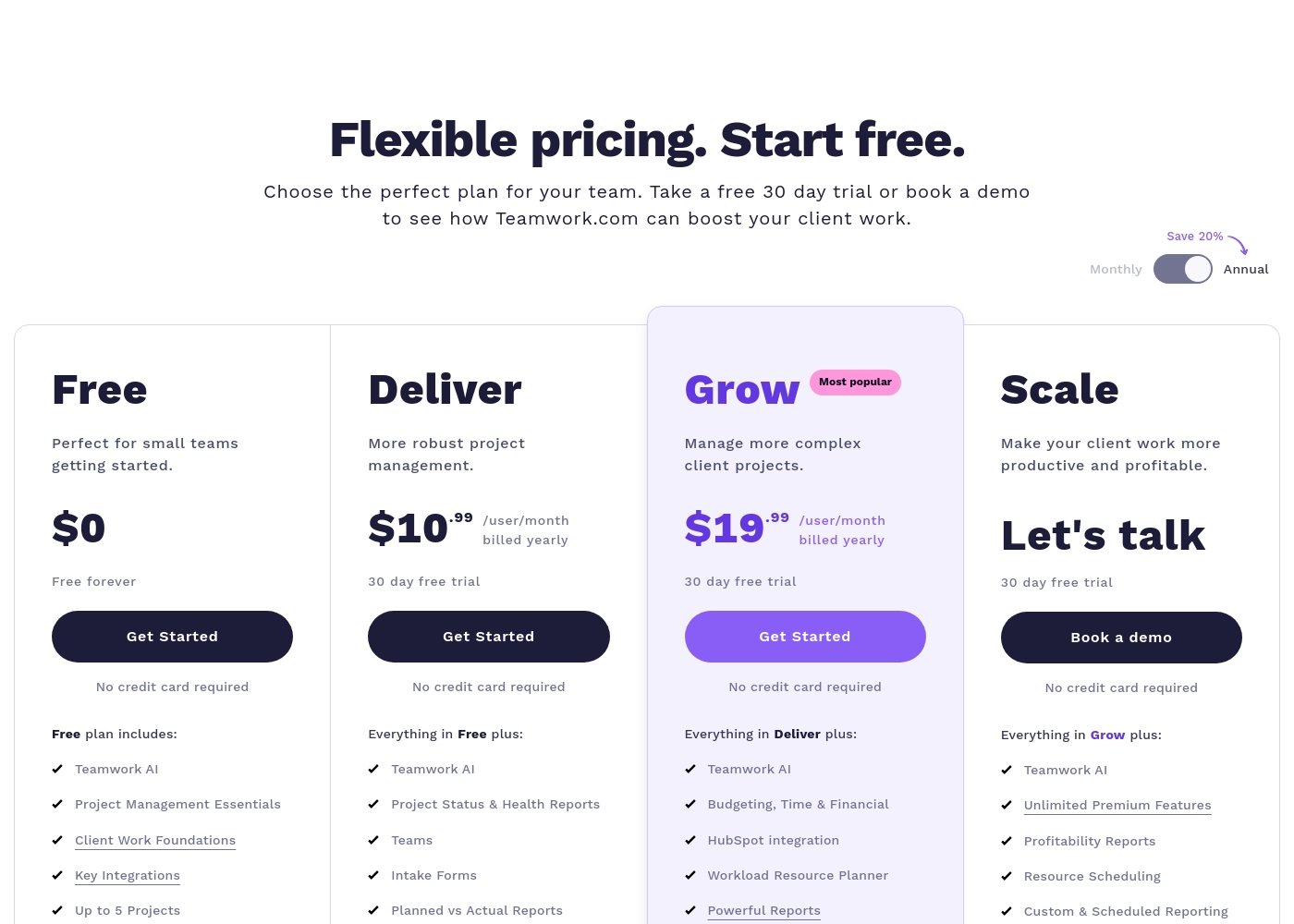
Teamwork costs between $0 and Talk to Sales per month with 4 plans: Free at $0, Deliver at $10.99/user/month, Grow at $19.99/user/month, and Scale at Talk to Sales.
Teamwork offers flexible pricing tailored to your team's size and complexity needs. You can choose to pay monthly or save 20% by selecting an annual subscription.
Free
Price: $0 (Free forever) Websites Supported: Not explicitly stated Best For: Perfect for small teams getting started. Refund Policy: Not explicitly stated Other Features:
- Teamwork AI and Project Management Essentials
- Built-in Time Tracking and Client Work Foundations
- Key Integrations including Slack, Zapier, and MS Teams
- Up to 5 Users and 5 Projects; 100 Automations monthly
- Teamwork AI
- Project Management Essentials
- Client Work Foundations
- Built-in Time Tracking
- Key Integrations (Slack, Zapier, MS Teams)
- Project Status & Health Reports
- Teams
- Intake Forms
- Planned vs Actual Reports
- Integrations (Quickbooks, Harvest and many others)
- Budgeting, Time & Financial
- HubSpot integration
- Workload Resource Planner
- Powerful Reports (Utilization, Time Spent)
- 50 Project Templates
- Unlimited Premium Features
- Profitability Reports
- Resource Scheduling
- Custom & Scheduled Reporting
- Retainer Management (beta)
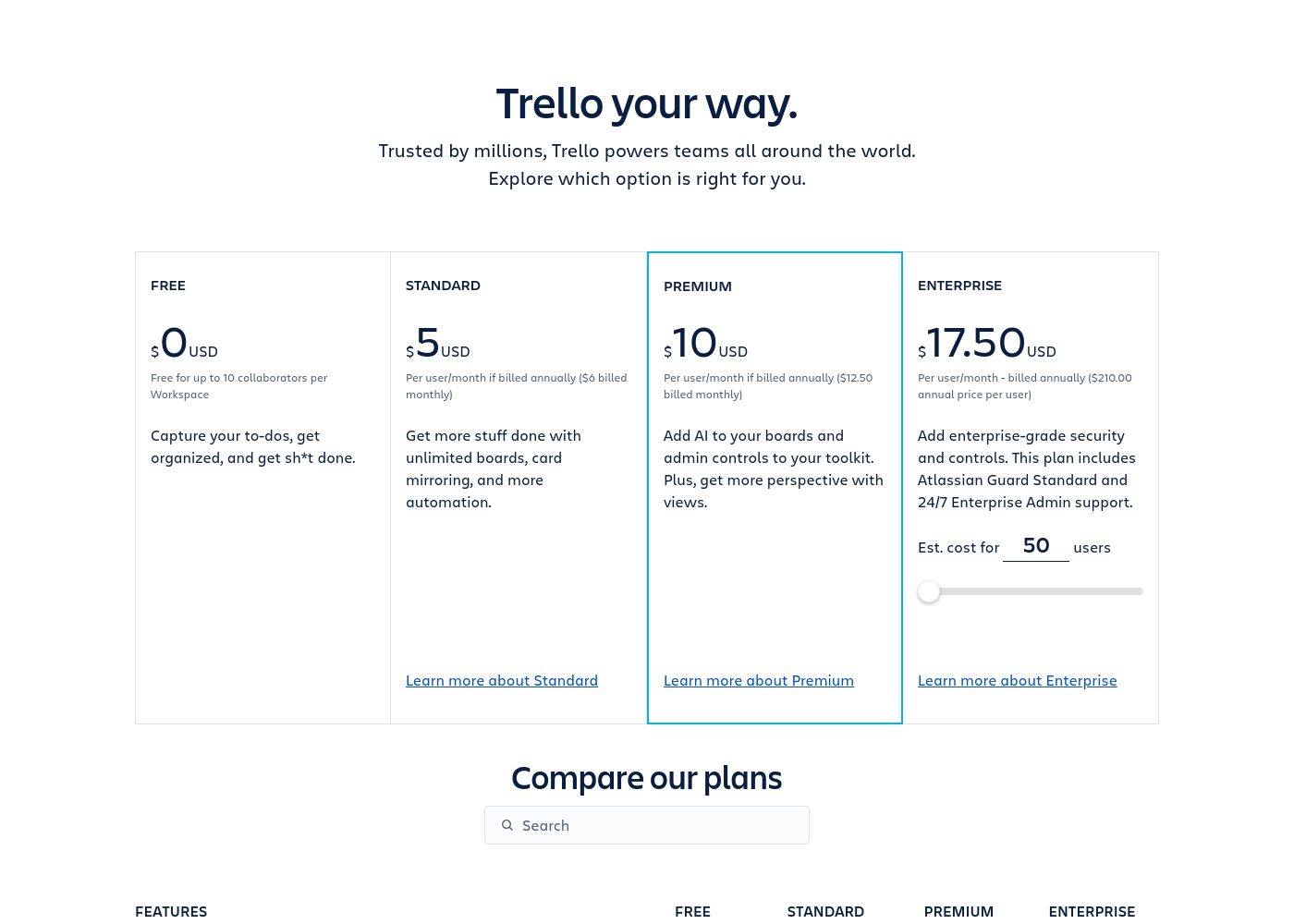
Trello costs between $0 and $17.50 per user/month, offering four plans: Free at $0, Standard at $5/user/month (annually), Premium at $10/user/month (annually), and Enterprise at $17.50/user/month (annually).
Trello offers flexible plans for individuals and large organizations. Let’s look closer at what each plan provides, based on annual pricing options.
Free
Price: $0 USD Websites Supported: Not explicitly stated Best For: Capturing to-dos, fundamental organization Refund Policy: Not explicitly stated Other Features:
- Unlimited cards
- Up to 10 boards per Workspace
- Unlimited Power-Ups per board
- 250 Workspace command runs per month
- 2-factor authentication
- Unlimited cards
- Unlimited Power-Ups per board
- Unlimited storage (10MB/file)
- 2-factor authentication
- Unlimited activity log
- Unlimited boards
- Card mirroring
- Advanced checklists
- Custom Fields
- Quick capture powered by AI
- Atlassian Intelligence (AI)
- Views: Calendar, Timeline, Table, Dashboard, and Map
- Admin and security features
- Workspace-level templates
- Simple data export
- Unlimited Workspaces
- Organization-wide permissions
- Free SSO and user provisioning with Atlassian Guard
- 24/7 Enterprise Admin support
- Public board management
Pricing Notes
- Teamwork pricing is less predictable above the Grow tier; Scale requires a custom quote.
- Trello offers a transparent, fixed price up to $17.50/user/month for its top Enterprise tier.
- Teamwork users complain about high hidden costs, like being charged $500 to export project chat history.
- Trello's paid plans (Standard and Premium) cost significantly less per user than Teamwork's paid options.
- Teamwork enforces restrictive limits, like low budget caps, often forcing users into expensive, premature upgrades.
Pricing Head-to-Head
User Reviews
Teamwork's external feedback presents a sharp contrast. Users consistently praise the core software for its powerful functionality, describing it as having a simple interface and a broad scope of data that is essential for running a business.
Clients reportedly appreciate the transparency it offers. However, positive sentiment is heavily outweighed by severe criticism directed at business practices and pricing.
Teamwork is an excellent tool with an extremely simple interface and TONS of functionality. As a former project manager, the level of detail and broad scope of data available sets this tool apart easily.
Trello receives mixed but generally favorable external feedback, often lauded as an amazing app for personal and team organization. Users consistently praise its simple design and exceptional ease of use, which makes it perfect for startups and small businesses utilizing the generous free plan.
The core utility, including dynamic block control and strong real-time syncing, is highly appreciated. However, recurring pain points are frequently mentioned, stemming largely from the Atlassian acquisition.
Trello is a great tool for starting out, especially for small businesses. It has a robust free plan you can use for organization before deciding to go premium. It’s an excellent option for startups working with a limited budget.
Our Verdict
Choosing between Teamwork and Trello means deciding between deep financial control and sheer simplicity. They are fundamentally designed for different teams. Trello is the default choice for quick setup and visual workflow management. If you need robust PM features immediately, Trello wins the day. Teamwork’s superpower is its unified platform for professional services and advanced resource planning. The platform excels at providing profitability reports and utilization data. Teamwork helps large agencies optimize client costs and handle intricate budgets, which Trello simply cannot do. Trello’s strength lies in its unbeatable ease of use, generous free tier, and visual workflow delivery. Trello's automation is more generous, and paid plans are much more affordable and predictable than Teamwork's tiers. Trello lets small teams organize tasks fluidly. The deciding factor is complexity: Teamwork is built for managers who need financial oversight and resource forecasting. Trello is built for teams focused on organizing tasks visually without overhead. Don't choose Teamwork unless deep resource planning is crucial. If you run an agency billing clients, pick Teamwork for its budget and profitability tools. If you are a small team that needs a simple, reliable way to organize tasks cheaply, Trello is the smarter and faster choice.
Frequently Asked Questions
Which software is better for tracking project profitability?
Teamwork is explicitly built to track project profitability and manage client costs. It includes native budgeting and financial reporting tools in its Grow plan. Trello requires multiple third-party Power-Ups, making native cost tracking impossible.
Does Teamwork or Trello offer a better Free plan?
Trello offers a significantly better Free plan, accommodating up to 10 collaborators per workspace. Teamwork restricts the Free plan to only five users and five projects. Trello also gives 250 monthly automations versus Teamwork’s 100.
Which tool provides the best visual project views?
Trello is the master of visual organization, rooted in the Kanban methodology. Trello Premium also offers Calendar, Timeline, and Map views. Teamwork offers traditional Gantt and PM visualization, but Trello is simpler.
Is Trello cheaper than Teamwork for growing businesses?
Yes, Trello's paid tiers are more affordable and clearer than Teamwork's. Trello Premium for unlimited automation is $10/user/month (annually). Teamwork's comparable Grow plan is nearly double that price.
Does Teamwork have a Resource Management feature like Trello?
No, Teamwork has advanced, native Workload Resource Planner tools built-in. Trello lacks native resource planning and requires integrations for that depth. This is a core differentiator for Teamwork.
Which software is easier to implement and learn?
Trello is much easier to implement, praised for its low learning curve and quick value realization. Teamwork has high functionality, leading to a steeper learning curve for new users.
Ready to Choose?
Both tools have their strengths. Choose based on your specific needs.