UniConverter vs VideoProc
UniConverter and VideoProc are premium, all-in-one media toolkits, making choosing difficult. UniConverter offers unmatched raw speed for converting demanding 4K and 8K files. VideoProc leans into specialized AI tools, like powerful video stabilization and deep photo restoration. We'll show you which tool perfectly suits your digital workflow.
Rapid, Reliable Video Conversion Powerhouse.
We assessed UniConverter 16 as an exceptionally fast and comprehensive media management suite, capable of handling demanding 4K/8K content with AI enhancement. The high user rating confirms its reliable performance and intuitive design for batch operations. Overall, UniConverter offers best-in-class conversion speed and features, making it a strong recommendation for creators and professionals.
Pros
- Ultra-fast 4K/8K conversion speed (up to 130X).
- Wide-ranging tools include editing, recording, and AI enhancement.
- Intuitive interface that is easy for all users.
- Handles batch processing reliably without quality loss.
Cons
- Perpetual license requires repurchasing upon subsequent major version upgrades.
- May struggle when uploading very large iPhone RAW photos (>40MB).
Versatile AI converter with great support.
We find VideoProc to be an incredibly versatile and powerful media processing tool, particularly for users needing high-quality conversion and AI enhancement. The excellent reputation of its customer support team adds significant value to the purchase. Overall, it's an essential, user-friendly toolkit that handles complex media tasks efficiently.
Pros
- Exceptional and highly responsive customer support helps resolve licensing issues swiftly.
- All-in-one suite handles conversion, editing, stabilization, and downloading tasks.
- Fast processing fueled by Level-3 Hardware Acceleration technology.
- Effective AI upscaling and video compression capabilities.
Cons
- Users report aggressive, unsolicited application notifications and ads.
- Some licensing restrictions caused confusion regarding multi-PC usage with lifetime plans.
- Installation difficulties noted concerning hardware verification for certain AMD systems.
AboutUniConverter
UniConverter 16 is an all-in-one solution for anyone managing digital media. It focuses on delivering professional quality through a user-friendly interface. This software is ideal for tackling demanding files like 4K, 8K, and HDR video.
You get versatile format support, handling over 1,000 video and audio types. Furthermore, UniConverter delivers rapid work, showcasing conversions optimized to process at an incredible 130X speed. It really meets all your needs for getting, editing, enjoying, and sharing media. ✅
AboutVideoProc
VideoProc stands out as a versatile media processing suite designed to handle diverse digital content tasks. It appeals to anyone needing to convert, edit, or intensely enhance their media files. This tool works across different media types, offering specialized features for video, images, and audio. You can also use it to manage DVDs, download online content, and record materials. It is truly a comprehensive toolkit for modern digital creators. 💡
Highlights
Feature Comparison
Features Overview
We highlight the main differences and pick a winner for each feature.
Conversion Speed
UniConverter is built for maximum speed, hitting 130X on GPU acceleration. VideoProc is fast but doesn't offer a specific speed metric.
UniConverter emphasizes raw power, achieving video conversion speeds up to 130X faster than standard processing. This massive speed boost is perfect when handling large batches of 4K or 8K content frequently. UniConverter’s system is optimized specifically for maintaining pristine quality during rapid, high-demand conversion tasks. VideoProc is also fast, utilizing Level-3 Hardware Acceleration technologies for smooth processing. While users praise VideoProc’s speed, the company does not claim the hyper-speed factors seen with UniConverter. VideoProc focuses its acceleration on its comprehensive suite of tools, including AI enhancements. If your primary bottleneck is the amount of time required to convert demanding 8K files, UniConverter is the clear champion. VideoProc is fast enough for most users but simply doesn't compete with UniConverter's 130X claims. The need for speed typically dictates choosing UniConverter. For professional content creators managing daily output, UniConverter provides noticeable workflow efficiency that saves hours weekly.
Shaky Video Fixes
VideoProc provides integrated stability tools to smooth out shaky footage. UniConverter does not explicitly include a stabilization feature.
VideoProc excels at fixing common video capture errors, specifically offering a dedicated Video Stabilization feature. This tool automatically smooths out excessive camera motion from action cams or shaky handheld footage. Users rely on VideoProc to deliver professional, stable video results quickly. UniConverter is focused on conversion, compression, and AI enhancement like upscaling and watermark removal. UniConverter’s powerful feature set does not currently list a specific, integrated video stabilization tool. Fixing shaky videos would require using external software or complex manual editing. This difference is the deciding factor if you frequently work with mobile or action camera footage. Choose VideoProc if stabilizing shaky clips is a recurring part of your editing workflow. UniConverter is not the right choice for this specific cleanup task. When combining stabilization with Super Resolution AI, VideoProc can rescue almost any piece of old or poorly shot footage easily.
Lifetime Licensing Value
VideoProc’s Lifetime License includes all future major software updates. UniConverter’s Perpetual Plan requires fees for major version upgrades.
UniConverter offers a Perpetual License at $85.99, which is a great one-time purchase, removing monthly fees. However, this license only covers the current version and its minor updates, not future major releases. Users often express frustration when UniConverter requires repurchasing for new versions like V17. VideoProc provides two robust one-time payment options: the Lifetime License ($45.95) and the Family License ($57.95). Crucially, VideoProc’s Lifetime License explicitly includes access to full features and future software updates indefinitely. This makes the VideoProc option much higher value in the long term. If you prefer locking in a price once and forgetting about renewal or upgrade costs, VideoProc is the superior choice for guaranteed future access. UniConverter’s perpetual plan is better viewed as a long-term subscription equivalent to the current version only. Long-term users seeking maximum value and stability should strongly favor the licensing model of VideoProc.
AI Video Enhancement
UniConverter upscales videos aggressively to 8K and removes watermarks in bulk. VideoProc focuses on stabilization and detailed resolution enhancement.
UniConverter provides powerful AI tools specifically designed for aggressive video quality improvement, including upscaling low-resolution footage to crisp 8K output. The AI Watermark Remover is a standout feature, quickly eliminating logos or text from footage in batches. UniConverter leverages AI credits for these powerful functions. VideoProc uses Super Resolution and Upscaler AI to revitalize video quality and smooth motion with Frame Interpolation. While VideoProc enhances resolution, its AI focus is broader, extending heavily into stabilizing shaky clips and refining photo quality. UniConverter is generally better if you need maximum resolution output (8K) and bulk cleaning via the watermark tool. VideoProc shines when you need to fix foundational flaws like shakiness and noise automatically. They represent two different AI priorities. UniConverter's AI credits model means heavy users might incur extra costs, whereas VideoProc's AI tools are included in the license price.
Audio Refinement Tools
VideoProc offers dedicated noise suppression, which is essential for studio quality. UniConverter focuses more on advanced subtitling and transcription.
VideoProc offers precision audio repair tools, including dedicated Noise Suppression to clean up background noise and static. It also features a powerful Vocal Remover for isolating or eliminating vocal tracks from music. These tools are critical for enhancing communication clarity. UniConverter has useful audio utilities like Vocal and Noise Removers, but its main audio strength lies elsewhere. UniConverter features excellent Speech-to-Text transcription and an Auto Subtitle Generator and Translator. UniConverter helps you make your content accessible and global. If your primary concern is fixing bad sound quality by removing hums and noise, VideoProc is the better, more specialized option. If you need global accessibility features like automated translation, UniConverter excels. Educators needing to create accessible course videos with precise subtitles should choose UniConverter, while podcasters seeking clean audio tracks should lean toward VideoProc.
Compression Efficiency
UniConverter’s AI compression achieves up to 150% size reduction without quality loss. VideoProc also compresses effectively but without that high quantitative claim.
UniConverter features a newly enhanced AI compression model built for extreme efficiency and quality preservation. This smart compression can reduce large file sizes by up to 150% while maintaining original HD quality. UniConverter is ideal for shrinking massive files for archival or transfer. VideoProc also offers effective video compression capabilities and is lauded by users for saving hard drive space. Reviewers confirm that VideoProc preserves quality while reducing size, though no specific percentage reduction is cited. If maximizing your storage or meeting strict platform limits is critical, UniConverter’s verifiable 150% reduction claim is a compelling advantage. UniConverter gives you confidence in extreme size reduction. For social media creators facing tight upload limits, the advanced compression of UniConverter provides a reliable solution.
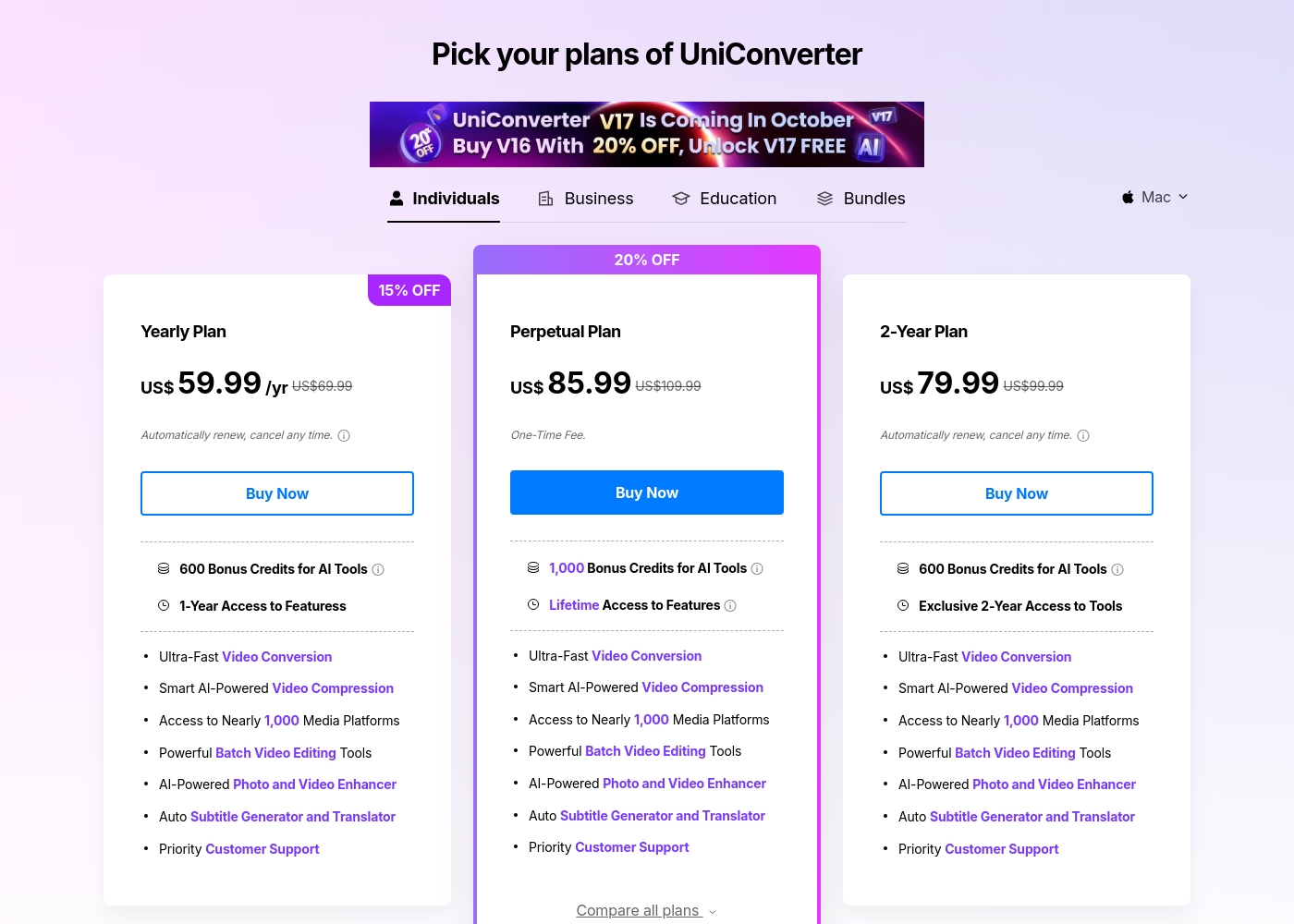
UniConverter costs between $9.99 per month and $85.99 (one-time fee) with four main individual plans: Monthly Plan at $9.99/month, Yearly Plan at $59.99/year, 2-Year Plan at $79.99, and Perpetual Plan at $85.99.
Here is a look at the features and commitments included in UniConverter's individual licenses.
Monthly Plan
Price: $9.99 per month Websites Supported: Supports 10,000+ download sites Best For: Short-term or occasional use Refund Policy: 30-day money-back guarantee (under accepted circumstances) Other Features:
- 1-Month Access
- 600 Bonus Credits for AI Tools
- Supports 4K/8K Conversion
- Batch High-Quality Compression
- Priority Customer Support
- 50 Bonus AI Credits
- High-Speed Conversion (1/3 length limitation)
- 4K/8K Video Conversion (1/3 length limitation)
- Compress Video/Audio (1 file, ≤5 mins)
- Record Screen (1 min limitation)
- 1-Month Access to Features
- 600 Bonus Credits for AI Tools
- Supports 4K/8K Conversion
- Supports 10,000+ Download Sites
- Batch Compression, Trim, Crop, & Watermark
- 1-Year Access to Features
- 600 Bonus Credits for AI Tools
- Ultra-Fast Video Conversion
- Smart AI-Powered Video Compression
- AI-Powered Photo and Video Enhancer
- Exclusive 2-Year Access to Tools
- 600 Bonus Credits for AI Tools
- Ultra-Fast Video Conversion
- Smart AI-Powered Video Compression
- AI-Powered Photo and Video Enhancer
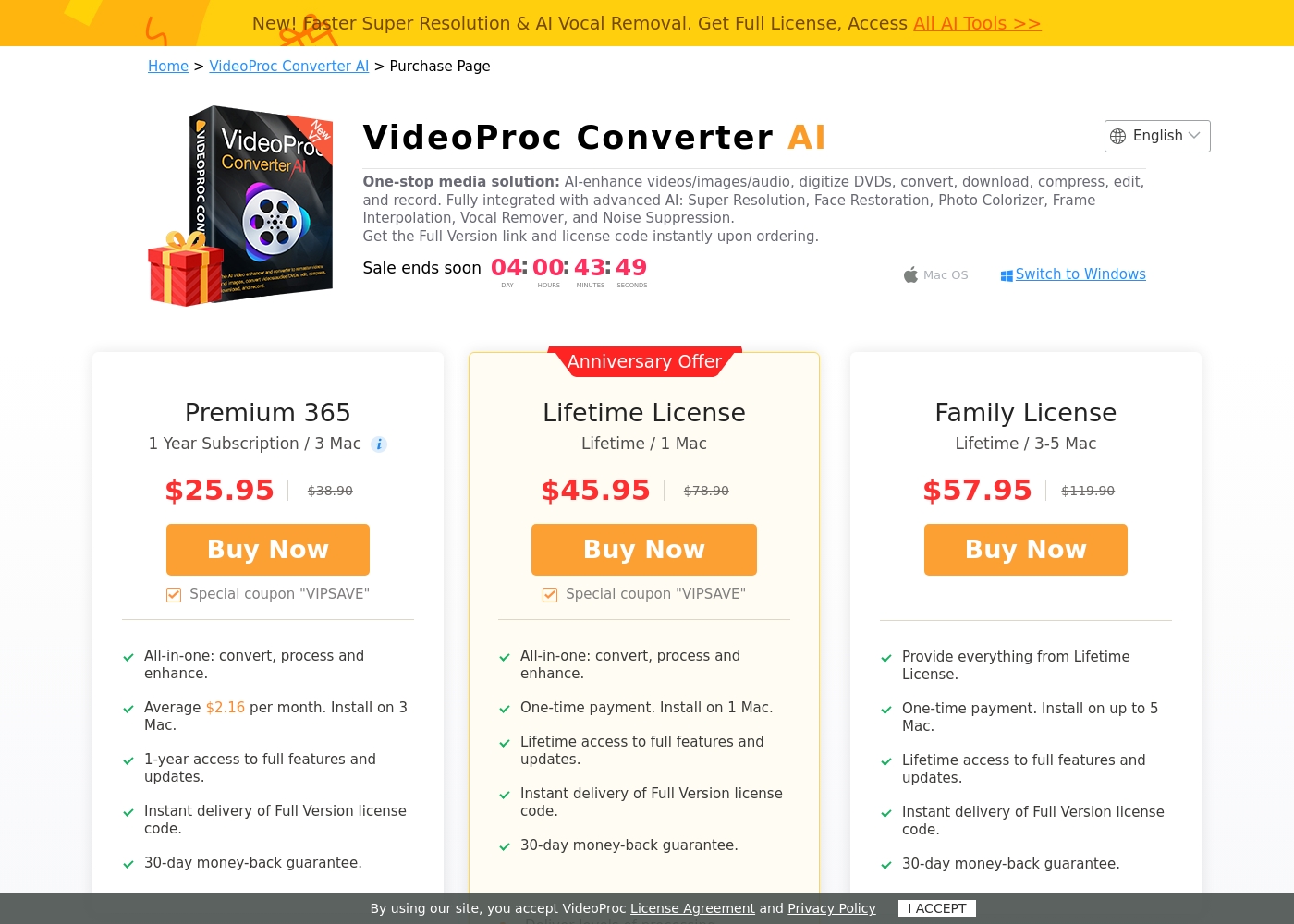
VideoProc Converter AI costs between $25.95 annually and $57.95 one-time with three plans: Premium 365 at $25.95/year, Lifetime License at $45.95 one-time, and Family License at $57.95 one-time.
Since the interface will show the current offers, here are the details for each plan offered for Mac users.
Premium 365
Price: $25.95 per year Websites Supported: 3 Mac Best For: Users who prefer budgeting yearly and only need a few installations Refund Policy: 30-day money-back guarantee Other Features:
- 1-year access to full features and updates
- All-in-one: convert, process, and enhance
- Instant delivery of Full Version license code
- 1-year access to full features and updates
- All-in-one: convert, process, and enhance
- Instant delivery of Full Version license code
- 30-day money-back guarantee
- One-time payment
- Lifetime access to full features and updates
- All-in-one: convert, process, and enhance
- Instant delivery of Full Version license code
- 30-day money-back guarantee
- Provide everything from Lifetime License
- One-time payment
- Lifetime access to full features and updates
- Instant delivery of Full Version license code
- 30-day money-back guarantee
Pricing Notes
- The Perpetual Plan from UniConverter does not include future major software version releases, requiring repurchase for new versions.
- VideoProc's Lifetime licenses are significantly better value as they explicitly include all future feature updates permanently.
- UniConverter offers a monthly subscription ($9.99) for short-term use; VideoProc only offers annual subscription ($25.95) or one-time purchase.
- UniConverter offers 1,000 bonus AI Credits with its Perpetual plan, which are consumed by AI features, potentially leading to extra costs.
- UniConverter’s free trial is severely usage-limited (1/3 video length conversion, 1 min recording).
Pricing Head-to-Head
User Reviews
User feedback across Trustpilot is exceptionally positive, highlighting UniConverter’s role as a powerful, all-in-one media tool. Customers consistently praise the software’s intuitive interface and its remarkable speed for large file processing and downloads.
Reviewers confirm that batch video conversions are handled seamlessly without crashing or losing quality. Key features users value include wide format support, compression tools, and the reliability of the screen recorder.
Wondershare UniConverter is fast, easy to use, and incredibly powerful. I rely on it to convert large video files in various formats quickly. It's truly one of the best tools I’ve added to my creative toolkit.
Users widely praise VideoProc as a user-friendly and superb software package. Reviewers frequently highlight its speed and power, noting the efficiency of conversion and AI upscaling for revitalizing old content.
A major theme across all feedback is the truly exceptional quality of customer support. Users describe the support team as "outstanding," "extremely fast," and "quick to respond," often resolving complex licensing and reinstallation issues quickly and professionally.
It can convert a 6–8 GB file into less than 100 MB without losing video quality. This saves precious hard drive space. It is incredibly user friendly and anyone can use it without difficulty.
Our Verdict
This comparison boils down to two distinct professional priorities: raw speed versus lifetime value and repair capabilities. If 130X conversion speed is essential, UniConverter is undeniably the superior machine. UniConverter handles massive 8K formats quickly and features powerful tools for bulk watermark removal and compression. VideoProc offers an outstanding solution for fixing common production flaws, like shaky footage and noisy audio tracks. VideoProc provides targeted AI tools for video stabilization and noise suppression that UniConverter lacks. Plus, it excels at detailed photo restoration. The real deciding factor for many will be the licensing structure. VideoProc’s Lifetime License is lower priced and includes all future major updates, offering better long-term budgeting. UniConverter’s Perpetual Plan forces you to repurchase for major version changes. Choose UniConverter if your core task is rapid, high-volume conversion of pristine 4K/8K content. However, if you need the peace of mind of a future-proof license and specialized flaw-fixing tools, VideoProc offers the better overall package.
Frequently Asked Questions
Which software is better for fixing shaky camera footage: UniConverter or VideoProc?
VideoProc is clearly better for video repair; it includes a dedicated Video Stabilization tool. UniConverter does not explicitly list this essential feature in its toolkit. If your source material is often unsteady, you should choose VideoProc immediately.
Does UniConverter’s Perpetual License cover future software updates like VideoProc’s license?
No, this is a critical difference. UniConverter’s Perpetual License only covers the version purchased and its minor updates. VideoProc’s Lifetime License is much higher value because it includes all future feature updates at no extra cost.
Which tool offers the fastest video conversion speed?
UniConverter is the winner here, claiming conversion speeds up to 130X thanks to aggressive GPU acceleration. While VideoProc is fast due to hardware acceleration, UniConverter provides quantifiable, superior speed metrics for large 4K/8K files.
Which software is better for cleaning up noisy audio tracks?
VideoProc provides specialized tools for refining sound, including dedicated Noise Suppression. It also has a Vocal Remover for isolating tracks easily. UniConverter includes similar tools but focuses more on transcription and subtitling capabilities.
Are AI features permanently free after purchasing UniConverter or VideoProc?
VideoProc’s AI tools are included in the license price indefinitely. UniConverter’s advanced AI features consume credits, and heavy usage may require purchasing extra AI Credits separately. Factor this potential hidden cost into your decision for UniConverter.
How does the file compression capability compare between UniConverter and VideoProc?
UniConverter boasts a specific capability to reduce file size up to 150% while preserving HD quality. Both tools compress well. UniConverter’s specific claim makes it reliable for meeting extreme file size limits, like for social media uploads.
Ready to Choose?
Both tools have their strengths. Choose based on your specific needs.