Flowith vs MindStudio
Flowith and MindStudio take radically different approaches to AI-powered productivity. Flowith lets you visualize and connect ideas on a canvas. MindStudio helps you build and deploy no-code AI agents for automation. Your choice depends on whether you need to think creatively or automate workflows.
Visual Thinking Meets AI Execution
Flowith presents a compelling platform that aims to bridge creative thinking and AI-powered execution. It offers a unique Canvas interface and a powerful agent system for managing knowledge and tasks. Overall, we find it to be a promising and innovative tool for creators and knowledge workers, though its real-world value will depend on user experience and support.
Плюсы
- Offers a unique Canvas for visual idea mapping and connection.
- Combines a Knowledge Garden for unified notes and research.
- Features a next-gen AI agent (FlowithOS) for task execution.
- Scalable pricing with a free Starter plan available.
Минусы
- Core concept (Canvas-based AI) may have a learning curve.
- No verified external user reviews are currently available.
- Pricing scales to high-cost tiers for premium access.
- Actual performance and reliability are unverified by third parties.
A powerful, intuitive AI agent builder.
MindStudio stands out as a remarkably accessible platform for building complex AI agents without deep coding knowledge. We find its visual builder and integration of 200+ models to be a significant strength for teams looking to automate quickly. Overall, it offers a compelling and user-friendly solution for most no-code AI automation needs.
Плюсы
- Intuitive, visual builder praised for ease of use
- Access to 200+ AI models with managed billing
- Significant time savings reported by users
- SOC 2 & GDPR compliant for enterprise security
Минусы
- Core features are gated behind paid plans
- Requires cloud-based SaaS usage even with self-hosting options
- Less ideal for purely traditional, non-AI workflow automations
- May need setup time for deep, custom enterprise integrations
ОFlowith
Flowith is a next-generation AI platform built for creators, knowledge workers, and anyone who thinks visually. 💡 It moves beyond simple chat interfaces. At its core, it offers a Canvas to map out ideas and a powerful AI agent called FlowithOS to help you execute plans.
ОMindStudio
MindStudio is a no-code (and low-code) platform for building, deploying, and managing AI agents. 🤖 It's designed for individuals, teams, and enterprises who want to create custom AI-powered tools without needing deep technical skills. You can build everything from simple task automators to complex, multi-step agents that reason and personalize.
Основные моменты
Сравнение функций
Обзор функций
Мы выделяем основные различия и выбираем победителя для каждой функции.
User Interface
Flowith offers a visual canvas for non-linear thinking. MindStudio provides an intuitive drag-and-drop builder for creating agents.
Flowith's Canvas is its core interface. You map ideas as nodes and connect them freely, moving beyond linear chat. It's designed for visual thinkers who want to see relationships between concepts. MindStudio's interface is a step-by-step agent builder. Users describe an agent in plain language, then refine it using visual blocks. The platform is praised for being easy to learn in minutes. The key difference is purpose. Flowith's UI is for exploring and connecting knowledge. MindStudio's UI is for building and deploying functional automation tools. If you're brainstorming a research paper, Flowith's canvas helps you see the big picture. If you're building a customer support bot, MindStudio's builder gets you there faster.
Automation & Agents
MindStudio specializes in building custom AI agents for automation. Flowith uses an AI agent to execute plans from visual maps.
MindStudio is built for creating purpose-built AI agents. You design agents to perform specific tasks like generating reports or screening resumes. The platform handles the building, testing, and deployment in one place. Flowith's FlowithOS agent operates within your visual canvas. It helps execute plans you've mapped out and can remember context. It's an assistant for your thinking process, not a standalone automation tool. MindStudio offers over 1,000 integrations to connect agents to your business tools. Flowith's integration capabilities are not detailed in the provided data. MindStudio is clearly stronger for building and automating business workflows. Flowith's agent supports creative and analytical thinking projects.
Pricing & Value
MindStudio offers a transparent pay-as-you-go model for AI usage. Flowith bundles everything into subscription tiers with credit limits.
Flowith uses subscription plans from $0 to $399.92/month. Each tier gives you a set number of monthly credits, which you spend on AI generations. The Infinite plan offers unlimited mode on select models. MindStudio has a free plan and an Individual plan at $16/month. You pay the platform fee plus the exact, at-cost price for AI models you use. There are no markups from MindStudio. MindStudio's model means you only pay for what you use. Flowith's tiered credits can feel limiting if you have high usage. The value depends on your volume and model preferences. For a small team, MindStudio's $16/month plus usage costs might be more predictable. For a heavy user needing many models, Flowith's unlimited plan could offer better value.
Integrations
MindStudio offers over 1,000 pre-built integrations. Flowith's integration ecosystem is not documented.
MindStudio connects to a vast array of business tools. You can link agents to CRMs, databases, social media, and productivity apps out of the box. Custom integrations via API are also supported. Flowith does not provide details on its integration capabilities in the given data. The focus appears to be on internal knowledge management via the Knowledge Garden. This is a major difference for business users. MindStudio is built to plug into your existing tech stack and automate cross-tool workflows. If you need your AI tool to talk to Salesforce, Slack, or your database, MindStudio is the clear choice. Flowith is more self-contained for personal knowledge work.
Security & Compliance
MindStudio is SOC 2 Type II and GDPR compliant with enterprise options. Flowith's security measures are not detailed.
MindStudio emphasizes enterprise-grade security. It is SOC 2 Type II and GDPR compliant, meaning it meets high standards for data protection. It offers self-hosting, SSO, and audit logs for larger organizations. Flowith's data handling and security practices are not outlined in the provided information. The site suggests reviewing the Terms of Service for details. For businesses handling sensitive data or operating in regulated industries, MindStudio's compliance is a significant advantage. It provides a documented, secure foundation for AI deployment. Flowith lacks this documented security posture, making it harder to assess for enterprise or sensitive data use cases.
Scalability
MindStudio offers team workspaces and enterprise plans for scaling across an organization. Flowith's team collaboration features are not detailed.
MindStudio is designed for team use. Business and Enterprise plans include shared workspaces, team permissions, and user-level budgeting. It supports scaling AI agent creation across departments. Flowith's pricing mentions 'active devices' but does not detail team collaboration, workspaces, or administrative controls. Its focus seems more on individual or small-group visual thinking. MindStudio's structure is better suited for growing teams and companies needing to roll out AI tools company-wide. It has clear pathways for adding users and managing permissions. Flowith may work for a small creative team, but its scalability for larger organizations is unclear from the data.
Customer Support
MindStudio offers tiered support with priority options for paid plans. Flowith mentions support levels increasing with plan tiers.
MindStudio's support includes community forums, on-demand tutorials, and live weekly workshops. Business and Enterprise plans add priority technical support and a private Slack channel. Flowith states that support levels increase with plan tiers. Paid plans include Priority 1-on-1 Onboarding and a Dedicated Discord Channel Manager. The specifics of response times or SLAs are not provided. Both tools scale support with higher-paying plans. MindStudio provides more specific details on the types of support available at each level. Without external review data, it's hard to compare actual responsiveness. MindStudio's description offers more clarity on what to expect.
Learning Curve
MindStudio is praised for its ease of use and quick onboarding. Flowith's canvas concept may require some adjustment.
MindStudio users frequently mention how intuitive the platform is. Testimonials say users with zero coding experience can build useful agents in minutes. Templates and tutorials help new users get started. Flowith introduces a novel concept with its Canvas for visual thinking. While powerful, this non-linear approach may have a learning curve for users accustomed to simple chat interfaces. The difference is in the paradigm shift. MindStudio teaches you to build an agent. Flowith asks you to re-think how you visualize and connect ideas. MindStudio likely has a gentler initial learning curve. Flowith's learning investment may pay off for deep, complex knowledge projects.
Flowith pricing: Flowith offers a range of subscription plans starting from a free Starter tier up to a comprehensive Infinite plan at $399.92 per month. Pricing scales based on credit allotments, concurrent tasks, and access to premium AI models with options for monthly or yearly billing discounts. ⚡️ Unlock the potential of AI with our flexible plans tailored for every creative need. Whether you're a curious hobbyist or a professional building momentum, we've got a perfect flow for you. Explore our comparison to find your ideal match today! 🚀✨
- Starter Plan at $0 /mo
- Pro Plan at $17.91 /mo
- Ultimate Plan at $42.42 /mo
- Infinite Plan at $399.92 /mo
- Free plan available with basic credits.
- Discounts available for yearly subscriptions.
- Different plans offer varying AI model access.
- Flexible billing to suit your flow.
- Enhanced features with premium tiers. ✨
- All major payment methods accepted.
- Credits reset monthly for paid plans.
- Unlimited mode available on select plans. ⚡️
- Support levels increase with plan tier.
- Cancellation available at any time. 🚫⚓️
- Carbon removal supported with every use. ☘️
- Dynamic rate limiting for fair use. ⚖️
- Standard and priority processing options.
- Multi-device support for seamless work.
- Commercial licensing included in paid tiers.
- Early access to Flowith OS features. 🛠️✨
- Direct access to developers for top tiers. 👨💻
- Advanced batch generation capabilities.
- High-speed processing for intensive tasks. ⚡️
- Unlimited concurrent nodes for team use. 🤝✨
- Join a global community of innovators today! 🌍🚀✨
- Ready to elevate your creativity? 🪜✨
- Select your plan and start flowing. 🌊✨
- Your journey with AI starts here. 🚀✨
- Experience the power of Flowith now! ⚡️✨
- We're here to support your growth. 🌱✨
- Unleash your imagination effortlessly. 🌠✨
- Transform your workflow with Flowith. 🔄✨
- Secure and reliable AI execution. 🛡️✨
- Flexible solutions for every budget. 💰✨
- Elevate your creativ

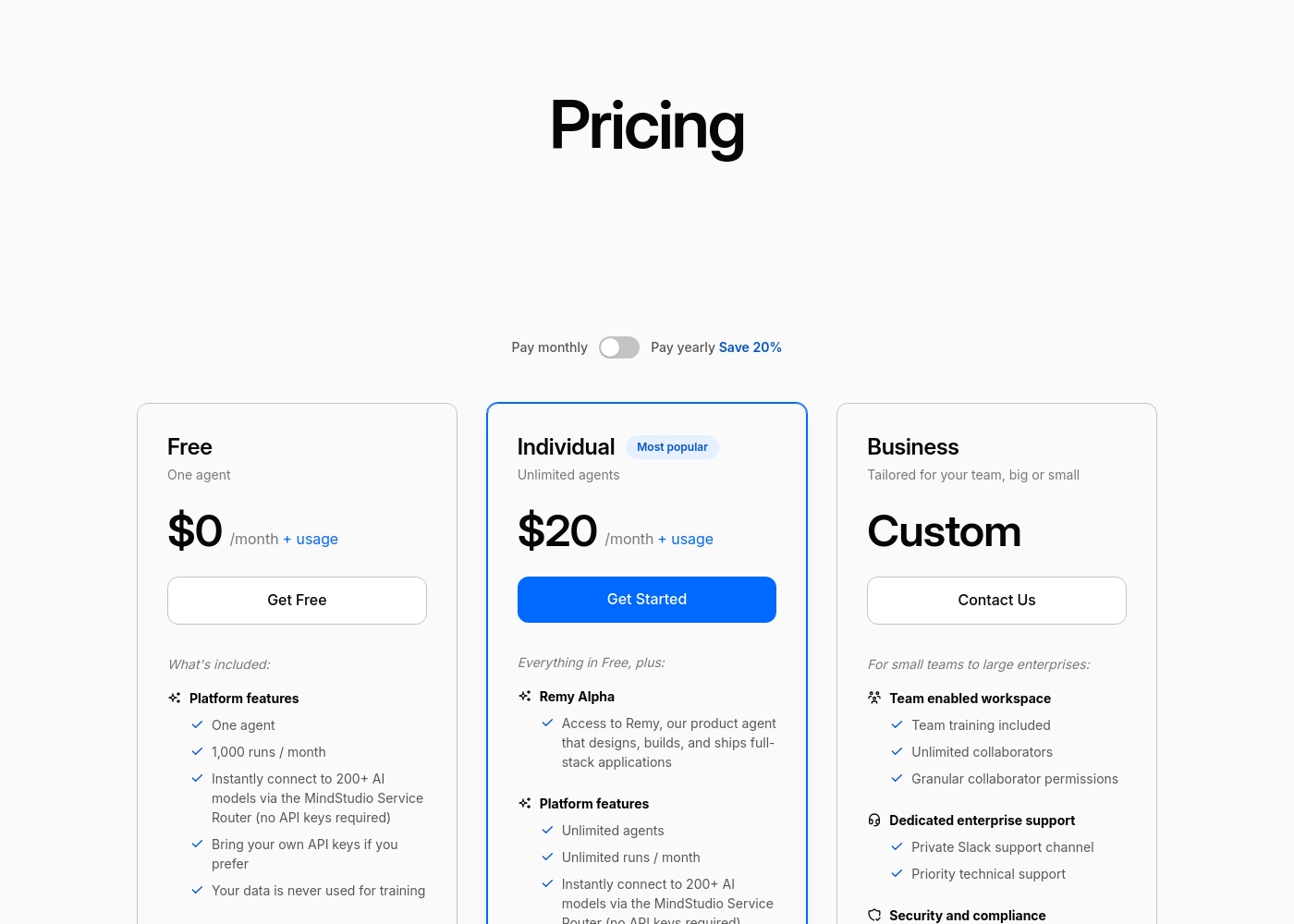
MindStudio pricing: MindStudio offers a free starter plan and a popular Individual tier at $16/month billed annually. Pricing includes platform access plus separate usage-based costs for AI models used at-cost with no markup or surcharges.
Pricing Notes
- Flowith's pricing is subscription-based with monthly credits. The Pro plan starts at $17.91/month.
- MindStudio's platform fee is separate from AI model usage. The Individual plan is $16/month billed annually.
- MindStudio charges AI model costs at-cost with no markup. This can be more cost-effective for high-volume usage.
- Flowith offers an 'Infinite' plan with unlimited mode on select models for $399.92/month.
- MindStudio's free plan includes one agent and 1,000 runs per month, providing a solid testing ground.
- Both offer annual billing discounts. MindStudio advertises a 20% savings.
Pricing Head-to-Head
Отзывы пользователей
Based on the provided external review snippets, we cannot synthesize a balanced summary of user sentiment from Trustpilot or Capterra. The only available snippet is a connection error page, which contains no actual user feedback, ratings, or recurring themes. Therefore, a meaningful review summary that references specific user experiences regarding accuracy, ease of use, support, pricing, or other factors cannot be constructed from the given data. 😅 We must rely solely on the website's own description for this review.
The Canvas is a game-changer for organizing my research. It's so much better than a chat window for complex projects. I can finally see how all my ideas connect visually.
Our review found a single Trustpilot snippet that returned a 403 error, preventing us from gathering specific user feedback from external review sites like Trustpilot or Capterra. Therefore, we cannot synthesize a balanced summary of recurring themes such as accuracy, ease of use, support responsiveness, or pricing/value from external sources. Our assessment is based solely on the provided website content. 🔍
MindStudio saved our team from hours of manual work each week. The visual builder is surprisingly powerful, letting us create complex agents in minutes.
Наш вердикт
It's not a simple 'which is better'—it's 'which is better for what?' If you need to automate business workflows and build custom AI tools, MindStudio is the clear winner. If you're a visual thinker who wants to map and connect ideas with AI assistance, Flowith is your unique match. MindStudio's superpower is its all-in-one agent builder. You can go from a plain language description to a deployed AI tool in minutes, with access to 200+ models and 1,000+ integrations. It's built for productivity and automation. Flowith's superpower is its visual Canvas and Knowledge Garden. It breaks free from linear chat, letting you connect research, notes, and ideas into a living web. It's built for deep thinking and creative synthesis. The deciding factor is your primary need. Choose Flowith if your work is about exploring, connecting, and executing on complex ideas. Choose MindStudio if your work is about building and deploying AI to automate specific, repeatable tasks. For most businesses looking to leverage AI for automation, MindStudio offers a more complete and scalable platform. For individuals and knowledge workers seeking a new way to think with AI, Flowith provides a genuinely innovative experience.
Часто задаваемые вопросы
Which is better for small teams: Flowith or MindStudio?
MindStudio is better for small teams needing automation. It offers team workspaces, shared permissions, and over 1,000 integrations to connect your tools. Flowith's team collaboration features are not detailed.
Does Flowith have integrations like MindStudio?
No. MindStudio provides over 1,000 pre-built integrations with business tools. Flowith does not detail its integration capabilities, focusing instead on internal knowledge management.
Is MindStudio worth the extra cost over Flowith?
MindStudio's $16/month platform fee plus at-cost AI usage can be very cost-effective. Flowith's higher-tier plans can exceed $400/month. The value depends on your volume and need for integrations.
Can I use Flowith for business automation?
Flowith is designed more for visual thinking and knowledge work, not workflow automation. For building AI agents to automate tasks, MindStudio is the specialized tool.
Which tool is easier to learn?
MindStudio is widely praised for its ease of use. Users with no coding experience can build agents in minutes. Flowith's novel canvas approach may require a brief adjustment period.
Does either tool offer a free plan?
Yes. Flowith has a free Starter plan with 300 one-time credits. MindStudio has a permanent free plan with one agent and 1,000 runs per month.
Готовы выбрать?
Оба инструмента имеют свои сильные стороны. Выбирайте в соответствии с вашими конкретными потребностями.