Maileroo vs Sender
Maileroo and Sender are both solid email platforms, but they serve different masters. Maileroo is a powerhouse for transactional delivery and developer-friendly API work. Sender shines as a simple, all-in-one marketing tool for small businesses. Here's how to pick the right one.
Güvenilir Teslimat Olağanüstü Destekle Buluşuyor
Artılar
- Ücretsiz planlarda bile olağanüstü ve duyarlı müşteri desteği.
- Son derece yüksek teslimat oranları; e-postalar tutarlı bir şekilde spam'den kaçınır.
- Entegrasyon ve kurulum süreci hızlı ve son derece basittir.
- Temiz, şık ve profesyonel kullanıcı arayüzü.
Eksiler
- Yüksek hacimli katmanlar için kesin fiyatlandırma yalnızca bir hesaplayıcı veya özel teklif yoluyla mevcuttur.
- Yerleşik, üst düzey platformlara kıyasla bazı gelişmiş özellik derinliğinden yoksun olabilir.
Simple, free, and effective for basics.
We found Sender to be a solid, no-frills tool for core email marketing tasks. Its free plan is a major draw for startups and small businesses. Overall, it delivers good value with a straightforward interface, though it may lack some advanced features for power users.
Artılar
- Extremely generous free plan (2,500 contacts, 15k emails/month).
- Clean, user-friendly interface that's easy to learn.
- Transparent, affordable pricing with no hidden fees.
- Includes essential automation features from the start.
Eksiler
- Advanced features and segmentation are limited on lower tiers.
- Some users report occasional email deliverability issues.
- Integrations can be inconsistent with certain platforms.
- Free plan lacks SMS marketing capabilities.
HakkındaMaileroo
Maileroo, daha iyi ve daha hızlı e-posta teslimatı için tasarlanmış güçlü bir platformdur. Tüm büyüklükteki işletmelerin hem karmaşık pazarlama kampanyalarını hem de kritik işlemsel e-postaları sorunsuz bir şekilde göndermesine yardımcı olur. Bir promosyon duyuruyor olun ya da önemli bir sipariş onayı gönderiyor olun, iletişimlerinizi kolayca oluşturabilir, yönetebilir ve gönderebilirsiniz. 💡 Kurulum basittir; teknik karmaşıklık hakkında endişelenmek yerine etkili mesajlar oluşturmaya odaklanmanızı sağlar.
HakkındaSender
Sender is an email marketing platform designed for businesses of all sizes. It helps you build, automate, and send email campaigns that people actually want to read. Think of it as your straightforward tool for staying in touch with your audience and driving sales. 🚀
Öne çıkanlar
Özellik karşılaştırması
Özelliklere Genel Bakış
Ana farkları vurguluyoruz ve her özellik için bir kazanan seçiyoruz.
Free Plan Value
Sender's free plan is more generous for marketing. Maileroo's is perfect for transactional testing.
Maileroo's Free Plan includes 3,000 outbound emails monthly. It also gives you unlimited contacts and basic automations. Sender's Free Forever plan offers 15,000 emails per month for up to 2,500 subscribers. This includes 24/7 support and full automation. The key difference is volume and audience size. Sender lets you email a larger list more often. Maileroo's plan is ideal for developers testing transactional workflows. If you're a blogger, Sender's free tier is a clear win. If you're an app needing reliable emails, Maileroo's is plenty.
Ease of Setup
Maileroo wins for developers. Sender wins for non-technical users.
Maileroo setup involves API keys or SDK integration. It's trivially simple if you're a developer. You can be sending within minutes. Sender offers a 5-minute setup with a visual builder. You can connect WordPress or WooCommerce with no code. It's built for beginners. The trade-off is technical skill vs. simplicity. Maileroo assumes you can handle code. Sender assumes you want a point-and-click experience. Choose Maileroo if your team includes a developer. Choose Sender if your marketing team runs the show.
Deliverability Focus
Maileroo's infrastructure is built for inbox placement. Sender focuses on marketing reach.
Maileroo runs its own email infrastructure. This guarantees high deliverability and speed. It's designed to keep you out of spam. Sender's reviews note occasional deliverability hiccups. Their focus is on campaign tools and ease-of-use, not infrastructure purity. Maileroo also offers free dedicated IPs for high-volume senders (250K+ emails). Sender doesn't mention this. For critical transactional emails, Maileroo's reliability is its superpower. Sender is fine for promotional blasts.
Marketing Features
Sender offers a more complete marketing toolkit out-of-the-box.
Sender includes landing pages, 100+ templates, and SMS marketing. You can run omnichannel campaigns from one dashboard. Maileroo focuses on email delivery and campaigns. It has segmentation and A/B testing, but lacks landing pages and templates. The gap is in breadth. Sender is a mini marketing suite. Maileroo is a specialized delivery engine. If you need to capture leads with pop-ups, Sender is your tool. If you just need to send great emails, Maileroo excels.
Pricing Transparency
Sender's prices are clear. Maileroo's higher tiers require a quote.
Sender publishes full pricing. You see $10/month for 1,000 subscribers. No hidden fees. Maileroo's costs for over 3,000 emails are hidden. You must use a calculator or contact sales. This is common for usage-based models. The difference affects budgeting. Sender lets you predict costs. Maileroo requires a conversation for scale. For predictable budgets, Sender wins. For custom enterprise needs, Maileroo's model might be better.
Team Collaboration
Sender includes multi-user seats. Maileroo doesn't specify team features.
Sender's paid plans include 3 to 10 user seats. Teams can collaborate on campaigns with role-based access. Maileroo's data doesn't mention multi-user access or team features. It seems focused on individual developers or single accounts. This is a critical difference for growing teams. Sender supports collaboration natively. Maileroo may require separate logins. If you have a marketing team of 5, Sender's Professional plan is built for you. Maileroo is for individual or technical use.
Advanced Segmentation
Maileroo offers deeper, behavior-based segmentation. Sender's is more basic.
Maileroo highlights advanced segmentation based on user behavior. You can create precise segments for targeted campaigns. Sender's advanced features are limited on lower tiers. You may need the Professional plan for robust segmentation. The difference is depth vs. accessibility. Maileroo provides powerful tools upfront. Seller gates them behind higher costs. For data-driven marketers who live in analytics, Maileroo's segmentation is superior.
Maileroo, 3.000 e-postaya kadar göndermeyi içeren Ücretsiz Plan için aylık 0 ABD Dolarıdır. Fiyatlandırma bu hacmin ötesinde ölçeklenir, ancak bu daha yüksek katmanların kesin maliyetleri doğrudan belirtilmemiştir.
Doğru uyumu seçmenize yardımcı olmak için ücretsiz hizmetin ve genel ölçeklenme yapısının bir dökümü aşağıdadır.
Ücretsiz Plan
Fiyat: Aylık 0 $ Desteklenen Web Siteleri: Açıkça belirtilmemiş En İyi Kullanım Alanları: Aylık 3.000 e-postanın altında güvenilir işlemsel e-posta hacmi gerektiren yeni kullanıcılar, geliştiriciler veya küçük startup'lar. iade Politikası: Geçerli değil (Ücretsiz) Diğer Özellikler:
- Ayda 3.000 Giden E-posta
- Ayda 1.000 Gelen E-posta
- Tüm planlarda Sınırsız Kişi
- Otomasyonlar
- Başlamak için kredi kartı gerekmez
- Ayda 3.000 Giden E-posta
- Ayda 1.000 Gelen E-posta
- Sınırsız Kişi
- Otomasyonlar
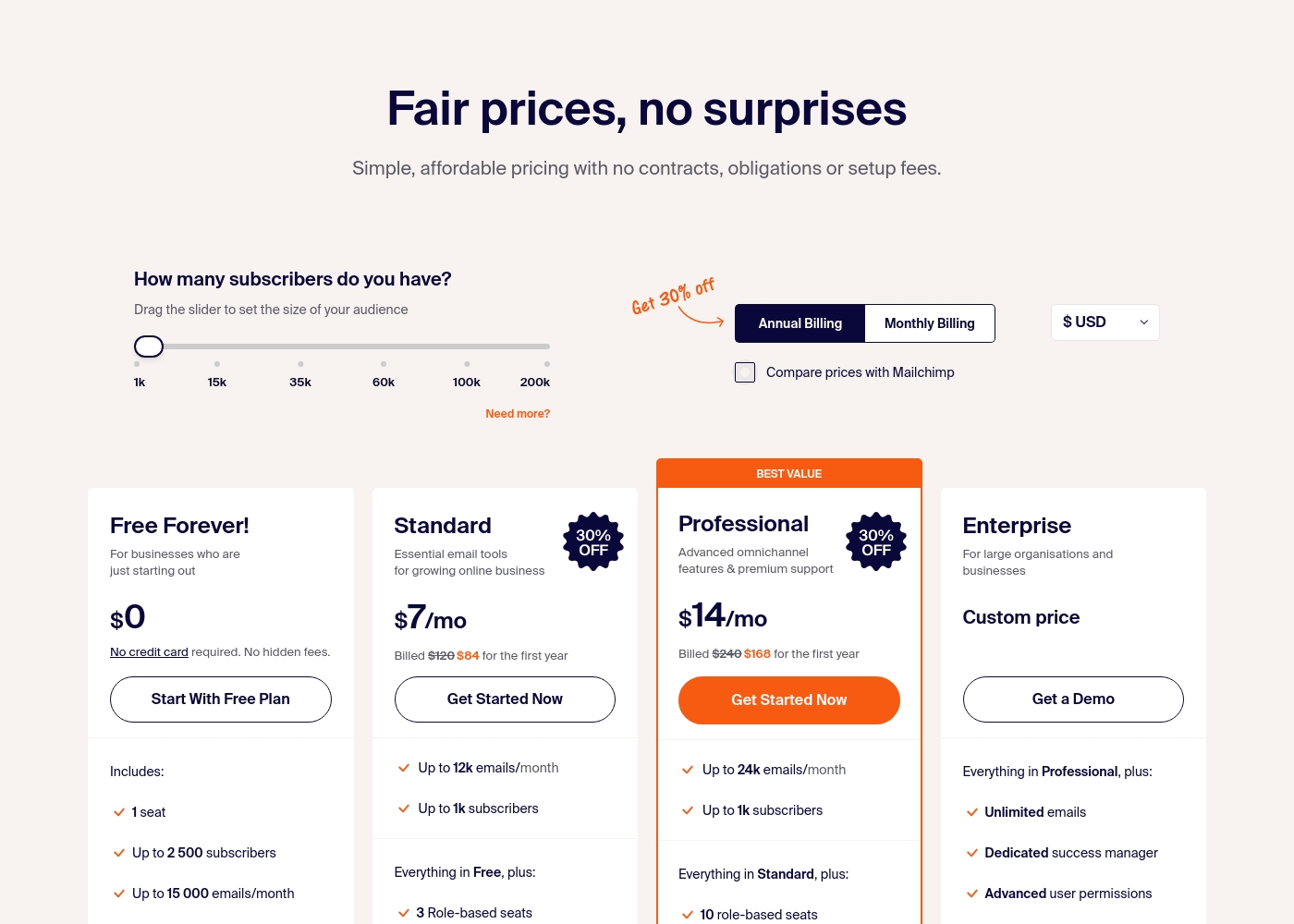
Sender costs between $0 and a custom price per month with 4 plans: Free Forever at $0, Standard at $7, Professional at $14, and Enterprise at Custom price.
Take a look at the specific features and limits included in each plan tier below.
Free Forever!
Price: $0 monthly Websites Supported: Not explicitly stated Best For: Businesses who are just starting out Refund Policy: Not explicitly stated Other Features: 1 seat, up to 2,500 subscribers, 15,000 emails/month, 24/7 live support, email automation.
- 1 seat
- Up to 2,500 subscribers
- Up to 15,000 emails/month
- 24/7 live support
- Email automation
- Up to 12k emails/month
- Up to 1k subscribers
- 3 Role-based seats
- Automated sequences
- Up to 24k emails/month
- Up to 1k subscribers
- 10 role-based seats
- Premium support
- Unlimited emails
- Dedicated success manager
- Advanced user permissions
Pricing Notes
- Maileroo's Free Plan is permanent with 3,000 emails. No credit card needed.
- Sender's Free Forever plan is permanent with 15,000 emails. Also no credit card.
- Maileroo's paid pricing is volume-based and not public. You must contact sales.
- Sender's paid plans start at $10/month (billed annually) for 1,000 subscribers.
- Maileroo includes Unlimited Contacts on all plans, saving money for large lists.
- Sender's plans cap subscribers (e.g., 1,000 on Standard), but offer multi-user seats.
Pricing Head-to-Head
Kullanıcı yorumları
Kullanıcı geri bildirimleri Maileroo için ezici bir şekilde olumlu olup, Trustpilot'ta Mükemmel 4,6 yıldız derecelendirmesi almıştır. İncelemeciler tutarlı bir şekilde olağanüstü düzeydeki müşteri desteğine dikkat çekmekte, ekibin (ve Areeb gibi personelin) ücretsiz katmandaki kullanıcılar için bile sabırlı, zamanında ve ayrıntılı yardım sağladığını belirtmektedir.
Bu proaktif yanıt verme, önemli bir farklılaştırıcıdır. Postmark, Mailjet ve Amazon SES gibi sağlayıcılardan geçen kullanıcılar, geçiş sürecinin inanılmaz derecede kolay olduğunu ve entegrasyonu genellikle son derece basit olarak tanımladıklarını bildirmektedir.
Müşteri desteği karşısında çok etkilendim. Ücretsiz katmana kaydoldum ve kurulum konusunda yardıma ihtiyacım oldu, Maileroo bana ayrıntılı talimatlarla her adımda yardımcı oldu. Kesinlikle bir şirketle yaşadığım en iyi deneyimlerden biriydi.
User sentiment on Trustpilot and Capterra highlights Sender's generous free plan and ease of setup as major positives. Many praise the intuitive interface and reliable automation.
😊 However, some note occasional deliverability hiccups and a learning curve for advanced features. Customer support is frequently mentioned as responsive, though a few users report slow responses during peak times.
The free plan is unbeatable for a new business. I set up my first automation in minutes. The platform is simple and gets the job done without fuss.
Bizim Kararımız
For most people, **Sender** is the easier, more complete tool. It's the clear winner if you're doing traditional email marketing. But **Maileroo** isn't really competing in that arena. Its superpower is bulletproof transactional email delivery. It's the engine you trust for password resets and receipts. The deciding factor is your core need. Pick **Sender** if you want to build campaigns, automate sequences, and collaborate with a team. Pick **Maileroo** if you're a developer or business obsessed with email landing in the inbox, every single time. **Final verdict:** Choose **Sender** for straightforward, affordable email marketing. Choose **Maileroo** for mission-critical transactional email delivery and API simplicity.
Sıkça Sorulan Sorular
Which is better for transactional emails: Maileroo or Sender?
Maileroo is built specifically for transactional email delivery with high reliability. Sender also supports transactional emails, but its focus is on marketing campaigns. For critical messages like password resets, Maileroo's infrastructure is superior.
Does Sender have a free plan like Maileroo?
Yes, Sender's Free Forever plan is more generous, offering 15,000 emails per month for 2,500 subscribers. Maileroo's free plan includes 3,000 emails. Both are permanent and don't require a credit card.
Is Maileroo worth it if I just need email marketing?
Probably not. Maileroo excels at email delivery and API work, but lacks marketing tools like landing pages and templates. Sender is a better fit for basic email marketing needs.
Can I migrate from Maileroo to Sender easily?
Migration details aren't specified for either platform. However, both offer straightforward setups. You'd need to re-import your contacts and rebuild campaigns in Sender's visual builder.
Which tool is easier for a non-technical user?
Sender is significantly easier for non-technical users. It offers a 5-minute setup and a drag-and-drop interface. Maileroo requires some technical knowledge to use its API and developer tools.
Does Sender support SMS marketing?
Yes, Sender offers SMS marketing credits that you can purchase separately. The cost depends on the destination country. Maileroo does not mention SMS capabilities.
Seçmeye hazır mısınız?
Her iki aracın da güçlü yönleri var. Özel ihtiyaçlarınıza göre seçin.